Claude
  Cursor
  Codex
Codex  Hugging Face
  NVIDIA
  Visual Studio Code
  Devin
Devin  Kiro
Kiro  Open Code
  NanoClaw
 Docker
  npm
npm  PyPy
PyPy  Wiz
Wiz 
 金融サービス
  ゲーム・エンタメ
  公共部門
公共部門  自動車
自動車  テクノロジー
  ヘルスケア
ヘルスケア 


Definition
Docker is an open-source platform that automates the deployment of applications inside lightweight and portable containers. This technology leverages operating system virtualization to isolate software from its environment, ensuring that code behaves identically during development and production. Organizations utilize this consistency to accelerate release cycles and reduce infrastructure costs by sharing the host system kernel.
Overview
Docker is a containerization platform that simplifies the process of developing and deploying applications by decoupling the software from the hardware. Originally released in 2013, Docker transformed the industry by making Linux container technology accessible and easy to use. Before Docker, isolating applications required complex manual configuration or heavy virtual machines. Docker introduced a standard format and a developer-friendly CLI that helped accelerate cloud-native development across the globe. Today, it is the foundational tool for building modern, distributed systems and securing the software supply chain.
For IT decision-makers and architects, Docker delivers measurable business value: it reduces infrastructure costs through kernel sharing, compresses release cycles by eliminating environment drift, and enables DevSecOps teams to embed security earlier in the pipeline. These benefits translate directly into faster time-to-market, lower operational overhead, and a stronger security posture across the organization.
What are Docker Images and Containers?
A Docker image is a read-only template containing the instructions for creating a container. It acts as a blueprint or snapshot of the application environment. A container is the runnable instance of that image. While images are immutable and stored in a registry, containers are the active processes that execute the code.
The Evolution of Containers
Containers existed before Docker in the form of Linux Containers (LXC), but they were difficult to manage and lacked a unified ecosystem. Docker standardized container packaging, enabling the rise of registries, orchestration tools, and industry-wide governance through the Open Container Initiative (OCI). Today, the runtime layer has also matured: Docker Engine now delegates low-level container operations to containerd, a Cloud Native Computing Foundation (CNCF) graduated project that implements the OCI runtime specification. Understanding this layered architecture is important for teams evaluating production runtimes or constructing Kubernetes clusters, where containerd operates as the default container runtime.
Key Terminology
- Docker Engine: The core client-server application that builds and runs containers, backed by containerd at the runtime layer.
- Dockerfile: A text document containing the commands to assemble an image.
- Docker Image: A read-only template containing the instructions for creating a container. It acts as a blueprint or snapshot of the application environment, stored in a registry.
- Docker Container: The runnable instance of a Docker image; the active process that executes the code.
- Docker Hub: A public registry for sharing and downloading container images.
- Registry: A storage and distribution system for Docker images, available as a public service or a private enterprise registry.
- Docker Artifact: A specific, immutable version of an image that has passed testing and is ready for production deployment.
- Base Image: The initial, read-only layer that provides the essential OS libraries upon which an artifact is built.
- Open Container Initiative (OCI): The governing body that establishes industry standards for container formats and runtimes, ensuring cross-platform compatibility and preventing vendor lock-in.
How Does Docker Work?
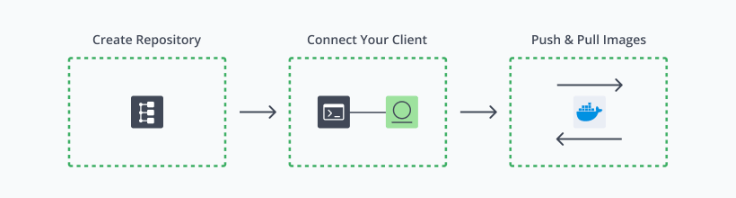
Docker operates on a client-server architecture. The Docker client (CLI) talks to the Docker Daemon, which does the heavy lifting of building, running, and distributing your containers. When you initiate a command like docker run, the daemon checks for the required image locally; if it isn’t found, it pulls it from a registry like Docker Hub.
The Image Layer System
Docker images are constructed using a layered file system. Each instruction in a Dockerfile, such as installing a package or copying code, creates a new layer. These layers are stacked and remain read-only. When a container is launched, Docker adds a thin “writable layer” on top. This “copy-on-write” strategy ensures that multiple containers can share the same underlying image layers while maintaining their own unique state, leading to extreme resource efficiency and fast build times.
The Container Lifecycle and Kernel Isolation
The process begins with a developer defining the environment in a Dockerfile, then building an image and running it as a container. Docker achieves isolation through two distinct Linux kernel mechanisms:
- Namespaces: Provides process-level isolation by giving each container its own view of the filesystem, network interfaces, process IDs, and hostname.
- Control Groups (cgroups): Governs resource management by enforcing CPU, memory, and I/O limits on running containers.
These two primitives are complementary: namespaces define what a container can see, while cgroups define how much it can consume.
The Docker Ecosystem
Docker’s core engine doesn’t work in isolation; it’s supported by a suite of tools that extend its capabilities for multi-service development and cross-platform use.
Docker Compose
Docker Compose is the standard tool for defining and running multi-container applications from a single configuration file. Using a docker-compose.yml file, developers declare all services, networks, and volumes required for an application in a human-readable format. With a single docker compose up command, Compose builds or pulls the required images and starts all services in the correct dependency order. This capability is central to local development workflows, integration testing, and staging environments where services such as a web application, database, and cache must operate together consistently. For DevSecOps teams, Compose also provides a reproducible environment specification that can be committed alongside application code, strengthening traceability across the supply chain.
Docker Desktop
Docker Desktop is the recommended client application for developers working on macOS and Windows. Rather than requiring manual setup, it bundles everything a developer needs — the Docker Engine, CLI, and Compose — into a single install that works out of the box, regardless of the machine they’re using.
It includes a visual dashboard for managing containers without relying solely on the command line, integrates with popular code editors, and comes with a built-in Kubernetes environment for teams that want to test at scale locally. For enterprise organizations, a paid tier adds centralized controls and dedicated support, making it a practical choice for larger development teams.
What are the Benefits of Docker?
Docker provides immediate value to the development lifecycle by standardizing the environment and reducing the friction between development and operations teams.
- Environmental Consistency: Docker ensures that the environment remains identical throughout the pipeline. This helps accelerate cloud-native development by removing bugs caused by mismatched library versions or OS configurations.
- Resource Efficiency: Because containers share the host kernel, they require far fewer resources than virtual machines (VMs). You can run dozens of containers on a single host where you might only be able to run a few VMs, significantly reducing infrastructure costs and increasing density.
- Rapid Deployment: Containers can be started or stopped in seconds. This speed is essential for modern scaling patterns, allowing systems to respond to traffic spikes instantly and enabling developers to iterate on code changes rapidly.
- Simplified Scaling: Docker makes it easy to run multiple replicas of a stateless service. When paired with orchestrators, it allows for horizontal scaling that is both predictable and automated.
Operational Challenges in Containerization
While Docker simplifies the packaging of applications, managing a sprawling ecosystem of containers introduces significant overhead. Beyond management, persistence remains a critical concern, as containers are temporary by nature. Ensuring that critical application data survives the lifecycle of a container requires rigorous volume management strategies. Security remains a top priority; running containers as “root” significantly expands the attack surface, increasing the risk of a container breakout where an attacker gains access to the underlying host system.
Best Practices
To maintain a secure and efficient container environment, teams must adhere to established industry standards. A foundational strategy is using minimal base images. Rather than starting from general-purpose distributions like Ubuntu, current DevOps best practices favor purpose-built alternatives. Alpine Linux, at roughly 5 MB, drastically reduces the attack surface by excluding unnecessary system utilities. Google’s Distroless images go further, containing only the application runtime and its direct dependencies with no shell or package manager present. Choosing either option over a standard Ubuntu base image meaningfully reduces the number of exploitable CVEs in production workloads.
Efficiency in the build process is driven by optimizing layer caching, ordering Dockerfile instructions from least to most frequently changed. This discipline must be paired with image immutability: no manual changes inside running containers; all updates must be codified in the Dockerfile and the image rebuilt. Security scanning serves as the critical gatekeeper, identifying vulnerabilities before images reach production.
Secure Container Management with JFrog
Docker containers are now the primary vehicle for the modern software supply chain. Securing them requires the same rigor applied to code, binary artifacts, and cloud infrastructure. Docker provides the foundation for containerized software delivery, but at enterprise scale, teams require a dedicated platform layer to manage the full container lifecycle securely.
The JFrog Software Supply Platform serves as that enterprise-grade layer: it centralizes Docker image management in a private registry, enforces security policy through integrated vulnerability scanning, and embeds governance directly into CI/CD pipelines. By unifying artifact management, supply chain security, and policy enforcement in a single platform, JFrog gives organizations full traceability from image build to production deployment. For any organization that needs to govern containerized workloads beyond what a public registry alone can provide, JFrog is the necessary operational complement to Docker.
For more information, please visit our website, take a virtual tour, or set up a one-on-one demo.