Secure, private Alpine repositories
Create secure and private local Alpine Linux repositories with fine-grained access control. Remote Alpine Linux repositories proxy remote Alpine resources and cache downloaded apk packages to keep you independent of the network and the remote resource, and virtual Alpine Linux repositories give you a single URL through which to manage the resolution and deployment of all your apk packages.
Retrieving RSA keys
Save time when using multiple Alpine repositories. You can avoid retrieving RSA keys manually by aggregating multiple Remote Repositories in a Virtual Repository that will enable you to use the Virtual Repository's key-pair to re-sign all the aggregated index files.
Universal solution
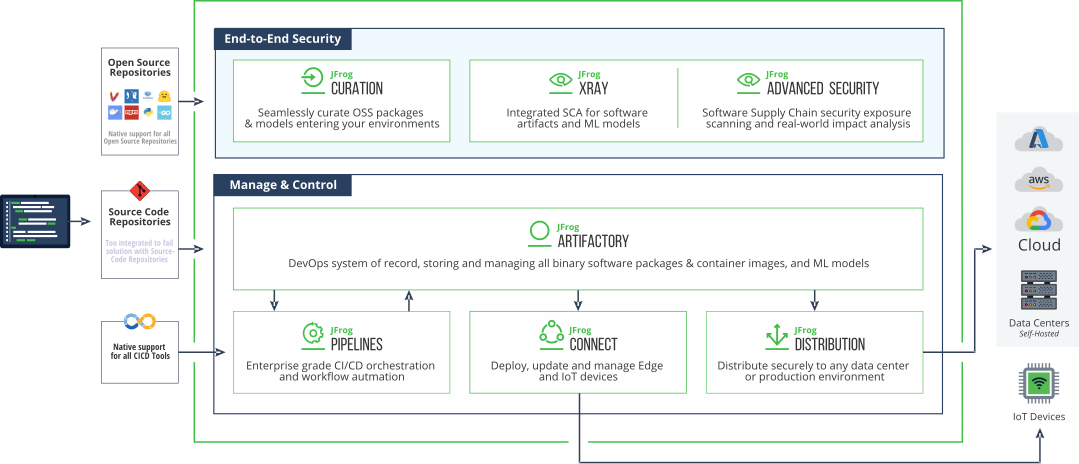
JFrog fully supports deploying Alpine Linux packages to Artifactory, which serves as a universal artifact repository. Artifactory lets you host internal artifacts using local repositories so you can share your packages inside your organization. Artifactory integrates with your existing ecosystem to support end-to-end binary management that overcomes the complexity of working with different software package management systems, like Docker, Go, NPM and Java, providing consistency to your CI/CD workflow.
Full Automation with REST API and JFrog CLI
Artifactory exposes an extensive REST API that provides access to its features anywhere in the development cycle effectively letting you automate any action you could do through the UI. JFrog CLI is a compact and smart client that greatly simplifies and optimizes automation scripts making them more efficient, more readable and easier to maintain across all JFrog products. Between them, the REST API and JFrog CLI facilitate fully automated and optimized software delivery when working with Alpine Linux packages.
Enterprise Ready
Secure, private Alpine Linux repositories in an Artifactory High Availability installation provide unmatched stability and reliability accommodating any number of users, build servers and interactions. Through cloud-based providers, Artifactory offers massively scalable storage that can accommodate terabyte-laden repositories. Advanced replication options support any network topology over multiple, geographically distant sites facilitating disaster recovery with instant failover to a DR site anywhere in the world.


 Claude
  Cursor
  Codex
Codex  Hugging Face
  NVIDIA
  Visual Studio Code
  Devin
Devin  Kiro
Kiro  Open Code
  NanoClaw
 Docker
  npm
npm  PyPy
PyPy  Wiz
Wiz 
 Financial Services
  Gaming
  Public Sector
  Automotive
  Technology
  Healthcare