helping to deliver secure software updates from code to the edge.
You have been redirected to the JFrog website

エージェントの信頼性は、取り込み・生成・配布するものの信頼性によって決まります。JFrogは、すべてのAIモデル、Agent Skills、MCPサーバー、AI生成コード、そして生成されたアーティファクトを単一の信頼できる管理基盤(Single Source of Truth)で統制します。
エージェント型ソフトウェアサプライチェーン全体をセキュアに保護することで、新しい開発スピードでも信頼できるソフトウェアを提供できます。
To configure Alpine Linux to pull packages from JFrog Artifactory:
1. Add your Artifactory Alpine repository to the /etc/apk/repositories file on your Alpine Linux system.
2. Update the repository list by running:
– bash
– Copy code
– apk update
3. Install packages from Artifactory using the apk command, just as you would with any other repository.
This setup allows you to use JFrog Artifactory as your primary source for Alpine packages.
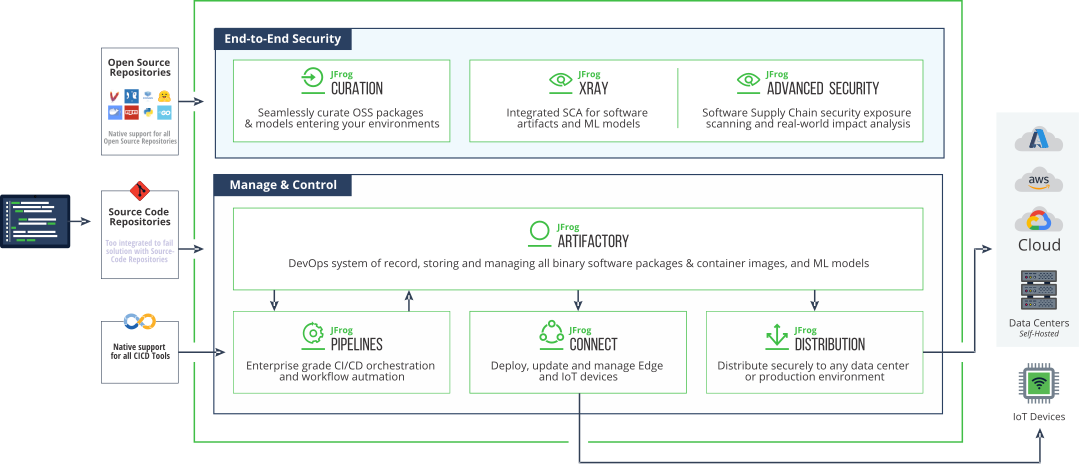
Yes, JFrog Xray can scan Alpine Linux packages stored in JFrog Artifactory for security vulnerabilities. By integrating Xray with your Artifactory Alpine repository, Xray will automatically analyze the packages for known vulnerabilities and license compliance issues. This ensures that only secure and compliant packages are deployed to your Alpine Linux systems.
You can automate the build and deployment of Alpine Linux packages using JFrog Pipelines by:
1. Creating a pipeline in JFrog Pipelines that includes steps to build Alpine packages from source.
2. Pushing the built packages to an Alpine repository in JFrog Artifactory.
3. Deploying the packages to your Alpine Linux systems from Artifactory as part of the CI/CD process.
This automation ensures that your Alpine packages are consistently built, tested, and deployed across your environments.
Your action was successful
Please try again later
Modal Message
helping to deliver secure software updates from code to the edge.
You have been redirected to the JFrog website