Claude
  Cursor
  Codex
Codex  Hugging Face
  NVIDIA
  Visual Studio Code
  Devin
Devin  Kiro
Kiro  Open Code
  NanoClaw
 Docker
  npm
npm  PyPy
PyPy  Wiz
Wiz 
 Financial Services
  Gaming
  Public Sector
  Automotive
  Technology
  Healthcare


The Agent Has Entered the Supply Chain
JFrog + OpenCode: Agentic development meets a system of record

By
9 min read
Software Delivery in the Age of Agents
The way software gets built has fundamentally shifted. AI coding agents are no longer just autocomplete on steroids; they’re resolving packages, configuring environments, selecting tools, and in some cases running the entire development lifecycle, with or without a human in the loop.
But here’s the problem: the tools and workflows agents rely on to do all of this were never designed with safety baked in. There’s no built-in concept of “what has my organization vetted?” No single place where an agent can ask, “Is this package safe to use?” or “Which MCP servers am I allowed to install?” Without that, agents make their own decisions, pulling from wherever they can resolve, installing whatever looks right, bypassing defined pipelines and operating entirely outside the guardrails that platform and security teams have spent years building.
That gap has real consequences. The shai-hulud attacks targeted the npm ecosystem through self-propagating malware campaigns that are still going on. Malicious MCP servers on PyPI spawned reverse shells the moment they were initialized. The LiteLLM incident in March 2026 saw attackers compromise a popular AI gateway library through its PyPI maintainer account. And the omnicogg dropper exploit hid an RCE payload inside a README specifically padded to evade automated scanners. Each attack exploited the same root cause: agents publishing private packages or sensitive content into public repositories, bypassing the entire corporate and developers consuming software that no one had actually vetted.
As AI agents take over more of the software delivery lifecycle, JFrog is best placed to be the trusted System of Record they rely on, a safe, vetted, and policy-enforced source of truth for packages, artifacts, MCP servers, AI skills, and security metadata.
The JFrog + OpenCode integration is perfectly suited to solve the growing pains of software delivery in the age of AI agents. OpenCode, as an open-source, configurable coding agent that supports pluggable LLM providers, including self-hosted open-source ones, is a natural fit. Together, JFrog and OpenCode bring enterprise governance and developer velocity into one flow, so whether a human or an agent is driving the session, the right packages come from the right place, policies are enforced by default, and approved tools are always within reach.
Why This Integration Matters
As we move closer to an autonomous software development workflow, we need to provide coding agents with a deterministic trust layer that gives control over AI assets and application assets throughout the software supply chain. OpenCode is an open-source, AI coding agent designed for developers who want agentic workflows without giving up control. JFrog is the platform that teams can use to manage, curate, and secure every artifact in their software supply chain.
The OpenCode and JFrog integration addresses the need for a deterministic trust layer that gives control over AI and application assets, as agents enter the workflow, without creating developer friction, by providing:
- Automated environment setup — JFrog CLI and package-manager configuration happens at session start, not during a half-day onboarding call.
- Curated package resolution — pip, mvn, npm, and other package managers are wired to your protected JFrog Artifactory repositories, not the open internet.
- Trusted package publishing — share and publish your artifacts to JFrog Artifactory repositories.
- Approved MCP servers — agents can only discover and install MCP servers that your platform team has vetted through JFrog’s AI Catalog.
- Corporate skills repositories — teams can publish and distribute internal OpenCode skills the same way they publish internal packages.
The result is that developers can move from a “new project clone” to a “productive flow” with fewer manual steps and less tribal knowledge transfer.
Developer Benefits
If you manage developer tooling at scale, the ROI here is straightforward. New developer onboarding that currently takes half a day of environment wrangling, finding the right Artifactory URL, configuring package managers, tracking down which MCP servers are approved, becomes a single opencode.json. Your tenth onboarded developer has the same experience as your first.
The ongoing benefits:
- Standardized artifact access — every developer resolves from the same curated repositories.
- Reduced support overhead — fewer misconfigured environments, fewer “it doesn’t work on my machine” tickets, less time spent by senior engineers debugging someone else’s setup.
- Secure-by-default — Curation policies, approved MCP registries, and team skills repos are baked into the agent’s context from day one, not bolted on after an incident.
For developers, the gain is simple: less time spent fighting setup, faster time-to-first-commit, and a daily workflow where the right tools and policies are already in place, so you can focus on building, not configuring.
The Goal of the Integration
Once set up, the integration gets out of the way. You can work in natural language in OpenCode while the agent handles the plumbing:
| Installing Safe Dependencies | |
| What you say | What happens |
| “Install pip requirements” | Dependencies resolved (pulled) from your JFrog PyPI virtual repository |
| “Setup pnpm to use my artifactory” | Pnpm is configured and wired to your JFrog instance |
| Publishing Your Own Artifacts for Runtime Sharing in Artifactory | |
| What you say | What happens |
| “build and push Python distribution” | Package publishes to your corporate PyPI repo — not PyPI.org |
| “push docker” | The Docker package is pushed to your private Artifactory Docker repo, not to Docker Hub |
Using natural language to search for MCP servers in the JFrog mcp-server registry in OpenCode
| Controlling and Installing MCPs | |
| What you say | What happens |
| “which MCP servers are available?” | Returns only the MCP servers your platform team has approved and pulled into your team’s project |
| “install MCP server mcp-server-name” | Pulls from your JFrog project MCP registry |
| Controlling and Installing Skills | |
| What you say | What happens |
| “install skill skill-name” | Pulls from your corporate skills repository |
| “publish my new skill ‘my-skill” | Publish a skill you created to your corporate skills repo for others to use |
Using natural language to search for skills in the JFrog skills repo in OpenCode
The key detail: OpenCode isn’t making ad-hoc decisions about where to fetch things. It’s operating within the boundaries your platform team has defined, without you having to think about it.
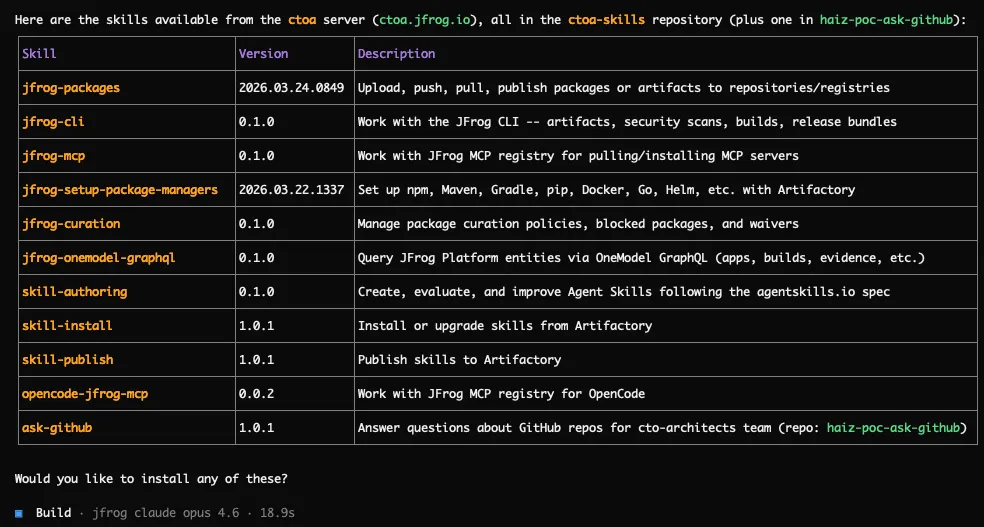
The result of searching for skills in the JFrog skills repo from the OpenCode prompt
How to Set Up the Integration
High-level architecture
The integration has three layers:
- OpenCode runtime — loads
opencode.json, registers and starts plugins, runs the model provider, and exposes MCP and skills to the agent.
→ Additional documentation and help https://opencode.ai/docs/ opencode-jfrog-plugin— TypeScript plugin that runs at project load and on session events: fetches JFrog-authored assets (instructions + skills), mutates OpenCode config, and drivesjf setupfrom local JSON.
→ JFrog Plugin source: https://github.com/jfrog/opencode-jfrog-plugin- JFrog CLI + local state — The jf JFrog CLI is the swiss-army knife for package-manager wiring;
.jfrog/local/package-managers.jsonis the persistent state cache of the Artifactory server/repo configured for each package manager. Bothjfandpackage-managers.jsonare automatically installed and configured by the JFrog skills installed by the plugin.
The Prerequisites
Before you begin, you’ll need:
- Access to a JFrog Platform instance with at least one project configured
- OpenCode installed (opencode.ai/docs)
- A configured JFrog Skills repository and a configured JFrog AI policy for MCP governance and secure skills management
Step 1: Add the JFrog plugin to your OpenCode config
Set up the JFrog and OpenCode integration by adding the JFrog-provided opencode plugin. Once OpenCode is installed, you can install the plugin on developers’ devices by adding it to either the global remote OpenCode configuration file or the local ones.
Adding the plugin to the global opencode config wires the opencode-jfrog-plugin into the developers’ OpenCode setup once they log into OpenCode.
→ See how to configure this here: https://opencode.ai/docs/config/#remote.
If your organization is not using a remote OpenCode configuration, then the plugin needs to be added to each developer’s OpenCode configuration file (see example below), read more here: https://opencode.ai/docs/config/#plugins.
OpenCode configuration example
The example below shows an opencode config file with the JFrog plugin and a provider.
|
Step 2: Let the plugin bootstrap your environment
The plugin is automatically pulled and run when OpenCode starts. It:
- Ensures JFrog instructions exist in
<project-root>/.jfrog/instructions, pulling the latest version if missing - Appends integration instructions into the runtime OpenCode config
- Installs required JFrog skills into
~/.config/opencode/skills/(if missing) which alters the default behaviour for packages, skills management, and MCP servers:- Dictates dependencies handling through the corporate JFrog platform rather than from public registries.
- Assists with OSS packages curation failures
- Handles packages pulling and pushing from and to the right JFrog project repositories
- Points mcp servers installations and discovery through JFrog’s project mcp gateway and adds them to the opencode configuration.
- Points skills installation and publishing against the corporate JFrog skills repositories
- Checks for
jfavailability and validates package-manager setup state at session start
Step 3: Configure your package managers (one time)
Run /skills and select the jfrog-setup-package-managers skill to configure all relevant package types in your project to use JFrog repositories. This will:
- Detect supported package types in the current project and run
jf configfor each - Create a
.jfrog/local/package-managers.jsonmappings file for each identified package type.
Once complete, this file enables seamless package push/pulls across sessions, keeping repository resolution predictable, secured, and curated, and eliminating “it works on my machine” onboarding drift.
Note: If you skip this step, the skill runs automatically the first time OpenCode runs a package operation (pull, build, install, etc.).
Orchestration Without Compromise
OpenCode and JFrog work best together when AI is given the role of a workflow orchestrator, not just an assistant. This integration demonstrates that model clearly: JFrog’s system of record with governance and package infrastructure stays central, while OpenCode orchestrates how developers interact with them to guarantee safe and transparent binary management. That combination leads to a better developer experience while keeping speed and control.
Here are a few practical next steps you can take to learn more or get started:
- Install OpenCode
- View the plugin on GitHub
- Configure remote OpenCode settings for your team
- Learn about JFrog Curation
- Learn about AI Catalog
 New insights from +1,400 security & DevOps leaders. Get the Full Report.