Claude
  Cursor
  Codex
Codex  Hugging Face
  NVIDIA
  Visual Studio Code
  Devin
Devin  Kiro
Kiro  Open Code
  NanoClaw
 Docker
  npm
npm  PyPy
PyPy  Wiz
Wiz 
 Financial Services
  Gaming
  Public Sector
  Automotive
  Technology
  Healthcare


Managing AI Agent Primitives Like Real Software Packages with APM and JFrog


By
14 min read

Note: This blog was updated on 28-Sep-2026.
AI agents are part of the modern development workflow.
They write code, review pull requests, generate tests, call tools, interact with MCP servers, and help developers move faster. But behind every useful agent, there is something just as important as the model itself: the context that tells the agent how to behave.
That context can include skills, prompts, instructions, hooks, commands, scripts, references, and MCP server definitions.
In a small project, managing these primitives is pretty simple. Maybe you’re the only developer working on the repository. What you see locally is all that exists. You know which prompts are being used, which instructions were added, and which tools are connected.
But when this becomes a team effort, a lot of questions arise:
- How do you make sure every developer is using the same agent instructions?
- How do you know everyone has the latest version of a shared skill?
- How do you prevent someone from silently modifying a prompt, hook or skill?
- How do you control who is allowed to publish, update, or consume these agent primitives?
- How do you apply governance, access control, and approval workflows before these primitives reach developers and AI coding tools?
And most importantly: How do you make sure these agent primitives are coming from a trusted source?
That is exactly where APM, the Agent Package Manager comes in.
What is APM?
APM is an open source package manager for agent primitives. It brings a familiar package-management model to the AI agent world, letting teams define skills, prompts, instructions, hooks, commands, and MCP servers as versioned dependencies in a single apm.yml file.
Once defined, every developer can run apm install and get the same agent context across tools like Cursor, Claude Code, GitHub Copilot, Codex, OpenCode, Gemini, and Windsurf.
Treating Agent Context as a Package
The APM project has a simple, but powerful core premise: treat agent primitives like packages. If you are familiar with package managers like npm, the concept will feel natural. Instead of manually copying prompts, instructions, skills, and MCP server definitions between projects, you define them as dependencies.
A project can describe the agent context it needs in a single apm.yml file. Then, every developer can run:
apm install
And receive the same agent setup.
That setup can include:
name: my-org-ai-project
version: 1.0.0
description: Shared AI agent setup for the packages team
author: platform-engineering

targets:
  - cursor
  - claude
  - copilot

dependencies:
  apm:
    - jfrog/packages-skills#^1.1.0
    - jfrog/pr-standards-instructions#^2.0.0
    - jfrog/build-test-instructions#^1.3.0
  mcp:
    - name: slack
      registry: false
      transport: http
      url: https://mcp.slack.com/mcp
      oauth:
        clientId: ""
        callbackPort: 3118

    - name: linear
      registry: false
      transport: http
      url: https://mcp.linear.app/sse
      headers:
        Authorization: "Bearer ${LINEAR_TOKEN}"


includes: auto
scripts: {}
In this example, the project is not starting from an empty agent setup. It declares the shared primitives the team wants every developer to use:
jfrog/packages-skills contains reusable skills for working with package-related workflows.
jfrog/pr-standards-instructions defines how the agent should help with pull request messages and review standards.
jfrog/build-test-instructions gives the agent the team’s expected build and test behavior.
jfrog/artifactory-mcp declares the approved MCP server configuration the agent can use when interacting with Artifactory.
Instead of copying these files manually between projects, the team declares them once in apm.yml. When a developer runs apm install, APM fetches the approved versions from JFrog and lays them out in the right place for the selected AI coding tools to consume.
Reproducing the Same Agent Context Everywhere
When a developer runs:
apm install
APM reads the project’s apm.yml, resolves the declared agent primitive dependencies, fetches the required packages, and writes the relevant assets into the project in a structure the selected AI coding tools can consume.
That means skills, prompts, instructions, hooks, commands, scripts, and MCP declarations are not copied manually from one repository or wiki page to another. They are installed as versioned dependencies.
This matters because the agent setup becomes reproducible.
The first install resolves the exact package versions and the assets they contain. Those resolved versions, along with content hashes, are captured in a lock file. By committing that lock file to the project, every developer who runs apm install gets the same resolved agent context.
Not “roughly the same instructions.”
Not “whatever was latest when they copied the file.”
The same versions. The same assets. The same agent setup.
So when a new developer joins the project, switches machines, or pulls a fresh clone, they can recreate the same agent environment the rest of the team is using. And when the team decides to update a shared skill or instruction, that update can happen intentionally through the dependency and lock file workflow instead of through copy-paste.
One apm.yml file.
One shared lock file.
One consistent agent context across every developer machine.
What Can APM Manage?
APM can manage different types of agent dependencies, including skills, prompts, instructions, agents, hooks, commands, and MCP servers. It’s not limited to one type of file or configuration. The source document includes a table that breaks the primitive types down and explains how each one fits into the agent workflow.
| Primitive | What it represents |
|---|---|
| Skills | Self-contained capability bundles with SKILL.md, scripts, and assets |
| Prompts | Reusable prompt templates with frontmatter |
| Instructions | Long-lived behavior rules, such as style guides and project conventions |
| Agents | Personas with explicit scope, tools, and triggers |
| Hooks | Event handlers fired by the runtime, such as pre-commit or on-tool-use |
| Commands | Slash-command shortcuts developers type into the agent UI |
| MCP servers | Tool-server declarations that consumers can wire into their agent harness |
This is where APM becomes more than a convenience tool. It creates a structured way to share, version, and reproduce the primitives that shape agent behavior.
Once something becomes part of the software workflow, it also needs governance.
The Missing Piece: A Trusted Registry
Managing agent primitives locally is useful, but local management is not enough. Even when teams keep their skills, prompts, instructions, hooks, and MCP configurations in internal Git repositories, they still need to deal with checkout, updates, version drift, and dependency management across multiple repos.
That might work for a small team, but it quickly becomes painful at scale. Every project now needs to know which repositories to pull from, which version to use, when to update, and how to make sure the right files are available in the right place for the agent to consume.
And there is another practical problem: Git repositories may not always be accessible to agents operating closer to production, inside controlled environments, or within restricted network boundaries. In those cases, relying on Git as the runtime distribution mechanism for agent primitives becomes fragile.
Enterprises need a trusted way to publish, consume, control, and audit these packages through a proper registry model. Without that, developers may end up pulling agent instructions, skills, scripts, or MCP configurations from scattered repositories, outdated copies, or random places on the internet — creating a new software supply chain problem.
An agent skill is not “just a prompt.”
A hook is not “just a helper script.”
An MCP server definition is not “just configuration.”
These primitives shape what an AI agent sees, what it is allowed to do, and which tools it can call — essentially impacting the quality, safety, and consistency of the outcome an agent produces.
That means they should be managed with the same discipline we already apply to software packages.
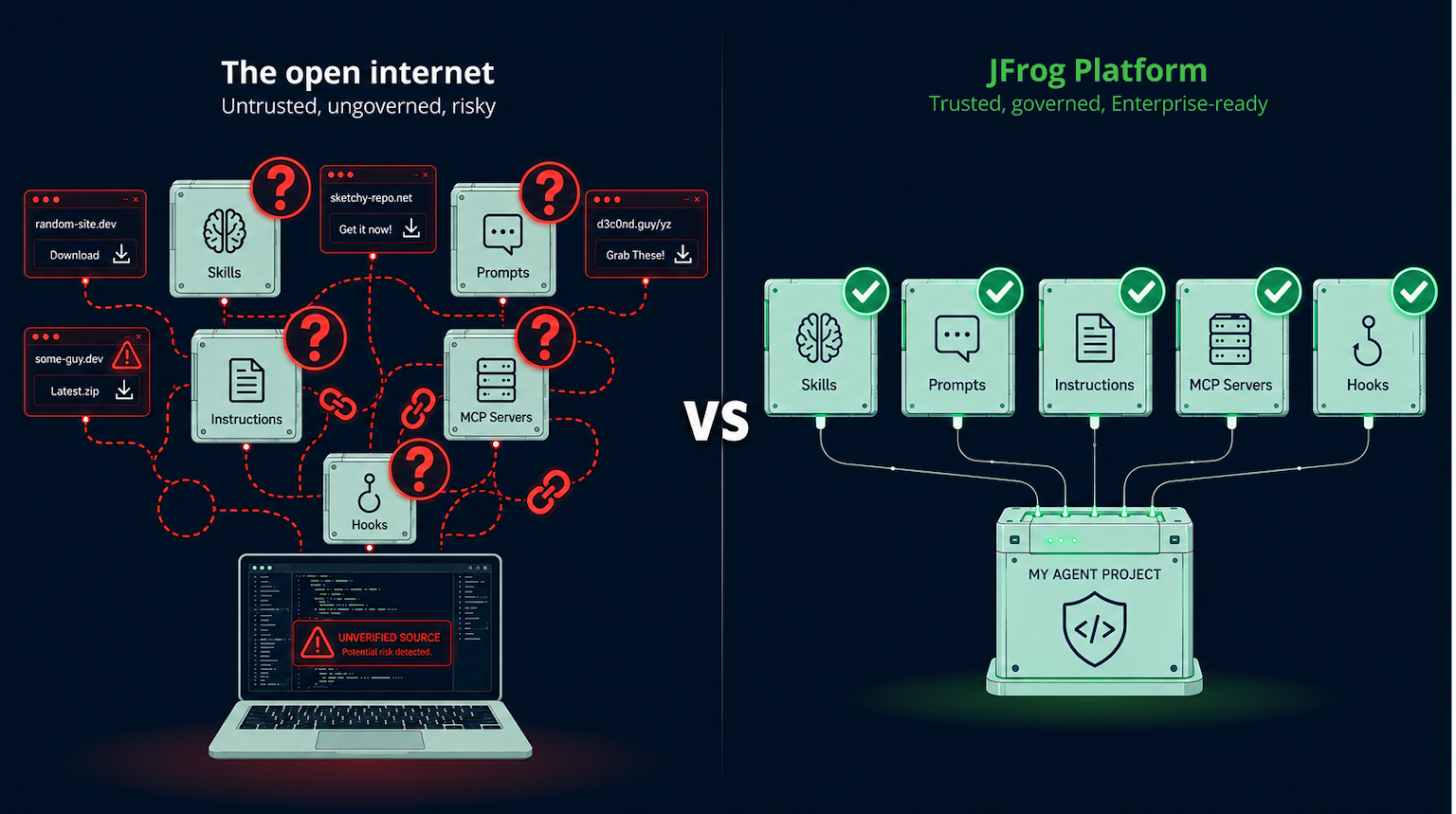
JFrog Support for APM Packages
JFrog now makes it possible to use APM with the JFrog Platform through a new Agent Packages repository type.
This means organizations can publish and consume APM packages directly through JFrog Artifactory, instead of relying on uncoordinated or untrusted sources.
With the APM-JFrog integration, teams can:
- Publish APM packages to an Artifactory trusted internal registry
- Consume APM packages from this trusted registry
- Share approved agent primitives across teams
- Keep agent behavior consistent across projects and machines
- Manage AI agent context using the same platform they already trust for managing software packages
How does JFrog for APM Packages work?
From the JFrog side, the flow starts by creating a new repository of type Agent Packages.
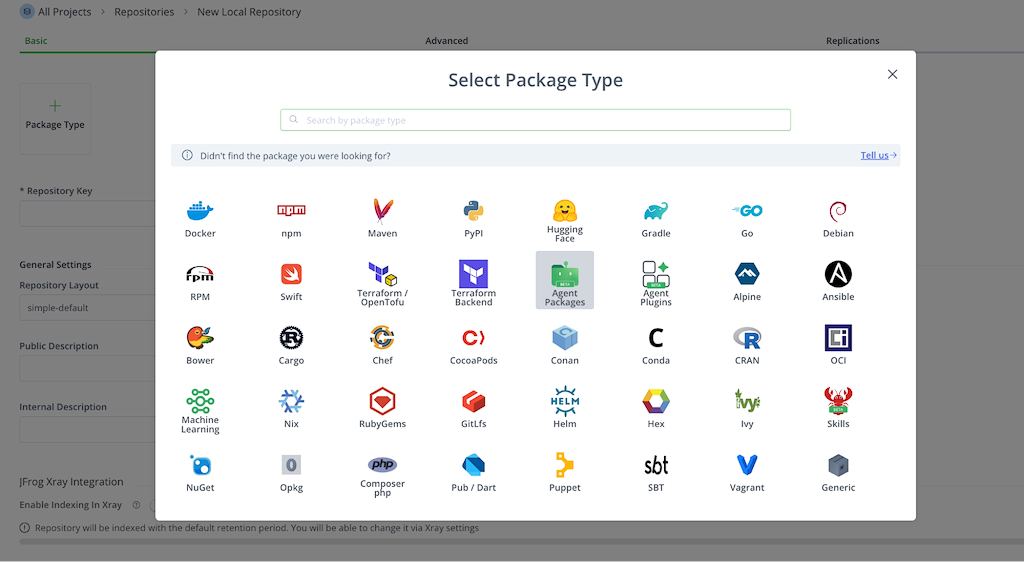
Then, APM should be configured to work with that registry by running the following commands:
apm experimental enable registries

apm config set registry.agent-packages.url \
https://.jfrog.io/artifactory/api/agentpackages/

apm config set registry.agent-packages.token

apm config set registry.agent-packages.default true
It’s as simple as that! From this point on, developers can use APM while pushing and pulling agent packages to/from JFrog.
A simple example
Imagine an organization has three APM packages:
jfrog/artifactory-instructions
jfrog/jfrog-instructions
jfrog/packages-skills
All three packages are already stored in Artifactory.
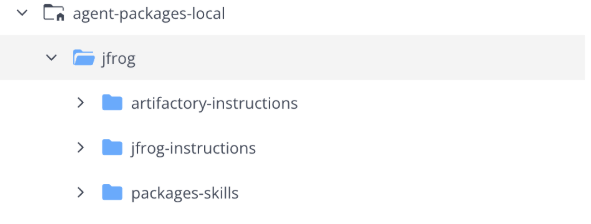
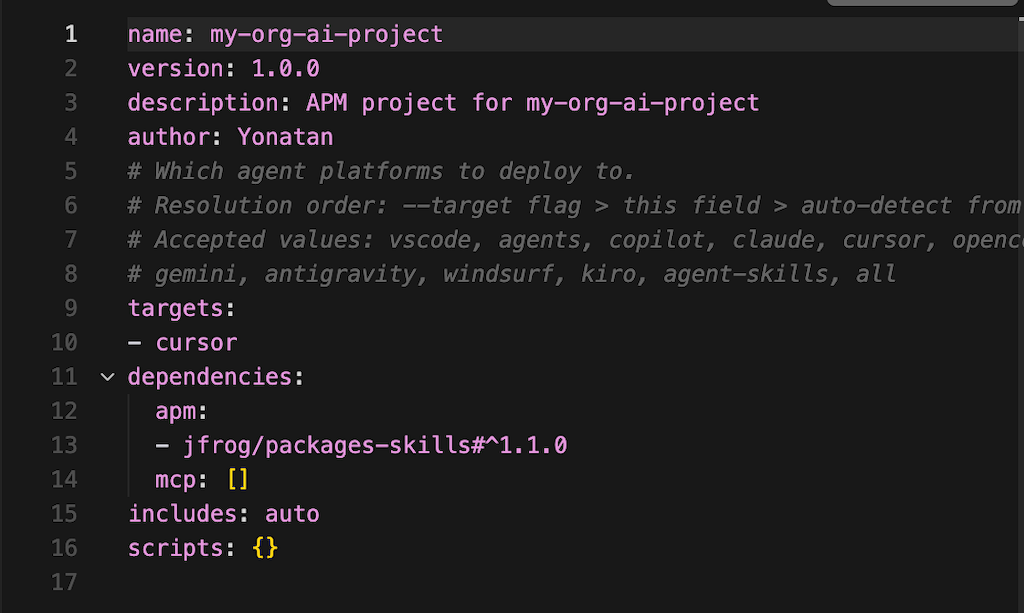
Now a developer can create a project with an apm.yml file that depends on:
dependencies:
 apm:
   - jfrog/packages-skills#^1.1.0
 mcp: []
includes: auto
scripts: {}
In this example, the project declares a dependency on jfrog/packages-skills#^1.1.0.
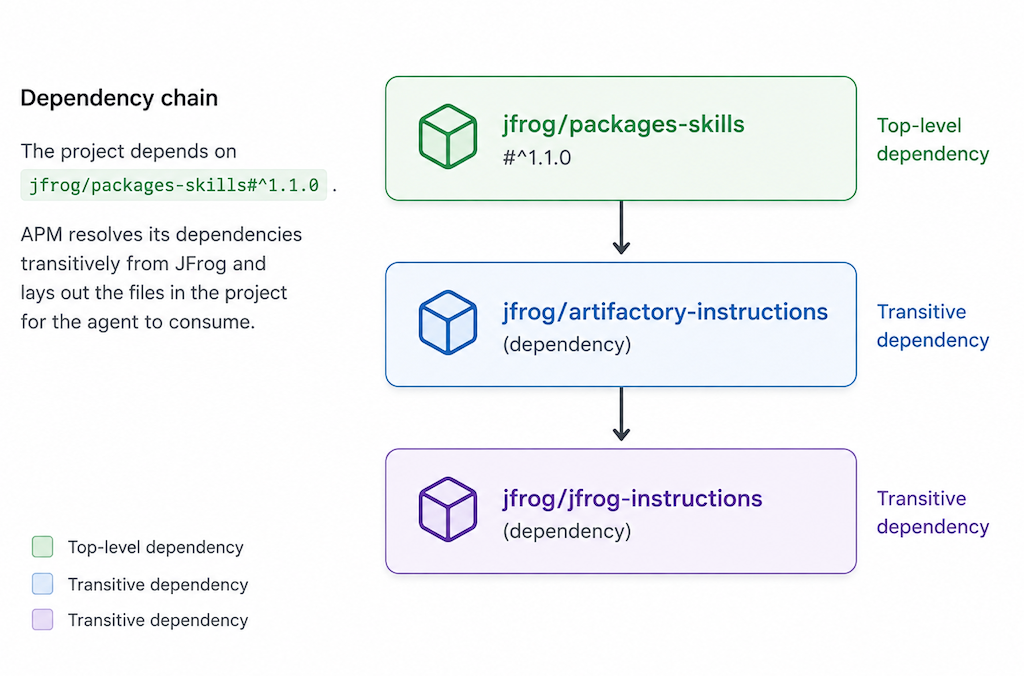
That package is not just a standalone skill package. It also depends on jfrog/artifactory-instructions, which in turn depends on jfrog/jfrog-instructions.
The dependency chain looks like this:
jfrog/packages-skills → jfrog/artifactory-instructions → jfrog/jfrog-instructions
In other words, the project only declares jfrog/packages-skills#^1.1.0 as the top-level dependency, but that package depends on jfrog/artifactory-instructions, which then depends on jfrog/jfrog-instructions.
When the developer runs apm install, APM resolves this dependency chain transitively, fetches all required packages from JFrog, and lays out the right files in the project for the agent to consume.
Then they run:
apm install
APM fetches the required packages from JFrog, transitively resolves the dependencies, and brings the right files into the project, placing them where the selected AI coding tools can use them.
No copy-paste.
No guessing of “which version are you using?”
No random agent primitive downloaded from an unknown source.
Every developer on the team can now work with the same approved agent primitives, same versions. Whether you have two developers or two thousand, the result is the same: everyone is now aligned.
Keeping agent primitives updated
Once agent primitives are managed as packages, updating them becomes familiar too.
To get the latest approved version, developers can run:
apm update
APM will fetch the latest primitives according to the version behavior defined in the project configuration.
This gives teams a clean workflow for rolling out better instructions, updated skills, new commands, or improved MCP declarations without relying on manual distribution.
From Install to Runtime: Where Approved Agents Actually Run
Installing the same approved primitives everywhere is the first payoff. When a developer runs apm install, those packages flow universally into whatever agent they already use, GitHub Copilot in VS Code, or any of the harnesses APM supports. Same source of trust, for every tool, on every machine.
But agents don’t only sit inside an IDE anymore. They are moving into CI/CD and remote runtimes such as GitHub Agentic Workflows, acting on repositories on their own. That raises a second question: When an approved package actually runs, how do you sandbox it, gate it, and put a budget on it?
Because APM packages are portable, the exact package sitting in Artifactory can run, unchanged, as an automated agent with GitHub Agentic Workflows, which runs AI agents as GitHub Actions in CI/CD. GitHub Agentic Workflows treat APM packages as first-class dependencies. You import a shared component, list the approved packages pinned to a version, and the workflow installs them into a sandboxed runner. Governance can be applied too.
Below is an example of a human approval gate before the agent runs, and a cap that budgets AI spend per run. In this example, the automation imports an approved APM package called acme/modernization-kit#v2.3. That package can contain the skills, instructions, prompts, hooks, commands, or MCP declarations needed for a specific workflow, a modernization initiative in this case.
on:
  issues: { types: [labeled], names: [modernize] }
  manual-approval: modernization-initiative         # human gate
imports:
  - uses: shared/apm.md
    with:
      packages: [ acme/modernization-kit#v2.3 ]     # approved, pinned package
engine: { model: sonnet }
max-ai-credits: 500                                 # spend cap per run
The important part is that acme/modernization-kit#v2.3 is not a loose script or copied prompt. It is a pinned APM package that can be approved, versioned, stored in Artifactory, and reused across governed automation flows.
So when the agent runs, it is not pulling arbitrary instructions from a developer’s local setup. It’s using an approved package version, with a human approval gate before execution and a budget cap that limits AI spend per run.
Skills, agents, instructions, hooks, and MCP declarations are all treated as packages. Once they are packaged this way, they can move through the same type of controls teams already trust for shipping software: approval, versioning, storage in Artifactory, controlled consumption, and repeatable execution.
That is the bigger idea: agent primitives are not just installed into coding tools. They can also become governed building blocks for automation. Approved at rest in Artifactory. Pinned by version. Gated before runtime. Sandboxed, metered, and traceable when executed.
Why This Matters Now, and What’s Next
AI agents are already active participants in the software development lifecycle. But the industry is still learning how to govern the new layer of dependencies they rely on: prompts, skills, instructions, hooks, commands, and MCP servers. These aren’t traditional packages, yet they behave like dependencies: created, shared, versioned, and consumed and updated across projects. They shape developer workflows, introduce risk, and need to be managed accordingly.
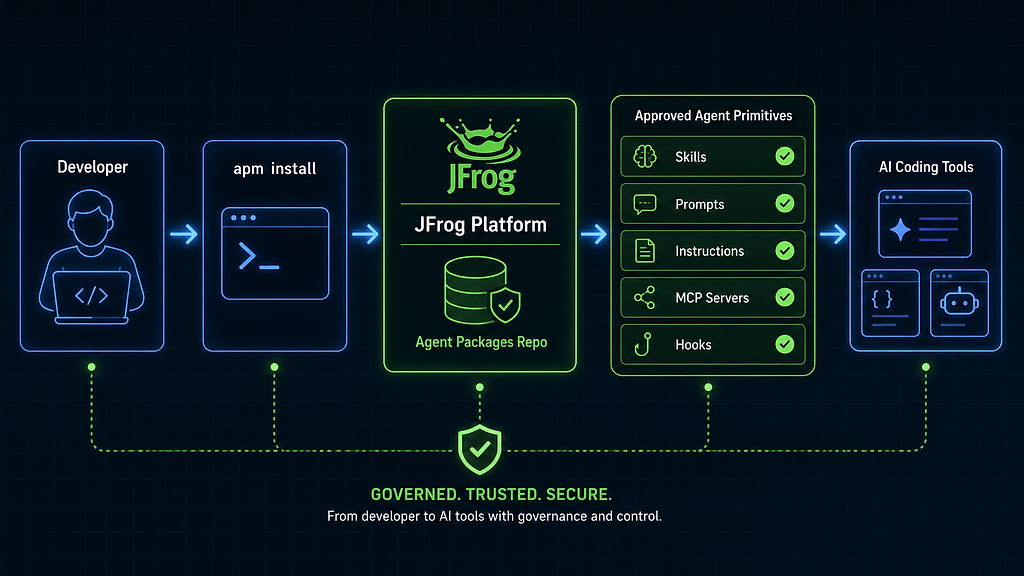
APM gives developers a package-manager experience for agent primitives. JFrog gives organizations a shared trusted registry, governance, and enterprise-grade control needed to use that model safely at scale. Together, they make it possible to manage AI agent context the way modern software teams already manage software packages.
What’s Next
Managing agent primitives as packages is the first step. The next step is securing them. JFrog is already working on a security layer that analyzes APM packages as they are pushed into Artifactory. It will check skills, prompts, instructions, hooks, commands, and MCP definitions for malicious instructions, hidden manipulations, unsafe behavior, and risky configuration patterns. This will allow teams to control agent primitives like any other software supply chain component: published to a trusted registry, inspected before use, and consumed only after passing the organization’s security controls.
The end goal is this: when developers and agents pull agent primitives from Artifactory, they can trust that those packages aren’t just managed, but are also verified and safe to use.
Ready to put this into practice?
Secure your AI agent supply chain today. Follow our full implementation guide in the JFrog APM documentation to learn how to publish, consume, and govern your agent primitives with Artifactory.
 New insights from +1,400 security & DevOps leaders. Get the Full Report.