Claude
  Cursor
  Codex
Codex  Hugging Face
  NVIDIA
  Visual Studio Code
  Devin
Devin  Kiro
Kiro  Open Code
  NanoClaw
 Docker
  npm
npm  PyPy
PyPy  Wiz
Wiz 
 Financial Services
  Gaming
  Public Sector
  Automotive
  Technology
  Healthcare


Agent Guard: Control AI Assets Before They Become Shadow AI

By
5 min read

A developer on your team just told Claude Code to connect to a new MCP server, the protocol coding agents use to reach organizational tools and data. Nobody in security reviewed it. Nobody in security even knows it happened. For two-thirds of enterprises, the primary obstacle to scaling agentic development isn’t budget or headcount — it’s security risk.
To close that gap, we extended governance to MCP servers and agent skills, making security visible, approved, and enforced in real time rather than logged after the fact, all built into the coding agent itself.
Every Coding Agent is a New Front Door
Coding agents don’t just write code anymore. They connect to MCP servers, load skills (i.e. packaged instructions the agent follows, often just a Markdown file), and install plugins that bundle both. Each connection or usage in these AI assets is a developer-made decision, made alone in an IDE, with no review checkpoint.
The numbers back up why that should worry you:
- Developers report that 42% of their code is currently AI-generated or assisted.
- About 36% of MCP servers and agent skills carry at least one security flaw.
- Roughly four in five enterprises have no governance framework for agentic AI.
You can’t review and manage what you can’t see, and today, most security teams can’t see any of this.
What coding agents enforcement actually looks like
Policy enforcement doesn’t mean slower development. It means three things are true at once:
- Every MCP server, skill, and plugin a developer’s agent can reach is visible within one catalog, whether it is approved or not.
- Nothing unvetted runs because the agent can’t physically reach it, not just because a ‘best practices’ policy document says it shouldn’t.
- Developers get all of this without leaving their IDE; no separate portal, no ticket queue, no waiting on security to unblock a build.
That last point matters as much as the first two. Policy enforcement that adds friction gets routed around or bypassed. Built-in enforcement into the tool developers already use doesn’t.
Agent Guard: Native Policy Enforcement for Coding Agents
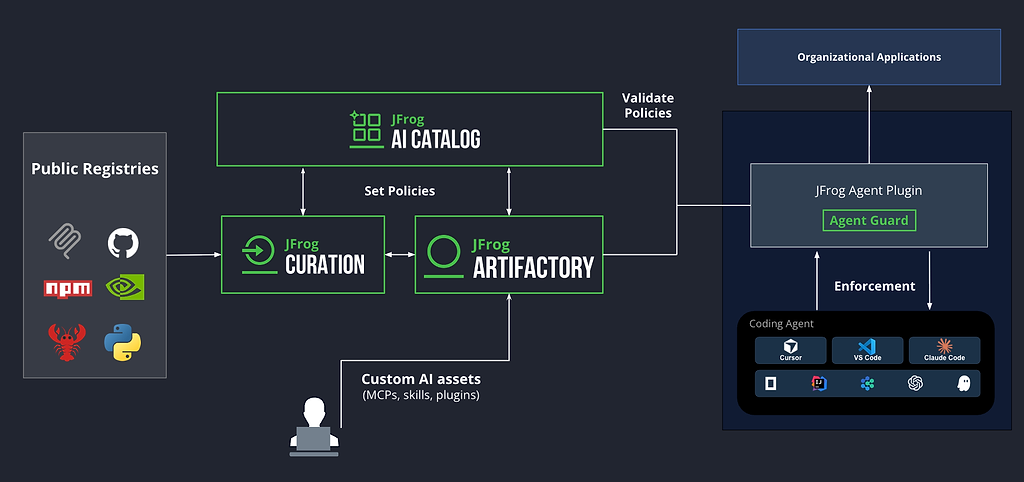
JFrog Agent Guard controls AI assets access for coding agents in three layers, and each one closes a different bypass. (Note: at the time of this writing, only MCP servers are supported, with support for agent skills on the way):
- The approved-only proxy. Once a developer authenticates, their agent can only see and use the MCP servers your project admin approved, pulled from your own JFrog Artifactory, not the open internet.
- The enforcement hook. Inside VS Code and Cursor, a lightweight hook checks every MCP tool call before it runs and denies any that aren’t routed through Agent Guard. A developer can’t sidestep governance by hand-adding a raw server.
- MDM lockdown. Your IT team distributes and locks this enforcement through standard device management like Jamf, Intune, or Kandji, so individual developers can’t turn it off.
The official JFrog plugin delivers and configures Agent Guard automatically. Install it once for your IDE, and then every approved MCP server is wrapped and routed through these three layers with no manual setup.
The result: only approved MCP servers run, every package comes from your platform, and opting out isn’t a setting a developer can find. Every allow and every deny writes to an audit log, so when your CISO asks what ran last quarter, you have a concrete answer instead of a guess.
Skills and plugins get the same treatment
MCP servers were the first assets we brought under this native enforcement. Skills and plugins will work the same way.
- Skills:
- A developer finishes a skill and tells their agent, “Publish this for our project.” The agent handles it: packs the bundle, signs it, and registers it in your catalog. No CLI commands to memorize, no repo path to look up.
- On the other side, a different developer in a different IDE asks their agent what’s available and installs one. The agent fetches it from the approved list, verifies the cryptographic signature, and confirms it’s ready to use. Claude Code and VS Code see the identical catalog — policy enforcement doesn’t depend on which agent your team prefers.
- Plugins
- These surface in the same unified marketplace, so a developer browsing for a plugin sees skills and MCP servers sitting right alongside it, all pulled from the same governed source.
One Catalog, No AI Silo
Here’s the part that’s easy to miss: none of these enforcement capabilities required a new, parallel system. MCP servers, skills, and plugins live in Artifactory next to your Docker images and npm packages. One RBAC model, one place your security team already looks.
Your developers are already connecting coding agents to MCP servers, skills, and plugins today, whether or not your security team can see it. JFrog’s Agent Guard, a part of the AI Catalog, closes that gap using the platform you already trust, with security and governance policies your developers can work with, not around.
Ready to see it? Book a demo of Agent Guard and the AI Catalog or read the Agent Guard docs to enable it yourself.
 New insights from +1,400 security & DevOps leaders. Get the Full Report.