NVIDIA
  Cursor
  GitHub


 Docker
  Maven
Maven  Financial Services
  Public Sector
  Technology
  Healthcare
  Gaming
  Automotive
  Enterprise


Introducing the JFrog Power for Kiro
Give your agentic IDE fluent JFrog Platform expertise in one install
A new CVE drops into a package you depend on. With the JFrog power for Kiro installed, your next move is a single prompt in your IDE, not a tab switch to the JFrog UI and thirty minutes of hand-rolled REST calls. This is what governed agentic development looks like in practice.
If your team manages artifacts on the JFrog Software Supply Chain Platform and uses Kiro as your AI-native IDE, the JFrog power for Kiro gives you fluent, safe access to JFrog for metadata queries, artifact management, security insights, and policy operations — without requiring you to become an AQL expert first.
The Problem: Why Generic Agents Struggle
Generic AI agents lack the JFrog-specific context needed to work reliably at scale. Without knowledge of instance topology, Artifactory Query Language (AQL) semantics, or the correct JFrog Platform REST routes, agents default to trial-and-error, forcing developers to jump between the JFrog UI, documentation pages, and manual API calls for tasks that should be conversational.
Model Context Protocol (MCP) servers cover a lot of ground, but connecting a raw server to an agent can mean a large, always-on tool surface. That taxes context and makes it harder for the agent to choose the right action.
The pain is not hypothetical. Here are two real-world examples of queries that are tedious in the UI and painful to script by hand:
- Supply-chain slice: “In our
docker-prod-local repository, list every image tag that still transitively depends on a given vulnerable package above a CVSS threshold, was promoted after build1842, and belongs to projectpayments– then show who can deploy from that repo.”- This query crosses search, properties, security metadata, and identity in ways no single UI screen answers cleanly.
Consistency audit: “Across all
npm-*virtual repositories, find artifacts tagged withbuild.pipeline=releasewhose resolved manifest no longer satisfies the semver range we publish in the internal catalog.”- Executing this requires stitching AQL (or repeated search bodies), manifest fetches, JSON comparison, plus pagination and timeouts on busy instances.
Doing the same with raw REST usually means sequences of calls across multiple JFrog Platform API paths, hand-rolled JSON parsing, and timeout guardrails for large tenants. Even with a standard MCP server connected, unscoped AQL queries can timeout on large instances. The JFrog power for Kiro encodes that operational knowledge so you spend less time correcting the agent and more time shipping.
What Does the JFrog Power for Kiro Do?
The JFrog power is an official, open-source package hosted at github.com/jfrog/jfrog-kiro-power. It is an installable capability that gives Kiro on-demand JFrog expertise — bundling MCP tools, steering guidance, and agent hooks into a single install. Rather than exposing a large, always-on tool surface that taxes context and confuses the agent, the power activates only when the conversation calls for it.
The power enables four core capabilities within the JFrog Platform:
- Artifact search: AQL-aware queries scoped to prevent timeouts on large JFrog Artifactory instances, respecting repository layout conventions for locals, remotes, and virtuals.
- Repository and project management: Create projects, configure local, remote, and virtual repositories, and apply the conventions the JFrog Platform expects.
- User, group, and membership administration: Handles flows via JFrog Platform REST where MCP tooling does not yet provide coverage, using token hygiene enforced by the steering files.
- Security metadata queries: Retrieve vulnerability severity, affected versions, and remediation hints from JFrog Xray, tied to artifact paths the agent already understands from the same conversation.
These capabilities are delivered through three building blocks:
- The Power Metadata (
POWER.md) contains the metadata (name, description, keywords) Kiro uses to determine when the power is contextually relevant. - The MCP Configuration (
mcp.json) points the MCP client to your instance’s JFrog MCP endpoint (https://<your-subdomain>.jfrog.io/mcp). - The Steering Files are focused guides covering search, artifact management, metadata, projects, repositories, and user administration.
Together, these three components turn “help me with JFrog” into behavior that matches how the JFrog Platform actually works in production at scale.
jf api directly to jq – save to a file first. It’s the kind of guardrail that takes a team six months of large-tenant pain to learn. The power ships with it on day one.How Does the JFrog Power for Kiro Work?
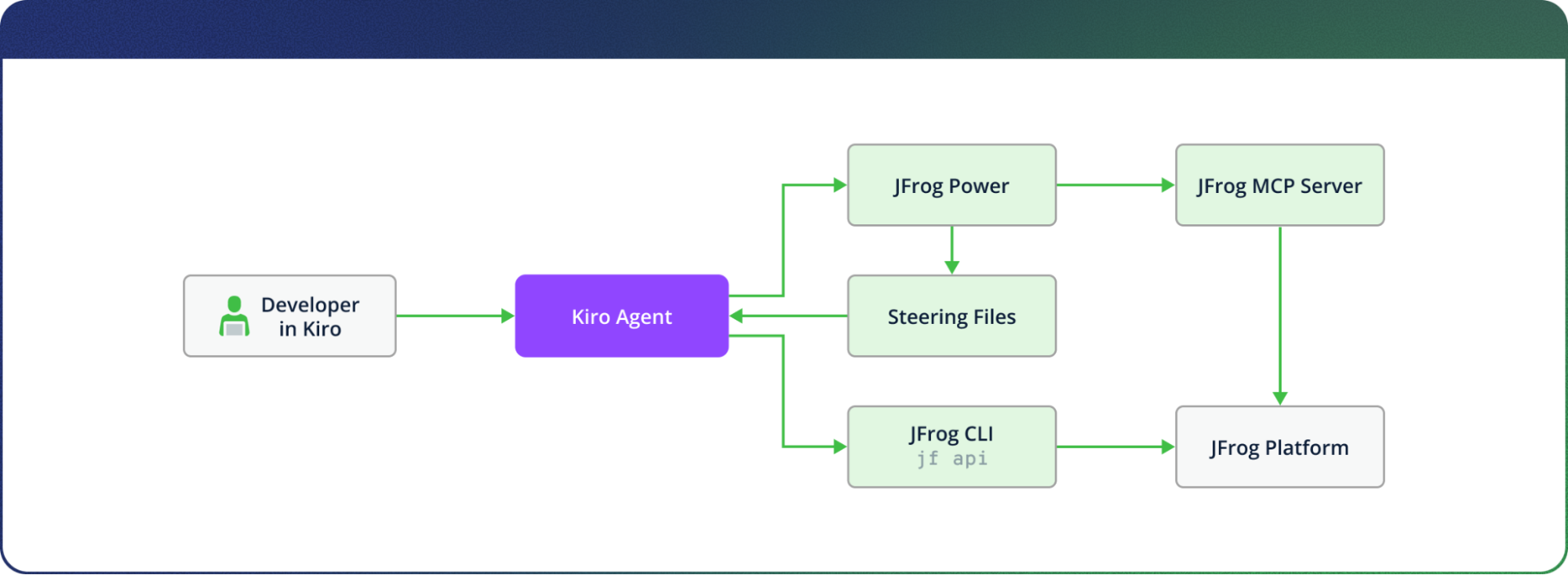
The JFrog power for Kiro follows a strict, documented priority order that ensures operations use the most reliable available path and degrade gracefully when a path is unavailable.
| Priority | Mechanism | When it Applies |
| 1. JFrog MCP Server | OAuth-authenticated MCP tools | All supported operations; preferred for Artifactory search, security queries, project management |
2. JFrog CLI (jf api) |
CLI REST calls with jf config credentials |
When MCP has no tool for the job, or when MCP is unavailable |
| 3. Steering-enforced guardrails | Steering file rules applied to both paths | Always active — prevents timeouts, destructive operations, and unsafe piping patterns |
The JFrog MCP server handles authentication via OAuth in the browser on first use — you do not embed access tokens in mcp.json. Note that your JFrog Platform Admin must enable the JFrog MCP integration on the instance before OAuth can succeed. Full setup documentation is available in Add the JFrog MCP server to an MCP client.
When MCP has no tool for the task, the steering directs the agent to JFrog CLI version 2.100.0 or later. Credentials live in jf config (encrypted at rest), and the agent uses full JFrog Platform API paths — /artifactory/..., /access/..., /xray/.... This covers identity, permissions, and admin operations that MCP does not yet surface.
The steering files enforce a set of operational guardrails across both paths: prefer execute_aql_query (MCP) or jf api /artifactory/api/search/aql over patterns that risk timeouts on large instances; never pipe jf api output directly to jq — save to a file first; treat destructive operations with explicit confirmation. That last guardrail alone represents six months of large-tenant learning. The power ships with it from the first install.
What Can You Do with the JFrog Power for Kiro?
Here are the kinds of prompts the JFrog power can handle, and what’s happening under the hood when you ask:
- “Search for artifacts named myapp in our release repository”— Triggers
execute_aql_queryvia the JFrog MCP server with AQL scoped to prevent instance-level timeouts. - “Create a project for my team with npm local, remote, and virtual repositories” — Calls
create_projectand repository configuration tools in sequence, applying JFrog Platform naming conventions automatically. - “List users and groups relevant to project payments” — Uses
list_jfrog_projectsand associated identity queries via JFrog Platform REST when MCP coverage ends. - “Show vulnerability severity counts for this JAR path in JFrog” — Invokes
jfrog_get_artifacts_summaryagainst JFrog Xray, returning severity breakdown tied to the specific artifact path. - “Upload this build artifact to the correct local repo with properties” — Routes through JFrog CLI with the correct
/artifactory/...path and attaches artifact properties per steering file conventions.
Each prompt resolves without the developer needing to know which API path, which MCP tool, or which CLI command to use. The power handles the routing; you stay in the IDE.
How to Install
Installing the JFrog power for Kiro requires three steps: configuring JFrog CLI, enabling MCP in Kiro, and importing the power from GitHub. The entire process takes under ten minutes for a standard JFrog Platform SaaS instance.
Step 1: Prerequisites
Verify that Kiro 0.7 or later is installed with Model Context Protocol enabled in settings. Restart Kiro if prompted.
Step 2: Install and configure JFrog CLI
Install JFrog CLI (minimum version 2.100.0) via Homebrew or the official installer. Then configure your server connection:
# Add the JFrog server you want to the CLI configuration
$ jf config add  \
 --url=https://YOUR_JFROG_PLATFORM_URL \
 --access-token=YOUR_TOKEN \
 --interactive=false

# Set the active JFrog server to be used by the CLI
$ jf config use
Generate access tokens from your JFrog Platform access token settings. Verify connectivity with:
# Readiness check
$ jf api /artifactory/api/v1/system/readiness

# Version check
$ jf api /artifactory/api/system/version
Step 3: Add the power in Kiro
Open the Powers sidebar in Kiro → under the AVAILABLE section, find JFrog Platform.
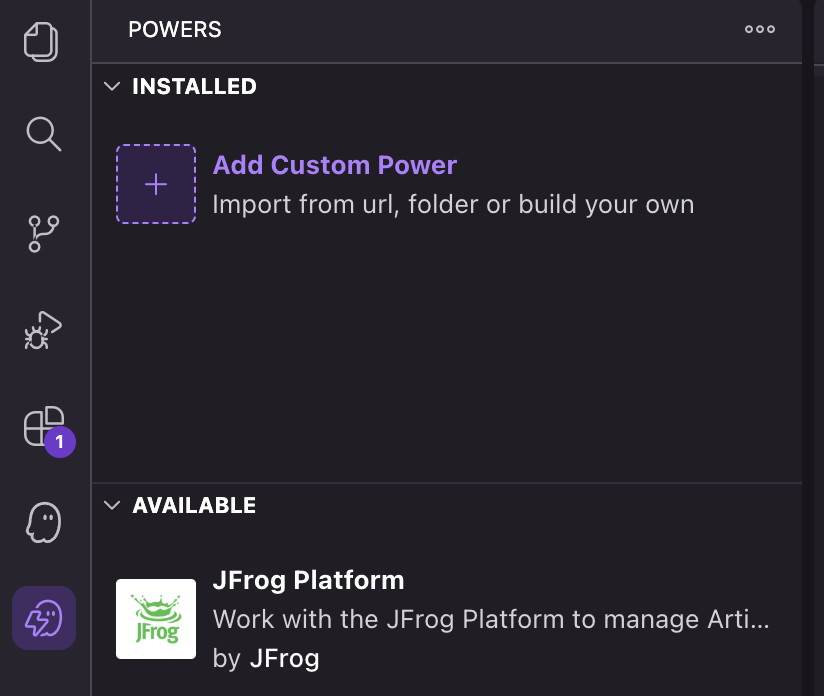
The POWERS side panel
Select the JFrog Platform power, and click the install button.
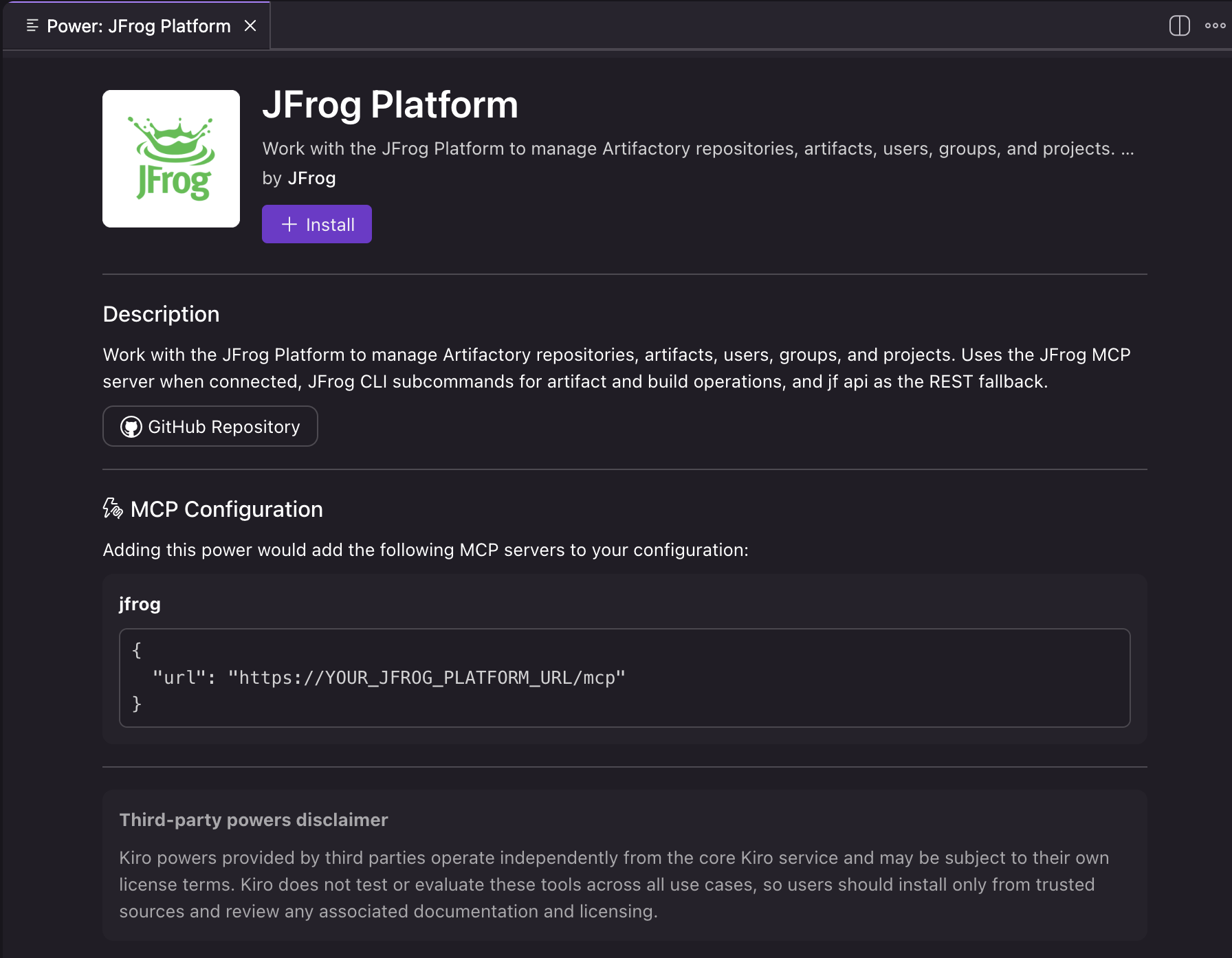
The JFrog power for Kiro panel
Once installed, select the JFrog power for Kiro from the INSTALLED powers side panel.
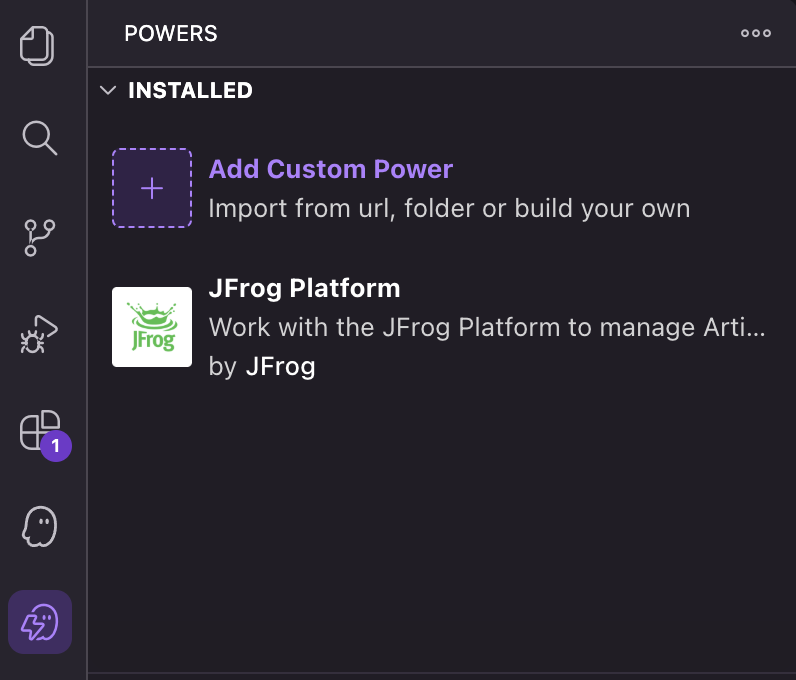
Navigate to the JFrog Platform tab, click Open powers config in the MCP Configuration section, and replace YOUR_JFROG_PLATFORM_URL with your actual JFrog Platform URL.
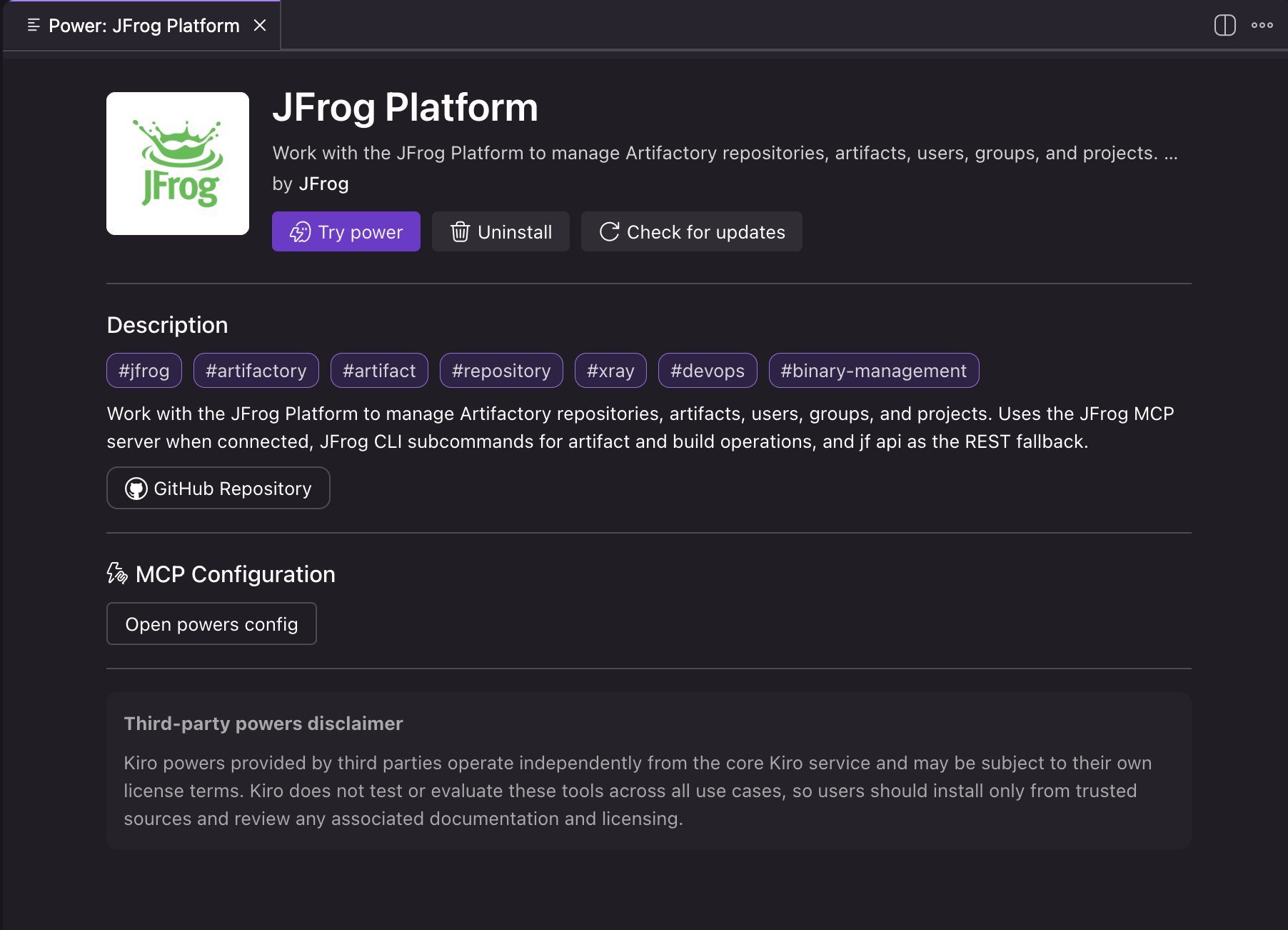
The installed JFrog power for Kiro panel
For API reference tables and troubleshooting guidance, POWER.md in the repository is the authoritative companion to this post.
For deeper API tables and troubleshooting, the repository’s POWER.md is the authoritative companion to this post.
How Credentials are Protected
The JFrog power for Kiro enforces three layers of credential and operational safety. Authentication uses browser-based OAuth, so your credentials are never stored in the power’s configuration files. CLI fallback credentials are encrypted at rest via jf config and accessed only through JFrog Platform API paths — never surfaced in the agent’s context. And as covered in the steering guardrails discussed earlier, destructive operations always require explicit confirmation before the agent proceeds.
Agentic Development Requires Governed Tools
Agentic development is only as trustworthy as the tools your agent uses. When those tools lack domain knowledge, your agent becomes a liability — generating API calls that time out, skipping governance checks, and pulling you back to the UI you were trying to avoid. The JFrog power for Kiro changes that equation.
If you use Kiro and run the JFrog Software Supply Chain Platform, installing the JFrog power for Kiro is the fastest way to give your agent correct JFrog semantics, safer search and API usage, and a governed split between MCP and JFrog CLI. You stay in the IDE. Your software supply chain stays under control.
Ready to see what governed agentic development looks like across your full software supply chain? Check out these additional resources to learn more:
Additional Resources
- Kiro Powers directory
- JFrog power for Kiro — source and issues
- JFrog MCP server setup guide
- JFrog CLI documentation
For support, open an issue on the repository or contact support@jfrog.com as noted in the project README.
Experience
JFrog Today
Discover how the JFrog Platform unites DevOps, DevSecOps and MLOps for secure, rapid software delivery.