Claude
  Cursor
  Codex
Codex  Hugging Face
  NVIDIA
  Visual Studio Code
  Devin
Devin  Kiro
Kiro  Open Code
  NanoClaw
 Docker
  npm
npm  PyPy
PyPy  Wiz
Wiz 
 Financial Services
  Gaming
  Public Sector
  Automotive
  Technology
  Healthcare


Ending the Chaos of CLI Version Drift: Introducing the JFrog CLI Control Manager

By
4 min read

In a large-scale DevOps environment, small discrepancies lead to massive headaches. You’ve likely experienced it: a script runs perfectly on a developer’s laptop but fails in the production pipeline. You spend hours hunting for the cause, only to discover a mismatch in CLI versions.
At JFrog, we know the JFrog CLI is vital to your automation, but managing it manually across thousands of users and pipelines is a hurdle that slows you down. We’re introducing the JFrog CLI Control Manager (JFCM) to eliminate that friction with intelligent, automated control.
Instead of wrestling with version drift and manual updates, JFCM ensures your environments remain consistent and predictable. It provides your team with the visibility and tools needed to maintain high-performance pipelines without the administrative overhead.
The Invisible Tax: Why Your Pipelines Fail in Silence
For most enterprise organizations, managing CLI usage at scale creates three primary pains:
- Version Drift: Different teams and CI runners use different CLI versions. This inconsistency causes intermittent build failures and “it works on my machine” syndrome, stalling release cycles.
- Debug Blindness: When a build fails, critical context is often missing. Without a record of exactly which commands and versions were executed, root cause analysis becomes a slow, manual guessing game.
- Upgrade Anxiety: Teams often delay adopting new features or security patches because they fear breaking a stable pipeline. Without a way to benchmark performance or validate changes, upgrades feel like a move into the unknown.
The Relief: How JFCM Brings Order to the CLI
JFCM acts as the “confidence engine” for your CLI operations, moving your team from manual troubleshooting to automated parity. Here’s how it alleviates the pressure on your DevOps engineers:
- Automatic Environmental Parity: JFCM eliminates version drift by using a .jfrog-version file. The moment a developer or CI runner enters a project directory, JFCM automatically switches to the required CLI version. Everyone stays synced without lifting a finger.
- A “Flight Recorder” for Every Command: The history command ends debug blindness. It tracks versions, timestamps, and commands, allowing you to replay the exact context of any failure. This visibility slashes your Mean Time to Resolution (MTTR).
- Data-Driven Upgrades: Use the benchmark and compare commands to take the guesswork out of maintenance. You can statistically analyze execution times across versions and detect output differences before rolling changes to production.
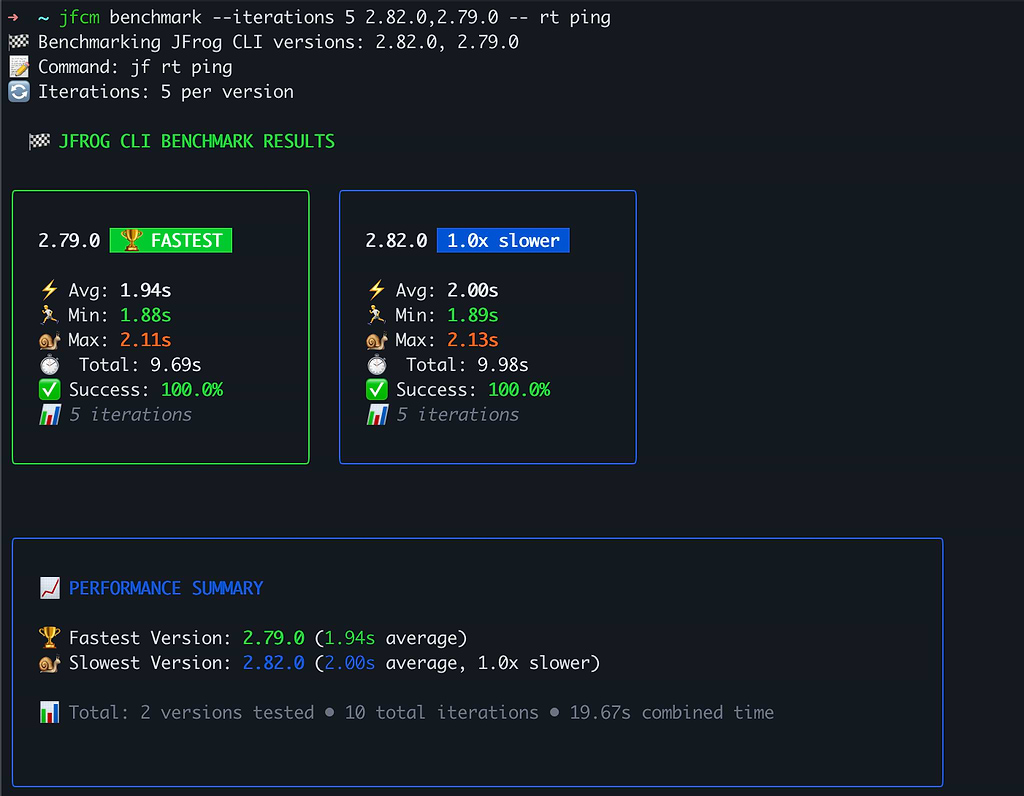 See the performance impact of various CLI versions on your pipelines
- Safe Innovation: With the link command, you can test experimental builds or custom binaries in a sandbox, safely isolated from your production environment.
This is just the beginning. Check out the full list of commands and new functionality in the JFrog CLI Control Manager documentation.
Focus on Delivery, Not Tool Maintenance
The complexity of enterprise DevOps shouldn’t be a barrier to speed. By addressing the fundamental pain of version consistency and providing deep operational visibility, the JFrog CLI Control Manager ensures your pipelines are performant and predictable. You can finally stop managing your tools and start focusing on delivering high-quality software.
Ready to simplify your CLI operations? Download the JFrog CLI Manager with one line; it auto detects your OS and Architecture:
curl -fLg "https://releases.jfrog.io/artifactory/jfcm/scripts/getCli.sh" | sh
Works on:
- macOS (Apple Silicon M1/M2/M3 — arm64)
- macOS (Intel — amd64)
- Linux (amd64, arm64, arm, 386, s390x, ppc64, ppc64le)
- Windows via Git Bash / WSL / Cygwin
- Windows native (PowerShell/cmd): use the direct binary link below.
Want to install a specific version?
curl -fLg "https://releases.jfrog.io/artifactory/jfcm/v1/0.0.15/scripts/getCli.sh" | sh -s 0.0.15
For more information, check out the JFrog CLI documentation to see how easy it is to achieve total environmental parity.
 New insights from +1,400 security & DevOps leaders. Get the Full Report.