Claude
  Cursor
  Codex
Codex  Hugging Face
  NVIDIA
  Visual Studio Code
  Devin
Devin  Kiro
Kiro  Open Code
  NanoClaw
 Docker
  npm
npm  PyPy
PyPy  Wiz
Wiz 
 Financial Services
  Gaming
  Public Sector
  Automotive
  Technology
  Healthcare


Building a Governed AI Model Supply Chain: Integrating AWS SageMaker and the JFrog Platform
AI safety is a feature. Trusted AI is the system built around it.


By
9 min read

Amazon SageMaker accelerates the process of training and deploying machine learning models. However, as AI adoption scales from individual experiments to enterprise-wide production, the focus of leading Fortune 500 software development operations and security teams must shift from pure velocity to governance.
The question is no longer just “Can we ship this model?” but “How do we manage the lifecycle of what we ship?”
If your organization struggles with versioning, access control, and multi-environment promotion, your current storage setup might be holding you back. This post explores how integrating SageMaker’s infrastructure capabilities with JFrog Artifactory creates a governed, auditable, and secure AI supply chain.
The Tension Between Speed and Governance
In a typical AI model development project, there is a disconnect between how things are built and how they are secured.
- The Developer View: You need to pull a Llama-3 model from Hugging Face, run a SageMaker training job on a p4d instance, and see if the weights improve. You don’t want to wait for a security ticket to download a model or install a library.
- The Platform View: Security teams need to know exactly what is inside that model. If you’re pulling weights from a public hub and combining them with internal data, you’re creating an artifact that needs documented attestation.
When teams try to bridge this gap using basic cloud storage, infrastructure problems emerge. Nevertheless, both operations and security agree that the main goal is to enable the developer to work at full speed while the platform automatically captures the audit trail in the background.
Why S3 Might Not Be the Best Choice for AI Artifact Management
Amazon S3, a high-performance, scalable, and secure object storage service, is excellent for high-durability storage, but it is essentially a “bit bucket.” In a standard SageMaker workflow, S3 stores your model.tar.gz. The problem arises when you try to scale that into an enterprise model registry.
- Object Awareness: To S3, a model weights file and a raw log file are the same thing: bytes. It doesn’t understand that a model has a relationship to a specific dataset or a training container.
- Metadata Limits: S3 tags are fine for billing, but they aren’t built for querying AI governance-specific questions like: “Which models used this specific version of a dataset that we just found has a data-poisoning issue?”
- The Promotion Problem: In software, you don’t just “save” code to production; you promote it from Dev to Staging to Prod after it passes tests. S3 doesn’t have a native concept of “promotion.” You end up manually moving files between buckets, which breaks the versioning chain.
The Fragmentation Problem
A production model serving an endpoint isn’t just one file. It’s a “triad” of moving parts, including:
- Weights (usually in S3)
- Inference Code/Runtime (usually a Docker image in ECR)
- Dependencies (libraries like torch or transformers pulled from PyPI)
Because these are spread across three different AWS services, your audit trail is fragmented. You have an SBOM for the container and a version for the weights, but no single “record of truth” linking them.
By centralizing the Model Triad, weights, inference code, and environment dependencies in JFrog Artifactory, you transition from simple file storage to a Production Deployment Graph. In a traditional S3-based workflow, these components are scattered across different services, making it nearly impossible to prove exactly which version of code ran which version of a model. By consolidating them into a single registry, you aren’t just managing files; you’re managing the immutable link between the model and the specific environment that runs it. This allows you to generate a combined, synchronized SBOM and AIBOM from one single source of truth.
The Multi-Environment Reality
Finally, very few organizations operate in a single unified cloud computing environment. Whether through mergers, hybrid-cloud requirements, or edge deployment needs, teams often find themselves managing models across multiple environments, such as:
- Hybrid Cloud: Training on SageMaker GPUs but deploying to on-premises Kubernetes.
- Multi-Cloud: Consolidating model registries after an acquisition across AWS, GCP, and Azure.
- Edge Deployment: Managing model updates across thousands of IoT devices via AWS Greengrass or NVIDIA Jetson.
Centralizing the “Source of Truth” in a platform-agnostic registry ensures that no matter where the artifact is used, the governance remains consistent.
The JFrog Platform as the AI Unified Governance Layer
To scale AI successfully, you must stop treating models differently from software. Integrating the JFrog Platform with SageMaker gives you a unified workflow. Data Scientists keep their velocity in SageMaker, while DevSecOps teams gain an auditable, scanned single source of truth.
This is based on three core capabilities:
1. Centralized Model Registry
Instead of scattered buckets, JFrog Artifactory acts as your central model registry. It manages model artifacts with immutable versioning and structured environment separation. When a data scientist finishes a SageMaker training job, they push the model to Artifactory, attaching rich metadata, such as hyperparameters and training metrics, directly to the artifact.
2. Curated Proxying for Hugging Face
Public repositories update constantly. JFrog Curation acts as a secure gateway and remote repository for Hugging Face teams to consume approved upstream models with built-in caching. If Hugging Face experiences an outage, your SageMaker training jobs continue running because JFrog cached the model locally.
3. Consolidated Security for SBOMs & AIBOMs
JFrog Xray automatically generates a Software Bill of Materials (SBOM) for the container and an AI Bill of Materials (AIBOM) for the model. Together, they provide a single, auditable record of the entire supply chain, blocking malicious models before they ever reach your production environment.
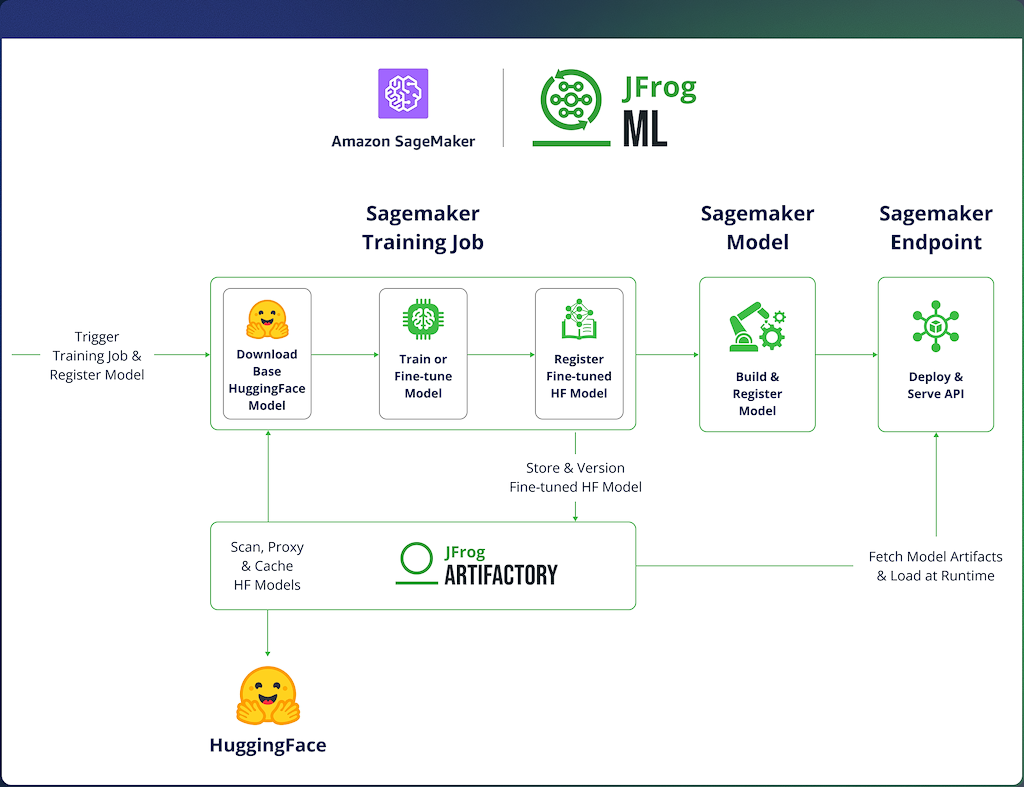
Integration Walkthrough – Orchestration, Training & Inference
Note: This excerpt is taken from a hands-on walkthrough that includes the complete implementation code. Please refer to the JFrogML Examples GitHub repository for details.
To begin with, let’s focus on two core patterns:
- Centralized Model Registry: Using Artifactory to manage model artifacts with immutable versioning and structured environment separation.
- Curated Proxying: Leveraging JFrog as a secure gateway for Hugging Face, enabling teams to consume approved upstream models with built-in caching and repeatability.
With that in mind, the integration is divided into three stages:
- Unified Model Orchestration – setting up environment configuration and externalizing secrets so that credentials are never hardcoded in your notebook or pipeline.
- Secure Model Lineage & Provenance – where the base model is pulled through Artifactory rather than directly from Hugging Face, and the resulting fine-tuned weights are registered directly to Artifactory upon completion.
- Dynamic Runtime Model Resolution – where the deployment endpoint dynamically loads a specific versioned model from Artifactory at runtime rather than pointing to a static S3 artifact.
1. Unified Model Orchestration
The workflow originates within a SageMaker environment, utilizing Secret Externalization to eliminate the risk of hardcoded credentials. By referencing AWS Secrets Manager IDs as environment variables, we establish a secure ‘contract’ that allows the notebook to authenticate dynamically during the training or inference execution.
|
2. Secure Model Lineage & Provenance
Inside the train.py script, the integration re-routes standard Hugging Face calls to Artifactory and uses the FrogML SDK to handle the output based on:
Proxied Base Model Download
By setting the HF_ENDPOINT environment variable, the Hugging Face snapshot_download logic is redirected. Instead of hitting the public Hugging Face Hub, the training job pulls the base model through an Artifactory Remote Repository. This ensures the weights are cached locally and scanned for vulnerabilities before they reach the SageMaker GPU instance.
Model weights registration via SDK
Once fine-tuning is complete, the script uses frogml.log_model. This function serializes the model weights from the container’s local memory/filesystem and pushes them directly to an Artifactory Local Repository. This bypasses SageMaker’s default behavior of depositing a generic .tar.gz into S3, ensuring the model is immediately versioned and metadata-tagged in your registry.
|
3. Dynamic Runtime Model Resolution
In a standard deployment, an endpoint often points to a static S3 URI. In our governed model, we replace that with a dynamic call to Artifactory using the InferenceSpec. This guarantees that the endpoint loads the exact, immutable version of the weights that was promoted, approved, and is currently running in end-user environments.
|
Unified Governance of Software Application and AI Artifacts with JFrog
Amazon SageMaker is an exceptional platform for experimentation, training, and managed inference. JFrog Artifactory complements it by making model consumption and distribution easy to control at scale.
Ultimately, this integration resolves the trade-off between agility and auditability: AI Engineers maintain the velocity required for innovation, while Operations and DevSecOps teams gain the comprehensive lifecycle control and visibility necessary for enterprise-grade quality and security.
This approach is an especially good fit for organizations that:
- Support multiple AI teams and need a consistent way to publish and reuse models
- Operate under security/compliance requirements and want tighter control over what enters the environment
- Run across multiple clouds, regions, or platforms, and need a reliable system of record for model artifacts
To try it yourself, start with the implementation examples in the JFrog ML Examples GitHub repo. For the framework-specific integration used in this guide, see the FrogML documentation.
For a personalized demonstration, please contact our team at your convenience.
 New insights from +1,400 security & DevOps leaders. Get the Full Report.