Claude
  Cursor
  Codex
Codex  Hugging Face
  NVIDIA
  Visual Studio Code
  Devin
Devin  Kiro
Kiro  Open Code
  NanoClaw
 Docker
  npm
npm  PyPy
PyPy  Wiz
Wiz 
 Financial Services
  Gaming
  Public Sector
  Automotive
  Technology
  Healthcare


Talk to Your Platform: Spin Up JFrog Self-Service Trials with MCP – No Human Intervention Required
How Cursor and Claude agents can run JFrog operations so you can concentrate on the results

JFrog is one of the first Software Supply Chain Management and Security Platforms to provide MCP functionality, which we have now opened up to anyone interested in trying Claude and Cursor in their own development environment.
Doing a free trial is one of the best ways to see how JFrog integrates with your developers, operations and security. Until now, the challenge has been that creating a test project with the right local, remote, and virtual repositories for Docker and Maven alone meant dozens of clicks, numerous screens, and the need to memorize mental maps of how access controls, JFrog Artifactory, and security policies fit together.
Today, that challenge no-longer exists. With JFrog’s new Model Context Protocol (MCP) enhancements you can get all the necessary jobs done directly from within your current AI coding environment.
With MCP enabled on your trial deployment, you can point Cursor, Claude Code, or other MCP-capable client at JFrog and ask for outcomes in plain language, such as: “Create a project”,” list vulnerable package versions”, ” check federated repo health”, or “ trace a release bundle to the edge”.
So whether you are looking to explore JFrog Artifactory, JFrog Xray or the broader JFrog Platform just add JFrog’s MCP Trial enabler and your agents can do the work for you to determine if JFrog is the right fit for your needs.
How do I Enable the JFrog MCP Trial Enabler?
MCP (Model Context Protocol) is an open standard for connecting AI assistants to external tools and data through a shared interface. Any compliant client can talk to any compliant server without custom plugins per integration.
JFrog’s MCP Trial enabler, is a remote MCP server hosted on your SaaS instance. After a platform admin enables it under Integrations → JFrog MCP Server, a URL such as the one below is returned::
https://<your-instance>.jfrog.io/mcp
There is nothing to install on your laptop beyond configuring your agent. The server stays current on JFrog’s side, and authentication uses OAuth through the client while avoiding potential security pitfalls such as pasting long-lived API keys into chat.
That model maps cleanly onto JFrog’s two self-service entry points the Tour and the 14-Day Trial:
| Trial type | Best suited for | MCP fit |
| Platform Tour | Guided exploration with sample data | See how agents answer real platform questions in a live environment |
| 14-Day Free Trial | Evaluation with your own repos, builds, and policies | Connect Cursor or Claude to your deployment and automate setup, security checks, and ops tasks |
Both paths require no credit card, no sales call. The addition of MCP is our way of enhancing your ability to experience the platform’s depth in the most transparent and intuitive way possible.
Cursor, Claude, and the Bigger Picture
The JFrog Platform MCP Server
The JFrog MCP Server is documented in the JFrog MCP Server tools reference. It exposes platform-native tools for repos, builds, evidence, distribution, security catalog, JFrog AppTrust, workers, and more.
- For Cursor, you can add the server in MCP settings per below:
{
  "mcpServers": {
    "jfrog": {
       "url": "<JFROG_PLATFORM_URL>/
mcp"
    }
  }
 }
Complete OAuth when prompted. From there, the agent can call any tool your user permissions allow
- For Claude Code , use the same remote URL pattern; Claude is listed among OAuth-capable clients in JFrog’s MCP server overview. Setup follows your client’s MCP configuration flow after the admin enables the integration.
- For VS Code, It is supported the same way under the mcp.servers block for teams on GitHub Copilot or other MCP-aware extensions.
What your Agent can Actually Do
You can see a full list of MCP tools here grouped by product and domain. Below is a practical guide that doesn’t include every parameter, but should be enough to inspire relevant prompts.
Access and identity
- Tokens – Create, list, and revoke access tokens
(access_tokens_create, access_tokens_list, access_tokens_revoke). - OIDC – Configure identity providers for GitHub, Azure, or generic OIDC (access_oidc_create_configuration).
- Projects – Full project lifecycle: create/update, roles, users, groups, move or share repositories (access_projects_create, access_projects_upsert_user, access_projects_move_repository_to_project, …).
- Roles & stages – Global roles and environment/stage discovery (access_roles_create_global_role, access_stages_list_global_stages).
JFrog Artifactory
- Repositories – Create, list, get, and update repos including federated and virtual layouts (artifactory_repositories_create, artifactory_repositories_list, …).
- Packages – Version lists, repo locations per version, native install commands (artifactory_packages_get_versions, artifactory_packages_get_install_instructions).
- Builds – AQL-backed build discovery, run history, full build info (artifactory_builds_list_builds, artifactory_builds_get_info).
- Federation – Health, conflicts, config sync
(artifactory_federation_get_status, artifactory_federation_update_repo_config). - Artifacts – Security summaries by path or checksum
(artifactory_artifacts_get_summary).
Distribution
- Release bundle v2 – Distribute, abort, path mapping, trackers, signing keys, edge eligibility (distribution_release_bundles_distribute, distribution_trackers_get_by_id, distribution_edges_list_for_bundle, …).
Evidence for supply chain attestations
- Search and retrieve security records – Render human-readable Markdown, prepare in-toto statements, and upload signed envelopes.
(evidence_records_search, evidence_records_prepare_statement, evidence_records_create_by_subject, …).
Security
- JFrog Catalog – CVE details, package/version vulnerability lists, public package metadata (catalog_vulnerabilities_get, catalog_packages_versions_list_vulnerabilities).
- JFrog Curation – Approved/blocked/inconclusive status for a version (curation_packages_get_status).
- JFrog Xray – Artifact security summaries (overlaps with Artifactory artifact tools).
Note: JFrog Catalog and JFrog Curation require unified/ultimate security packages on self-managed; SaaS trial entitlements follow your trial license.
JFrog AppTrust
- Application lifecycle – Applications and versions, promotion, release to PROD, rollback, lifecycle overview, activity logs
(apptrust_create_application, apptrust_promote_version, apptrust_release_version, …).
Workers
- Worker management – List and inspect JFrog Workers
(worker_list_all, worker_get_specific).
From “green-pizza” to Production Hygiene
JFrog’s own launch example is still the clearest illustration of trials with and without the JFrog MCP Server:
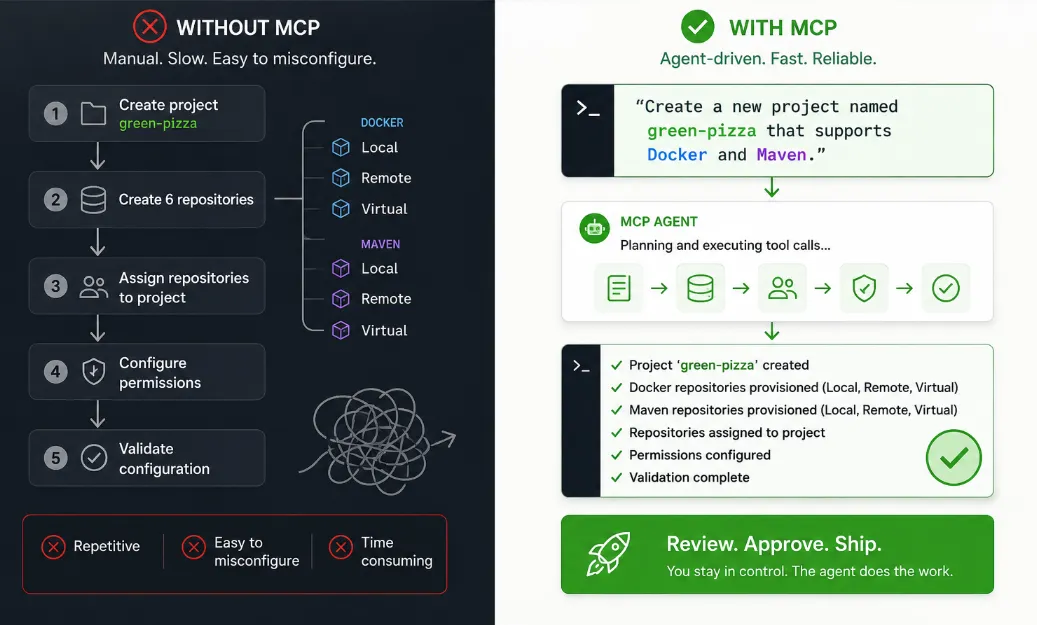
Without MCP: Create project green-pizza → six repositories (local/remote/virtual × Docker/Maven) → assign to project → permissions → validation. Powerful, but slow and easy to misconfigure.
With MCP: “Create a new project named green-pizza that supports Docker and Maven.” The agent chains the right tool calls; all you have to do is review the result.
Other prompts that can help you get the most value out of your JFrog trial:
- “List all repositories in the project demo and flag any without Xray indexing.”
- “What vulnerabilities affect log4j-core 2.14.1 according to the catalog?”
- “Show federated repositories in ERROR or DELAYED status.”
- “Get build info for my-service build number 42.”
- “Search evidence records in libs-release-local for path com/acme/widget.”
You stay in the IDE; while the platform answers with structured data the model can evaluate.
Checklist for Starting an MCP Enabled Trial
- Start a trial – Platform Tour or 14-Day Free Trial (own data, connect your stack).
- Enable the MCP server (admin) – Platform → Integrations → JFrog MCP Server → Set Up → accept beta terms → copy https://<instance>/mcp. See Enable the JFrog MCP Server.
- Wire your client – Paste the URL into Cursor, Claude, or VS Code per Add the JFrog MCP Server to an MCP Client; finish OAuth.
- Ask with intent – Name the outcome (project + package types, CVE check, build audit), not low-level REST paths; the agent selects tools.
- Skim the tool catalog – Check out the JFrog MCP Server Tools when you want to know what’s possible; the server can gain tools over time without redeploying your client.
Optional: watch the demo video from JFrog’s announcement.
Why MCP Matters for Evaluations
Previously, self-service trials answered the question: Can JFrog hold our artifacts, scan them, and fit our delivery model? Today, the real question is how JFrog can support my development operations and security requirements in the AI era.
Now that JFrog’s leading software supply chain platform is available with MCP, you can have your developers use their preferred AI coding agents, making their development experience faster, more streamlined and easier than ever, while letting the agents do the work so you can concentrate on the results.
In addition to discovering how your developers and agents benefit from the JFrog Platform, the JFrog MCP Server also provides these important advantages:
- Lower context switching – Security and package truth live in JFrog; the agent surfaces them in the editor.
- Faster time-to-value – Bootstrap repos and projects in one conversation during the trial window.
- Honest automation testing – If agent-driven setup matches how you want to run platform ops later, you’ve validated more than the UI.
- Remote, fully maintained server – Because new beta capabilities ship directly on JFrog Cloud, you always have access to the latest tool surface area without needing client updates.
We are constantly improving the JFrog MCP Server so be sure to check here for the latest information and availability.
Take Aways
Integrating MCP into the JFrog Platform and self-service trials is essential for understanding how AI coding can be deployed in your development environment. With MCP, the commands to push a container or scan a dependency can be driven from Cursor or Claude using the same vocabulary that your developers are using in production – natural language questions, tasks, and outcomes. This allows your evaluation to concentrate on results rather than wasting valuable time memorizing tabs and CLI commands.
Ready to try it? All you need to do is start a free trial, enable the JFrog MCP Server, and point your agent at /mcp. Then ask for something real: A project, a vulnerability report, or a build – and let your platform do the talking.
 New insights from +1,400 security & DevOps leaders. Get the Full Report.