Claude
  Cursor
  Codex
Codex  Hugging Face
  NVIDIA
  Visual Studio Code
  Devin
Devin  Kiro
Kiro  Open Code
  NanoClaw
 Docker
  npm
npm  PyPy
PyPy  Wiz
Wiz 
 Financial Services
  Gaming
  Public Sector
  Automotive
  Technology
  Healthcare


Giving OpenClaw The Keys to Your Kingdom? Read This First


By
9 min read

In security, we never assume perfection. We assume zero-trust, and we design controls to limit the blast radius. That mindset is missing from many OpenClaw deployments today.
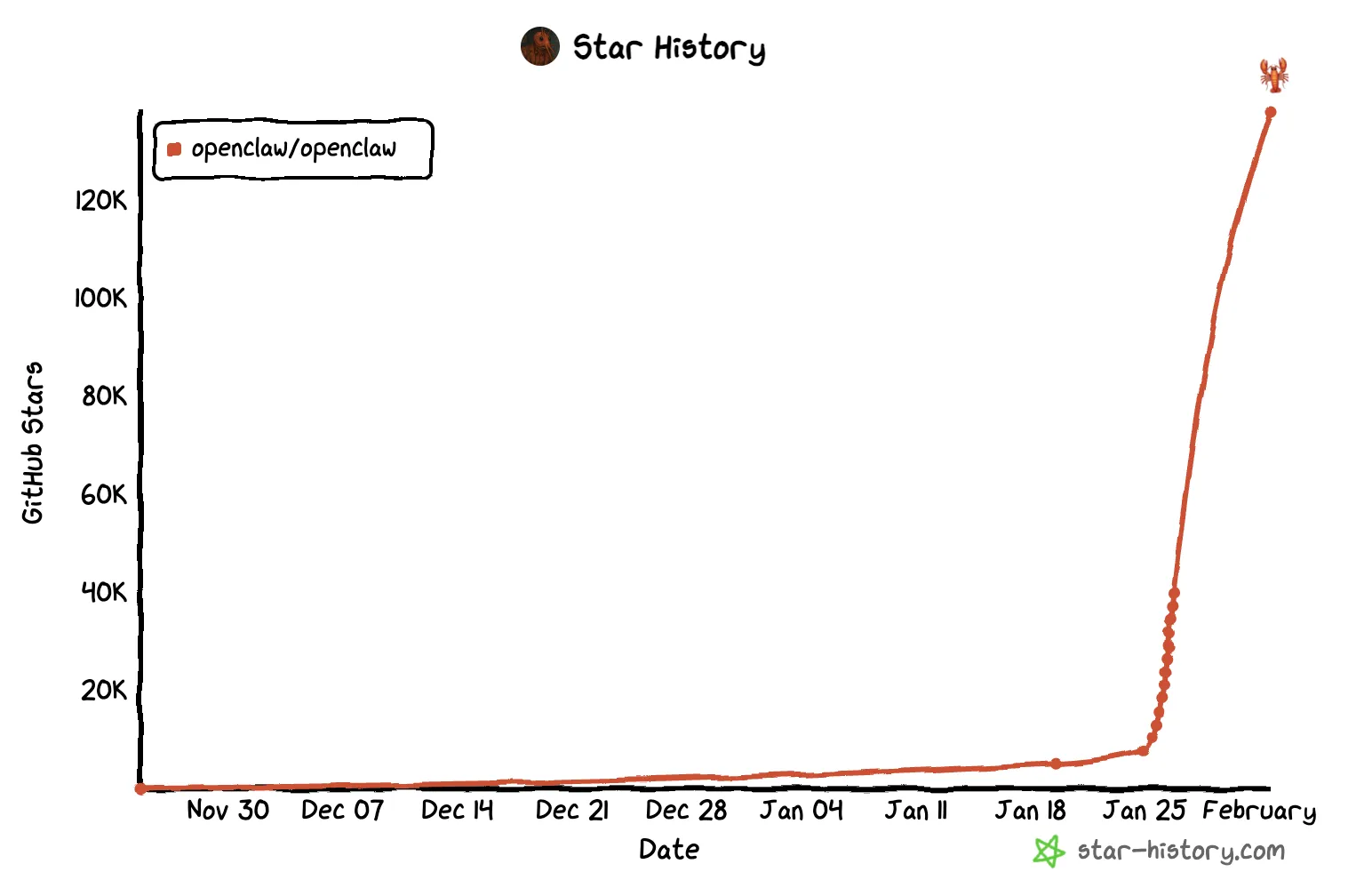
It is almost impossible not to hear about the new personal AI assistant, OpenClaw (formerly known as ClawdBot and MoltBot). Since its release in November 2025, it has taken the tech world by storm, rapidly accumulating well over 100,000 stars, tens of thousands of forks, and millions of visitors.
OpenClaw is an open agent platform that runs directly on your devices and integrates with more than 50 popular applications and services, including everyday chat platforms such as WhatsApp, Telegram, Slack, Discord, Google Chat, Signal, iMessage, Microsoft Teams, WebChat, and extended channels like BlueBubbles, Matrix, and Zalo.
With OpenClaw, an AI agent can:
- Manage your emails
- Access and edit files across your computer
- Answer Whatsapp or Slack messages or get command through those channels
- Surf the web
- And much more
However, these utilities do not come for free, you are paying OpenClaw with your own security posture. To work, the agent needs filesystem access, bash execution permissions, API keys, and network access. It is a lot to take in, and complexity comes hand-in-hand with security issues.
Peter Steinberger, OpenClaw’s creator, openly acknowledges that “security remains our top priority.” While honest, this statement quietly confirms that OpenClaw’s security model is still evolving.
The problem is – in the meantime, users are already installing it, granting it extensive permissions, and connecting it to their sensitive systems and accounts – while attackers are circling.
The Risk Is Real: Your Digital Keys Are at Stake
Installing an AI assistant like OpenClaw and granting it broad permissions is effectively handing over the keys to your digital life.
It is no different than giving the keys to your home to someone you barely know. That person might help you carry groceries today, but they could just as easily copy the key, invite others in, or leave the door unlocked without you ever noticing.
The risk is not intent alone; it is capability.
You must ask yourself:
- Do you have a safe for your most valuable possessions, or is everything left out in the open?
- How strong is that safe?
- Who can access it?
- Do you rotate the locks when keys are exposed or copied?
When users give OpenClaw access to email, files, calendars, messaging platforms, and API keys, often all at once and with no isolation, they are assuming perfect behavior from a system that is still evolving and already exposed to multiple security risks.
How does OpenClaw operate?
Before diving into the actual security risks, it is important to understand what OpenClaw actually is and how it operates under the hood.
At a high level, OpenClaw is a locally running AI agent gateway. When you install and start OpenClaw, it launches a service on your machine that acts as the brain and control plane for one or more AI agents. This service exposes a local web interface and API, usually bound to localhost on a specific port, which is how users interact with the agent.
The Local Gateway and Web Interface
When OpenClaw runs, it opens a local HTTP server that is accessible via a browser.
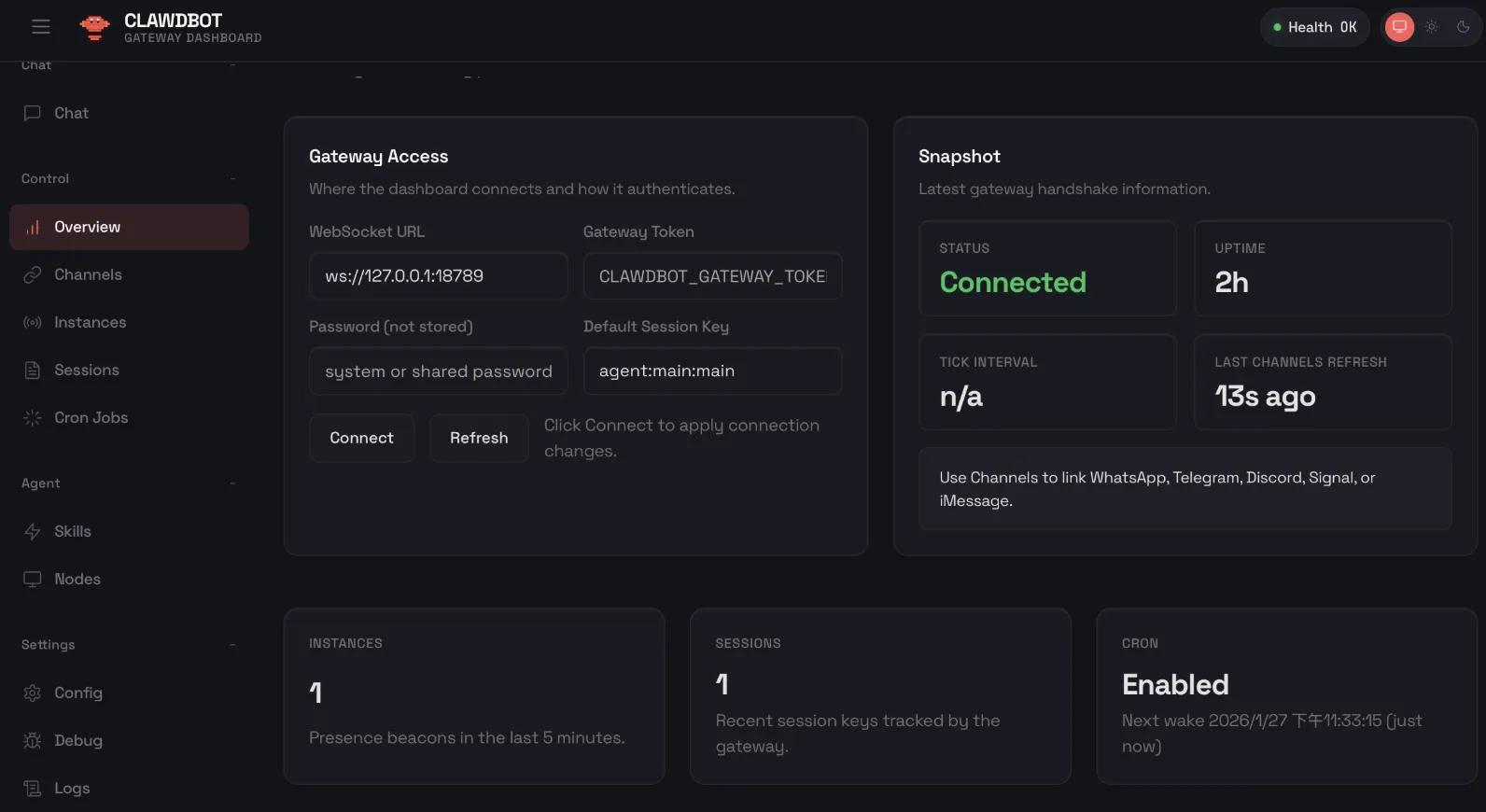
This simple dashboard masks the fact that your agents could have unrestricted access that threaten the security of your software supply chain
This web UI is more than just a chat window. It is effectively an agent control dashboard, allowing users to:
- Send natural language instructions to the agent
- Trigger actions like sending WhatsApp messages, posting to Slack, or querying APIs
- Execute tools such as file operations, code execution, or web requests
- Configure integrations and credentials
- View logs, tasks, and agent state
Behind the scenes, every message you type is translated into structured instructions that the agent processes and may turn into real-world actions.
Integrations and Permissions
OpenClaw’s power comes from its integrations. A single agent can connect to dozens of external services, including chat platforms, cloud providers, email systems, calendars, code execution environments, and more. In many deployments, agents are granted broad permissions to make these integrations “just work”.
These permissions are typically long-lived API tokens or OAuth credentials, which can be stored on local or remote configuration files as plain text, allowing the agent to act on the user’s behalf. Once granted, the agent does not distinguish between legitimate user instructions and malicious ones unless explicitly constrained.
Just a Few Days Into the Buzz, and We’ve Already Seen Exposure of Sensitive Accounts, Data and Files
Excessive Permissions and Misconfiguration
Users frequently install OpenClaw with broad access to email, cloud storage, calendars, messaging platforms, and even system-level commands. In many cases, administrative dashboards are exposed on all network interfaces with weak or no authentication, putting sensitive accounts, data, and files at risk.
When OpenClaw is properly configured, the agent is bound to the local interface and should only be accessible from the same machine. However, many users do not review or fully understand their configuration and end up exposing the agent to the entire network, or worse, directly to the internet, without any authentication.
As a result, anyone who can reach the exposed endpoint can interact with the agent and gain direct access to the hosting machine. Depending on the enabled tools and permissions, an attacker may be able to read files from the filesystem, access emails and WhatsApp conversations, extract API keys, read Slack threads, and trigger additional agent actions.
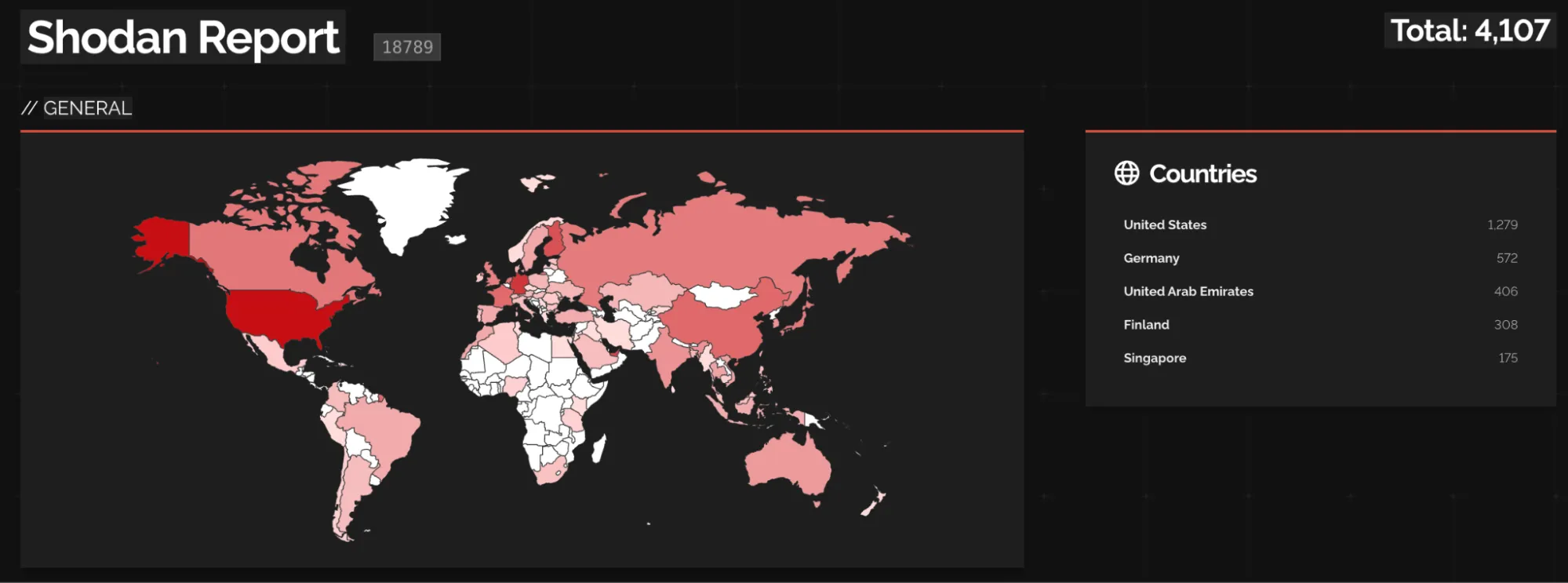
Exploiting this is not even complicated. Simply querying OpenClaw’s default port (18789) on Shodan already reveals thousands of exposed OpenClaw agents accessible over the internet, representing a significant and growing attack surface:
Supply Chain and Skill Ecosystem Risks
OpenClaw’s community-shared skill libraries and third-party extensions are largely unvetted. Malicious or vulnerable skills can request broad permissions, install malware, or exfiltrate sensitive information.
The multiple renames of the project have also created opportunities for attackers to clone domains, social media accounts, and repositories, pushing phishing, malware, or fraudulent offers. Combined, these factors make the supply chain a significant attack vector for users.
Recent examples include a VS Code extension called “ClawdBot Agent” discovered to be a trojan, which was released even though the official Clawdbot team never published a VS Code extension. Other examples were reported by Ofir Balassiano, who identified 37 malicious skills on ClawdHub linked to three distinct active campaigns.
And all of this is probably just the tip of the iceberg, as, like any AI agent, OpenClaw can run weaker models that are more susceptible to prompt injection attacks, which could influence its actions at every step.
Handle the Claw Carefully
Even though OpenClaw is powerful, you can take several practical steps to reduce risk:
- RTM & use “openclaw security audit” &: Avoid making misconfiguration mistakes, familiarize yourself with OpenClaw’s security configurations for safe Bash and tool executions, and enable Human-in-the-Loop for sensitive actions. Use OpenClaw’s built-in tool for security auditing before running the gateway, and after each configuration change.
- Limit network exposure: Always make sure OpenClaw is not exposed to the internet, better to be run only inside an isolated network. Use VPNs or Tailscale for secure external access. This section of the documentation shows how to run the Gateway locally.
- Enable authentication: Use the built-in gateway tokens or integrate with OAuth providers to enforce access controls. This section of the documentation shows how to configure Gateway Authentication properly.
- Restrict integrations: Only connect the services you need, and grant minimal permissions for each. You can restrict tools/binaries usage as described here, and here for starters.
- Be careful of malicious activity: Only use trusted and reviewed extensions and skills from official sources, watch out for malicious packages with similar names. Install only from known trusted sources.
- Monitor agent operations: Stay vigilant with logs and alerts to detect unusual behavior. Read the logging section on the official documentation, and direct the logs into your organization’s logging platform.
As always, these general steps can also help decreasing the risk from OpenClaw –
- Isolate execution: Run OpenClaw inside a VM, container, or sandboxed environment to prevent agent actions from affecting your main system.
- Rotate keys: Regularly regenerate and update API tokens and OAuth credentials.
How Can JFrog Help Secure OpenClaw?
If you are running agents in an enterprise environment, relying on individual configurations isn’t enough – you really need to secure your entire software supply chain. That’s where JFrog comes in with solutions to protect you from AI specific threats including:
- JFrog Curation: Automatically blocks suspicious or malicious 3rd party packages – including typosquatting and repackaged code – and IDE extensions, ensuring only trusted OSS artifacts and extensions enter your environment.
- JFrog AI Catalog: Provides a centralized system of record for the AI ecosystem, ensuring only explicitly allowed assets are used, by whom, and how.
- JFrog Artifactory: Acts as your secure unified registry. It stores OpenClaw binaries and Docker images, providing visibility and access control over deployed artifacts so you know exactly where agents exist in your organization.
- JFrog Xray: Continuously scans stored artifacts for vulnerabilities, sending immediate alerts if a new vulnerability (like a CVE in an agent dependency) is discovered.
Don’t let local tools become organizational risks. Schedule a demo today and see how the JFrog Platform gives you the visibility and control to secure your software supply chain in the age of AI.
 New insights from +1,400 security & DevOps leaders. Get the Full Report.