AzureML and JFrog: Securing the Model Lifecycle
Azure Machine Learning (AzureML) is a powerhouse for model experimentation and high-scale compute. However, for most organizations, the challenge isn’t building models; it’s the complex journey from a notebook to a secure, governed, and production-ready application.
When models and dependencies reside in unmanaged silos, you lose the traceability required for production. This fragmentation creates Shadow AI risks: unvetted Python packages, lack of version control, and models that might be malicious, non-compliant, or cannot be audited. To move from experimentation to enterprise execution, you need a secure, traceable path from the first line of training code to the final production model.
The Problem: When AI and Software Development Exist in Silos
Most organizations treat AI development as separate from their standard software development pipelines. AI/ML teams often pull packages and open-source models directly from public repositories (like Hugging Face) and store trained models in basic cloud storage buckets.
While convenient, these alternatives lack essential enterprise rigor:
- Security blind spots: Public packages often contain vulnerabilities or malicious code that bypasses standard CI/CD checks.
- Lack of provenance: Cloud buckets do not inherently provide the immutability or versioning needed for reliable rollbacks or “day two” operations.
- Compliance gaps: Without an AI Bill of Materials (AI-BOM), you cannot prove the origin or safety of a model during a regulatory audit.
To bridge this gap, the JFrog Software Supply Chain Platform acts as a trusted “AI Registry” for AzureML. By treating AI assets as standard software artifacts, you gain the security of a unified supply chain without slowing down experimentation.
In this guide, we’ll walk through a 4-step workflow to combine AzureML’s compute power with the security scanning capabilities to create a production-ready AI pipeline.
A 4-Step Guide to a Governed AI Pipeline
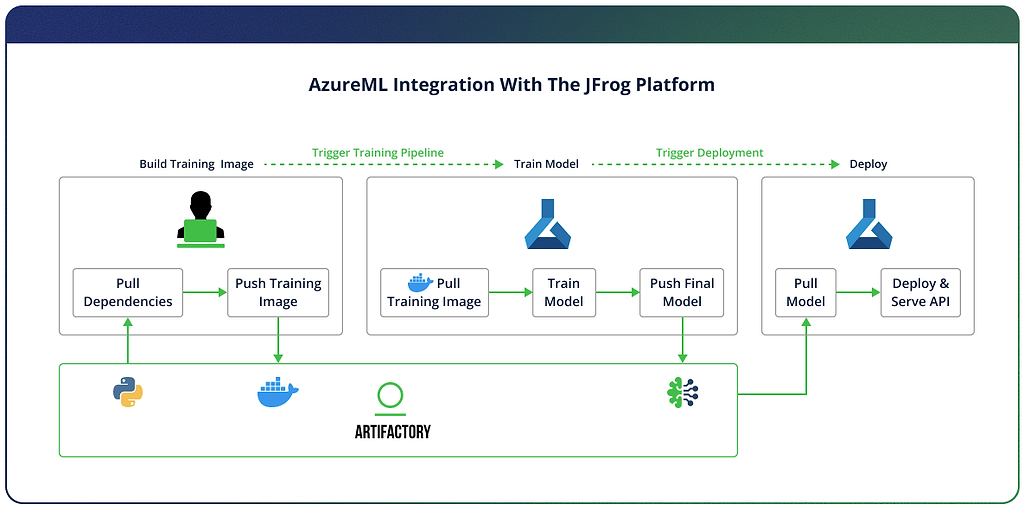
To make this integration practical, we’ll follow the lifecycle of a model with AzureML and JFrog from initial build to production deployment. This 4-step guide ensures that every binary and dependency is scanned, versioned, and immutable.
Step 1: Secure the Build Foundation
The security of an AI model starts with its dependencies. Instead of pulling Python packages directly from public repositories, which exposes you to supply chain risks, you route all requests through the JFrog Platform. This creates a secure proxy that caches and scans every package before it ever touches your training environment.
In the Build phase, add the following to your pip.conf file to ensure all your dependencies and base packages are safely pulled from Artifactory (replace with your actual values):
[global]

index-url = https://<username>:<access-token>@mycompany.jfrog.io/artifactory/api/pypi/pypi-virtual/simple

trusted-host = mycompany.jfrog.io
Continue to build your training image as usual, pushing it to Artifactory when done:
# Enable BuildKit
export DOCKER_BUILDKIT=1

# Set variables
export ARTIFACTORY_HOST=mycompany.jfrog.io
export ARTIFACTORY_DOCKER_REPO=docker-virtual
export TAG=1.0.0

# Login to Artifactory Docker registry
docker login ${ARTIFACTORY_HOST}
# Enter your JFrog username and access token when prompted

# Build and push
docker build \
  --platform linux/amd64 \
  -t ${ARTIFACTORY_HOST}/${ARTIFACTORY_DOCKER_REPO}/azureml-training:${TAG} \
  -f docker/Dockerfile \
  --secret id=pipconfig,src=${PIP_CONFIG_FILE} \
  --build-arg BASE_IMAGE="${ARTIFACTORY_HOST}/${ARTIFACTORY_DOCKER_REPO}/python:3.11-slim" \
  --push \
  .
Step 2: Trusted Training in AzureML
With your environment secured, you now instruct AzureML to run the Docker image, pulling it from Artifactory.
In the Train phase, create a connection in your training pipeline like so:
credentials = UsernamePasswordConfiguration(username=username, password=access_token) # Store credentials in KeyVault and rotate for security

ws_connection = WorkspaceConnection(
  name="JFrogArtifactory",
  target=,
  type="GenericContainerRegistry",
  credentials=credentials
)

env = Environment(
  image=docker_image # Training image will be pulled from the connection (Artifactory)
)

Step 3: Centralize Models in Artifactory
Once training is complete, the final model must enter your secure software supply chain. In the Upload phase, using the frogml SDK:
import frogml

frogml.files.log_model(
  source_path=model_path, # resulting model path from the training
  repository=ml_repo_name, # Artifactory repository where the model will be stored
  model_name=model_name,
  version=version,
  properties=properties, # key value pairs representing model metadata
  dependencies=dependencies,
  code_dir=code_dir
)
By logging the model to the JFrog Platform, you create an immutable record. Unlike loose cloud storage, the platform ensures that your model version remains exactly the same from the moment it leaves the training cluster to the moment it hits production.

Step 4: Immutable Deployment
Finally, to deploy the model, download the model required version from the Artifactory Machine Learning repository:
frogml.files.load_model(
  repository=ml_repo_name,
  model_name=model_name,
  version=version,
  target_path=target_path
)
Key Takeaways: Security by Design
By treating AI models as primary citizens within the JFrog Platform, you eliminate the friction between software and AI development.
- Full reproducibility: You know exactly which libraries, base images, and datasets went into every model version.
- Integrated security: Models are continuously and automatically scanned for vulnerabilities and license compliance throughout their entire lifecycle.
- Unified governed supply chain: Manage AI models under the same RBAC and audit policies as your standard software applications.
Conclusion: Bridge the Gap to Production
The path to production-ready AI doesn’t have to be a bottleneck. By integrating AzureML with the JFrog Platform, you provide your A/ML teams with the tools they thrive in while maintaining the security and governance practices your enterprise requires.
Ready to secure your AI supply chain? Contact us to see the integration in action or explore our interactive product tour.
 New insights from +1,400 security & DevOps leaders. Get the Full Report.