Claude
  Cursor
  Codex
Codex  Hugging Face
  NVIDIA
  Visual Studio Code
  Devin
Devin  Kiro
Kiro  Open Code
  NanoClaw
 Docker
  npm
npm  PyPy
PyPy  Wiz
Wiz 
 Financial Services
  Gaming
  Public Sector
  Automotive
  Technology
  Healthcare


Definition
Helm is a Kubernetes (K8s) package manager that standardizes deployments by bundling application resources into versioned packages called charts. This tool uses a templating engine and dynamic configuration values to render valid manifests instead of requiring operators to manage raw files individually. Ultimately, utilizing this software provides robust release lifecycle management, tracks configuration revisions directly within clusters, and enables instant rollbacks to prior stable states when bugs occur. Maintaining these structured pipelines ensures scalable, automated cloud-native application deployment.
Understanding Helm
To comprehend the utility of Helm, it is necessary to differentiate between managing raw K8s manifests and using a package manager. Helm is designed to automate the creation, packaging, configuration, and deployment of applications on K8s clusters. In a typical workflow without Helm, operators manage individual Yet Another Markup Language (YAML) files for every resource object, such as Deployments, Services, and ConfigMaps. Despite its name, YAML is technically a data serialization language rather than a true markup language.
At scale, manually managing these individual files becomes prone to human error and configuration drift. Helm addresses this by consolidating these resources into a single logical unit called a chart. This approach allows teams to deploy complex applications with a single action, ensuring that all necessary components are created with the correct configurations. Unlike tools like Kustomize, which modify manifests through overlays, Helm uses a templating engine to generate manifests dynamically based on versioned packages.
History and Evolution
The architecture of Helm has evolved significantly to meet the security requirements of enterprise environments. The project began as Helm Classic, a tool focused primarily on helping users find K8s software. The subsequent release, Helm v2, introduced a client-server model that relied on a cluster-side component called Tiller to manage installations. Tiller required elevated privileges to modify resources, which introduced security challenges regarding Role-Based Access Control (RBAC).
Helm v3 marked a major architectural shift by removing Tiller entirely. This version operates as a client-only tool that communicates directly with the K8s API using the user’s local credentials. This change improved security compliance and simplified the setup process for cluster administrators. Additionally, v3 introduced full support for OCI (Open Container Initiative) registries. Now a graduated Cloud Native Computing Foundation (CNCF) project, Helm is a cornerstone of the cloud-native ecosystem.
What are the Challenges of Helm?
While Helm is a powerful tool, it introduces specific complexities that teams must manage and which can become a barrier:
- Go templating language: While flexible, this engine is highly sensitive to whitespace and logic errors, which can make templates increasingly difficult to read and debug as configuration options grow.
- Semantic YAML errors: Mistakes in template logic can result in valid YAML that is semantically incorrect for Kubernetes, causing deployment failures that are often difficult to trace.
- Resource collisions: Conflicts occur if a chart attempts to create a resource name that is already in use or if multiple releases attempt to claim ownership of the same object.
- Namespace management: To prevent issues in multi-tenant clusters, teams must implement strict naming conventions to ensure that resources remain isolated and unique.
How Does Helm Work?
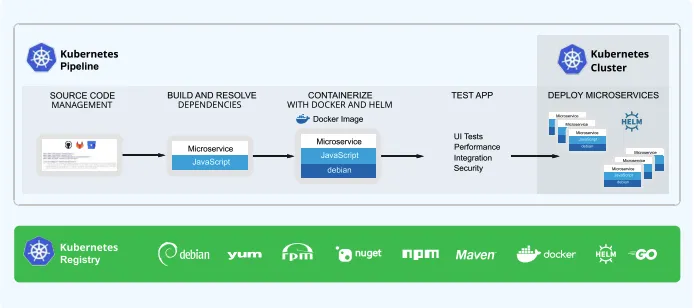
Helm functions by combining template files with configuration values to render valid K8s manifests, which are then applied to the cluster.
The Chart Structure
The core unit of Helm is the chart, a directory containing files that describe a related set of K8s resources. The Chart.yaml file serves as the manifest for the package, defining metadata such as the version, name, and description. The operational logic resides in the templates/ directory, which contains manifest files written in the Go template syntax. These templates are dynamic; when Helm installs a chart, it injects specific configuration data into these templates to generate the final YAML resources required by K8s.
Templating and Values
The template engine allows for flexible configuration management. A file named values.yaml provides the default configuration settings for a chart, such as image registries, replica counts, or service ports. Developers can override these values during installation to customize the deployment for different environments without altering the underlying chart code. This separation of configuration and logic allows a single chart to serve as the definition for development, staging, and production environments, promoting consistency.
Chart Repositories and Management
A Helm repository is an HTTP server that houses packaged charts and an index file that tracks available versions. These repositories act as the distribution layer for Helm packages.
Historically, the Kubernetes community relied on a single, centralized “official” repository. Today, the ecosystem has shifted towards a decentralized model where organizations pull from various sources:
- Community Repositories: Hosted by open-source projects (e.g., Bitnami or Prometheus) offering pre-packaged, standardized charts.
- Private Repositories: Internal servers established by organizations to host their own proprietary applications securely.
Effective chart management is a critical aspect of a secure software supply chain. A best practice for enterprise environments is curating internal repositories rather than pulling directly from the public internet. This involves proxying public community charts through a centralized platform, allowing security teams to scan and approve specific versions before they are made available to engineering teams.
Release Management
When a chart is deployed, Helm creates a release. Helm tracks the state of every release directly within the K8s cluster, maintaining a history of all revisions. This tracking capability enables advanced lifecycle management. If a new version of an application introduces a bug, operators can perform a rollback to a previous release, instantly reverting the cluster to a known good state. This mechanism provides a safety net for continuous deployment workflows.
Getting Started with Helm
Once you understand the architecture, you can begin using Helm to manage your applications via the command line. This includes essential lifecycle commands like helm install for new deployments and helm upgrade for updating existing releases.
| Category | Action / Command |
| Installation | Use package managers like Homebrew (macOS), apt/yum (Linux), or Chocolatey (Windows). |
| Setup | Add and update repositories: helm repo add and helm repo update. |
| Search | Find available software using helm search. |
| Deployment | Install your first chart using helm install <release-name> <chart>. |
| Lifecycle | Update existing releases or modify configurations using helm upgrade. |
| Memory | Inspect releases with helm list and check status with helm status. |
What are Helm Best Practices?
To ensure stability and security, organizations should adhere to established standards for chart development and maintenance. Charts should follow semantic versioning to communicate changes clearly to users. Developers are encouraged to keep templates clean and maintainable by using _helpers.tpl files to define reusable logic snippets, following the Don’t Repeat Yourself (DRY) principle. Regular maintenance of the values.yaml file, including clear comments explaining each parameter, ensures that charts remain consumable by other team members.
What are the Security Considerations with Helm?
Beyond chart signing, comprehensive Helm security considerations require attention to resource access. Securing deployments involves properly managing secrets using approaches like sealed secrets and external secret stores. Additionally, administrators must rigorously evaluate RBAC considerations to ensure that users and service accounts only have the permissions necessary to deploy their specific workloads. Implementing these supply chain security best practices is essential for maintaining a hardened enterprise environment.
Helm and the JFrog Platform
For enterprise organizations, managing Helm artifacts requires a robust registry solution. As a core component of the JFrog Platform, JFrog Artifactory, serves as a universal repository manager that supports Helm chart repositories.
By centralizing Helm charts within JFrog, teams gain control over their software assets. The platform enables the proxying of remote public repositories to ensure availability and the secure hosting of private internal charts. Integrated with CI/CD pipelines, the platform provides deep visibility into artifact lineage and security status, ensuring that deployments meet corporate governance standards.
For more information, please visit our website, take a virtual tour, or set up a one-on-one demo.