NVIDIA
  Cursor
  GitHub


 Docker
  Maven
Maven  Financial Services
  Public Sector
  Technology
  Healthcare
  Gaming
  Automotive
  Enterprise


Definition
GitOps is an operational framework where infrastructure, application configuration, and deployment workflows are managed declaratively in Git, using version control as the single source of truth. Changes flow through pull requests instead of manual pushes, allowing environments to be updated automatically through continuous reconciliation.
Overview of GitOps
GitOps applies software engineering disciplines to infrastructure and deployment. Instead of provisioning resources manually or pushing configuration updates directly into production, teams store declarative definitions for applications, clusters, and policies in Git repositories. GitOps is particularly well suited for cloud-native environments, where infrastructure is dynamic, containerized, and frequently changing. A GitOps controller continuously compares the desired state defined in Git with the actual state running in environments. When the two differ, the controller automatically reconciles the system back into alignment: deploying new releases, rolling back failures, or updating configuration without human intervention.
This approach introduces auditability and predictability into software operations. Every change becomes visible through commit history, branch policies, and pull requests, allowing teams to discuss, review, and approve updates before deployment. GitOps supports DevOps practices explored in DevOps, strengthening automation, shared ownership, and release velocity. Logging, versioning, rollbacks, and recovery all flow through Git, while deployment automation follows similar patterns used to secure code artifacts, SBOM tracking, and provenance workflows described in software supply chain content such as SBOM and software provenance.
GitOps also aligns naturally with cloud-native infrastructure, container orchestration, and microservices environments, particularly Kubernetes. Desired cluster state is declared using YAML manifests or Helm charts, and a controller synchronizes changes across development, staging, and production environments with no manual kubectl intervention.
GitOps Explained
GitOps operates through three core principles:
- Declarative Configuration: Teams describe the desired state of infrastructure and applications in files rather than running manual commands, giving every environment a consistent, version-controlled definition.
- Automated Reconciliation: Controllers watch Git repositories for changes, compare them with the live environment, and apply updates automatically. If configuration drifts due to manual edits or failure events, the system rolls itself back to match the declared state.
- Observability: Deployment history surfaces through pull requests, dashboards, CI checks, metrics, alerts, or chat notifications. Rollbacks are simple and versioned; reverting a commit restores the last known good state.
While CI handles artifact building, testing, and packaging, CD under GitOps becomes a pull-based process. Configuration updates merged into Git allow a GitOps controller to deploy changes into environments, orchestrating build, sign, and scanning workflows with policy-driven control.
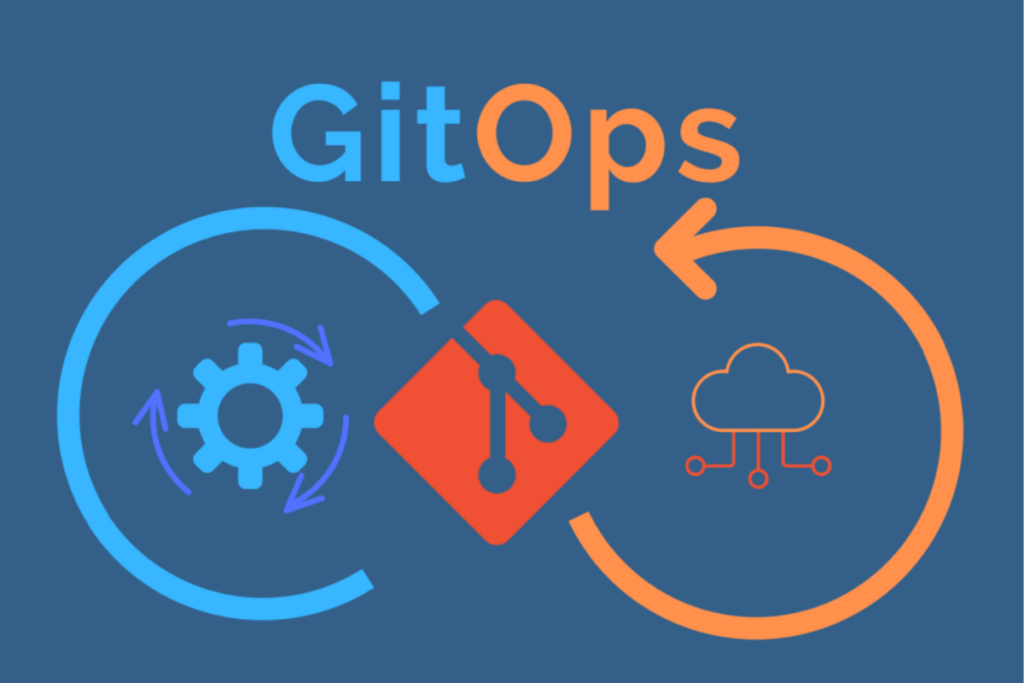
Image from ‘GitOps in 2025: From old-school updates to the modern way‘ by Robert Ross, licensed under CC BY 4.0.
Implementing GitOps in Your Team
Organizations adopting GitOps often begin by evaluating their current deployment methods. Manual pushes, snowflake servers, and inconsistent infrastructure definitions slow release frequency and create risk. Shifting to declarative configurations standardizes environments and enhances repeatability. Teams define base infrastructure, cluster resources, and release patterns using configuration repositories, each representing an environment such as development, staging, or production. A branching strategy may gate changes to sensitive environments behind approvals, code owners, or automated checks.
Introducing a GitOps controller is the next step. Tools such as Argo CD or Flux continuously monitor Git repositories and apply changes to Kubernetes when configuration files change. However, GitOps principles extend beyond Kubernetes; teams can apply these same pull-request-driven workflows to broader infrastructure provisioning using Infrastructure as Code (IaC) tools like Terraform combined with automation platforms like Atlantis. As adoption expands, teams progressively migrate environments, onboard new workloads, and transition manual changes toward pull-request driven workflows. Training and internal enablement ensure teams understand how Git flows, approvals, naming conventions, and rollback strategies align with operational governance.
Benefits of GitOps
Teams adopt GitOps to accelerate delivery speed, reduce operational risk, and unify development and operations workflows. Frequent, automated deployments make small changes safer and more routine, improving deployment frequency and reducing change failure rates. Human error decreases when manual steps are replaced by defined workflows, and issues resolve quickly through a documented rollback process that restores systems to a previous commit or tag.
Visibility increases because both code and infrastructure changes pass through pull requests. Auditors can trace decisions through commit history. Teams collaborating across time zones can understand what changed, why, and when. Disaster recovery becomes faster because environments can be recreated directly from Git definitions. Compliance improves naturally through version control, policy checks, and documented approvals.
From an infrastructure perspective, GitOps enforces consistency across development, staging, and production clusters. Instead of configuration drift accumulating quietly, reconciliation surfaces deviations immediately. New environments spin up predictably. When infrastructure or application configuration requires change, developers update configuration like code — review, test, merge, deploy. Teams gain confidence in their release pipelines and can scale systems without increasing manual overhead.
Comparisons: GitOps vs DevOps, CI/CD & Jenkins
GitOps vs DevOps
GitOps is not a replacement for DevOps. DevOps focuses on collaboration, automation, shared ownership, and continuous improvement across development and operations. GitOps is a specific operating model that implements those ideals through declarative configuration stored in Git, using pull requests, version history, and automated reconciliation as the enforcement mechanism. While DevOps encourages automation, GitOps defines how automation happens in practice. With Git as the source of truth, every environment change becomes traceable, reviewable, and repeatable.
GitOps vs CI/CD
CI/CD automates the build, test, and packaging process, while GitOps automates deployment and ongoing environment reconciliation. CI pipelines prepare artifacts and validate code quality, then store images or packages for release. In GitOps, deployment is triggered by configuration changes committed to Git, not by pushing updates directly to the cluster. A GitOps controller detects the merge and applies it automatically, continuously correcting drift if configuration deviates. CI builds software; GitOps ensures the right version is running.
GitOps vs Jenkins
Jenkins is a CI automation tool designed to build, test, and package applications, while GitOps is a deployment and operations model centered on Git as the source of truth. Jenkins pushes code forward through pipelines, but GitOps relies on pull-based reconciliation where controllers detect configuration changes in Git and deploy them automatically. Many teams use Jenkins for CI workflows, then hand off deployment to GitOps tools like Argo CD or Flux. GitOps is not a replacement for Jenkins; it governs environment state and drift correction, while Jenkins drives CI execution.
Understanding a GitOps Workflow
A GitOps workflow begins with a repository that defines the desired state for an application or environment. A CI pipeline builds and tests code, producing versioned artifacts stored and secured for deployment. A GitOps controller in the runtime environment monitors these repositories and applies changes automatically when a new configuration is merged. Observability systems track runtime conditions, surface health checks, push alerts, and route deployment results back into dashboards or pull requests.
Deployments may follow a push-based model, where CI/CD systems apply changes directly to clusters, or a pull-based model, where controllers detect changes and apply them internally. Pull-based GitOps improves security by avoiding external access into clusters, limiting change surface area, and providing greater scalability in multi-cluster environments. In both cases, Git remains the system of record.
Challenges of GitOps
Adopting GitOps requires workflow change. Teams accustomed to direct kubectl commands or manual deployments may initially resist Git-driven change management. Repository structure and ownership become critical, especially when multiple applications share clusters. Pipelines, branch rules, and YAML files introduce complexity if not documented. Visibility gaps surface when legacy tools or scripts modify environments outside Git, causing the system to reconcile constantly.
Mitigating these challenges begins with a structured rollout. Pilot projects validate patterns and help internal champions build best practices. Environment ownership must be explicit. Secrets require secure storage separate from Git, using sealed secrets, external vaults, or cloud secret stores. YAML conventions, naming strategy, and directory structure ensure consistency. Observability prevents silent failures. Authentication and access controls protect production branches. When misconfigured controllers continuously roll back manual edits, teams learn to enforce “no manual changes” and validate configurations in CI. These lessons strengthen long-term stability.
A major disadvantage of GitOps is the operational lift required to adopt it. Teams must store all configuration declaratively, restructure repositories, manage secrets securely, and eliminate manual environment changes. For organizations used to push-based or ad-hoc deployments, this represents a cultural and workflow shift that can slow early adoption until processes mature.
Best Practices for GitOps at Scale
Successful GitOps programs rely on predictable workflows, small changes, repository hygiene, and clear ownership. One repository per environment keeps the state easy to identify. Small pull requests reduce risk and accelerate review. Automated checks validate syntax, enforce policies, and scan artifacts before deployment. Protected branches require approvals for sensitive environments.
Version control becomes the mechanism for rollback and recovery. Teams revert problematic commits, and the controller restores the previous state. Documentation accelerates onboarding and reduces misconfiguration. Platform engineers maintain reusable templates for manifests, Helm charts, and pipelines. Deployment visibility is essential because dashboards, alerts, pull request status, and audit logs ensure teams understand what is deployed and where.
Getting Started with GitOps
Moving to a GitOps model is an incremental process. The steps below outline a practical path for teams transitioning away from manual, push-based deployments toward a fully declarative, automated workflow.
- Standardize Declarative Configs: Convert all manual steps into YAML or Helm charts.
- Establish Repository Structure: Use a “one repo per environment” strategy to prevent cross-environment contamination.
- Deploy a Controller: Install tools like Argo CD or Flux to monitor your repositories.
- Secure the Supply Chain: Sign and store artifacts so the controller only deploys trusted code.
By following these steps, organizations can ensure that their infrastructure is as traceable and reviewable as their application code, supporting a reliable path from local development to production.
Bringing GitOps and DevOps Delivery Together with JFrog
CI builds and validates artifacts while GitOps governs how and when they reach production. The JFrog Platform unifies artifact management, software supply chain visibility, policy enforcement, and pipeline automation so organizations can trace every deployment back to a signed, versioned build.
Whether a team manages a single cluster or hundreds, GitOps aligns development, security, and operations around a shared workflow anchored in version control. To learn more about how JFrog supports GitOps and CI/CD delivery, please visit our website, take a virtual tour, or set up a one-on-one demo at your convenience.