NVIDIA
  Cursor
  GitHub


 Docker
  Maven
Maven  Financial Services
  Public Sector
  Technology
  Healthcare
  Gaming
  Automotive
  Enterprise


Définition
Un fichier binaire est le fichier résultant de la compilation d’un code source écrit dans un langage compilé. Les fichiers binaires contiennent un code machine que le processeur d’un ordinateur peut directement exécuter. Ces fichiers ne sont pas directement lisibles ou facilement modifiables par l’homme. Ils servent d’unité de livraison fondamentale pour les logiciels, permettant aux applications de fonctionner comme prévu. Le processus de traduction d’un code de niveau supérieur dans ce format de bas niveau est le processus de compilation.
Vue d’ensemble des fichiers binaires
Le développement de logiciels consiste à transformer un code source lisible par l’homme en fichiers exécutables qu’un ordinateur peut traiter. Ces fichiers exécutés sont connus sous le nom de fichiers binaires. Comprendre la distinction et la relation entre le code source et les fichiers binaires est essentiel pour toute personne impliquée dans la chaîne d’approvisionnement logicielle, en particulier pour les professionnels qui gèrent et sécurisent les applications logicielles.
Que sont les fichiers binaires dans le monde des logiciels ?
Les fichiers binaires sont les résultats compilés et lisibles par la machine du code source, formant les composants exécutables de base de toute application. Les fichiers binaires eux-mêmes sont constitués d’instructions binaires composées de zéros et de uns que le processeur d’un ordinateur exécute directement.
Différence entre les fichiers binaires et le code source
La différence fondamentale entre le code source et les fichiers binaires réside dans leur format et leur objectif. Le code source est lisible par l’homme et contient des instructions de haut niveau basées sur des langages de programmation tels que C++, Java, Python et autres, qui définissent la logique de l’application. C’est ce que les développeurs écrivent et modifient et qui est ensuite traité par un compilateur ou un interpréteur pour créer un fichier exécutable.
En revanche, les fichiers binaires sont le résultat du code source exécutable par l’ordinateur et lisible par la machine, souvent appelé « build ». Ils représentent la version réelle et exécutable de l’application avec laquelle les utilisateurs finaux interagissent en fin de compte.
Types de fichiers binaires courants
Les fichiers binaires englobent plusieurs types de fichiers qui ont des fonctions différentes dans l’exécution et le déploiement d’une application :
- Fichiers exécutables (.exe, .bin) : il s’agit des principaux fichiers utilisés pour démarrer une application sur différents systèmes d’exploitation.
- Bibliothèques (.dll, .so, .jar) : il s’agit de modules de code compilé réutilisables qui fournissent des fonctionnalités spécifiques sur lesquelles les applications s’appuient pour fonctionner. Il s’agit souvent de dépendances externes.
- Fichiers objets (.o, .obj) : il s’agit de fichiers binaires intermédiaires générés lors de la compilation et ensuite liés entre eux pour produire le fichier exécutable final.
- Images de conteneur : ces packages de fichiers binaires complexes regroupent les fichiers binaires de l’application, ses fichiers de configuration et toutes ses dépendances, ainsi qu’un environnement système. L’adoption généralisée des conteneurs s’explique en grande partie par le passage de l’industrie d’architectures monolithiques encombrantes à des microservices agiles. Les conteneurs fournissent les environnements légers et isolés idéaux nécessaires pour développer, déployer et mettre à l’échelle ces nombreux composants indépendants.
Comment sont utilisés les fichiers binaires ?
Les fichiers binaires sont les produits transportables de l’ensemble du cycle de développement logiciel (SDLC) servant de composants essentiels et finaux nécessaires au déploiement des applications en production.
Déploiement de fichiers binaires dans les applications
La principale fonction d’un fichier binaire consiste à être déployé en production pour permettre l’accès des utilisateurs finaux. Dans les environnements de développement logiciel actuels, en particulier ceux qui reposent sur une architecture de microservices, les fichiers binaires sont souvent empaquetés dans des images de conteneurs et déployés sur des plateformes d’orchestration telles que Kubernetes.
Le processus de déploiement passe en général par un pipeline de livraison continue (en anglais, Continuous Delivery, ou CD) ou de déploiement continu (Continuous Deployment) (CI/CD), chargé d’automatiser la mise en production du package de fichiers binaires validé. Le fichier binaire lui-même contient tout le code compilé nécessaire pour que l’application fonctionne correctement sur le système cible.
Rôle des fichiers binaires dans le développement et la distribution de logiciels
Les fichiers binaires sont essentiels au maintien de l’efficacité et de l’intégrité tout au long du SDLC :
- Cohérence et portabilité : un fichier binaire est le package qui regroupe le code exécutable de l’application et ses dépendances explicites. Cela garantit un comportement cohérent de l’application dans divers environnements d’exécution, ce qui résout les problèmes de déploiement courants.
- Gestion des artefacts : en tant que types d’artefacts logiciels, les fichiers binaires sont stockés et gérés dans un Dépôt de fichiers binaires qui sert d’emplacement de stockage centralisé pour tous les résultats compilés. Il s’agit d’un élément fondamental pour une gestion efficace des packages, qui rend les composants logiciels traçables, accessibles et contrôlés par version.
- Sécurité : la sécurisation des fichiers binaires est essentielle pour la Sécurité applicative (AppSec), car un fichier binaire compromis peut introduire un code malveillant et entraîner des violations. La sécurité impose de vérifier l’intégrité et de valider la provenance de chaque fichier binaire pour s’assurer qu’il provient de sources sûres et fiables.
Exemples d’utilisation de fichiers binaires dans divers langages de programmation
Le format dans lequel les fichiers binaires apparaissent varie en fonction du langage de programmation et de l’environnement d’exécution prévu :
- Java : le résultat est généralement un fichier .jar, qui est une archive compressée contenant du bytecode Java compilé (fichiers .class). Ce bytecode est ensuite interprété par la machine virtuelle Java (JVM).
- C/C++/Go : ces langages sont compilés directement en code machine natif exécutable (par ex., des fichiers .exe sous Windows ou des fichiers ELF sous Linux) par un compilateur.
- nET : les packages sont souvent distribués sous forme de packages NuGet, qui sont des fichiers compressés contenant des assemblies .dll compilées et les métadonnées associées.
- Conteneurs : une image de conteneur Docker est un artefact binaire robuste qui regroupe les fichiers binaires compilés de l’application, toutes les dépendances et les configurations essentielles, ce qui lui permet de fonctionner de manière fiable sur n’importe quel système doté d’un moteur d’exécution de conteneur.
Comment gérer les fichiers binaires
Une gestion efficace des fichiers binaires est primordiale pour les pratiques modernes de DevOps et de sécurité. Cela nécessite des outils spécialisés et des procédures rigoureuses pour maintenir la sécurité, la cohérence des versions et une livraison efficace des logiciels.
Voici quelques bonnes pratiques pour le stockage et la gestion des versions des fichiers binaires, qui sont essentielles à la fois pour la sécurité et l’efficacité opérationnelle :
- Source unique de vérité : cet aspect est essentiel, car il garantit que toutes les équipes de développement et tous les pipelines de déploiement utilisent les versions définitives et approuvées des artefacts logiciels. Cela élimine toute ambiguïté quant à la version d’un fichier binaire qui est actuelle et correcte.
- Dépôt centralisé : tous les fichiers binaires et artefacts connexes doivent être stockés dans un dépôt d’artefacts logiciels centralisé, tel qu’un gestionnaire de dépôts de fichiers binaires, plutôt que dans un système de contrôle du code source. Cela permet de disposer d’un dépôt unique et faisant autorité pour toutes les versions, évitant ainsi les conflits et les dérives.
- Libérations immuables : une fois qu’un fichier binaire est construit, testé et promu pour la mise en production, il doit être considéré comme immuable. Toute modification nécessaire requiert un nouveau build et une nouvelle version unique afin de garantir la cohérence et la traçabilité.
- Métadonnées complètes : des métadonnées détaillées doivent être capturées avec chaque fichier binaire, le reliant au code source exact, au développeur, aux paramètres de build et à la liste complète des dépendances. Cette provenance est essentielle pour la conformité et la gestion des vulnérabilités.
- Analyse de sécurité : chaque fichier binaire doit être soumis à une analyse des vulnérabilités via l’analyse de la composition logicielle (SCA), afin d’identifier les risques connus dans les composants tiers et open source avant toute promotion ou distribution.
Outils et solutions pour la gestion des fichiers binaires
Des outils spécialisés automatisent le processus de gestion des fichiers binaires tout au long du SDLC. Une gestion efficace des fichiers binaires a un impact considérable sur la rapidité, la qualité et la sécurité de l’ensemble du processus de livraison des logiciels :
- Sécurité renforcée : la centralisation et l’analyse des fichiers binaires empêchent l’utilisation de composants vulnérables et contribuent à la sécurité applicative (AppSec) en garantissant que les contrôles de sécurité s’effectuent sur l’artefact compilé définitif.
- Amélioration de la reproductibilité et de la traçabilité : le stockage de fichiers binaires versionnés et de métadonnées complètes garantit que le logiciel exact qui a passé les tests peut être répliqué et déployé de manière fiable, ce qui simplifie considérablement le dépannage.
- Déploiement plus rapide : les dépôts centralisés et la gestion automatisée rationalisent le processus d’intégration et de livraison continues, éliminant les retards associés à une gestion fragmentée des artefacts et garantissant des versions continues et de haute qualité.
Comment JFrog intègre les fichiers binaires dans une chaîne d’approvisionnement logicielle fiable
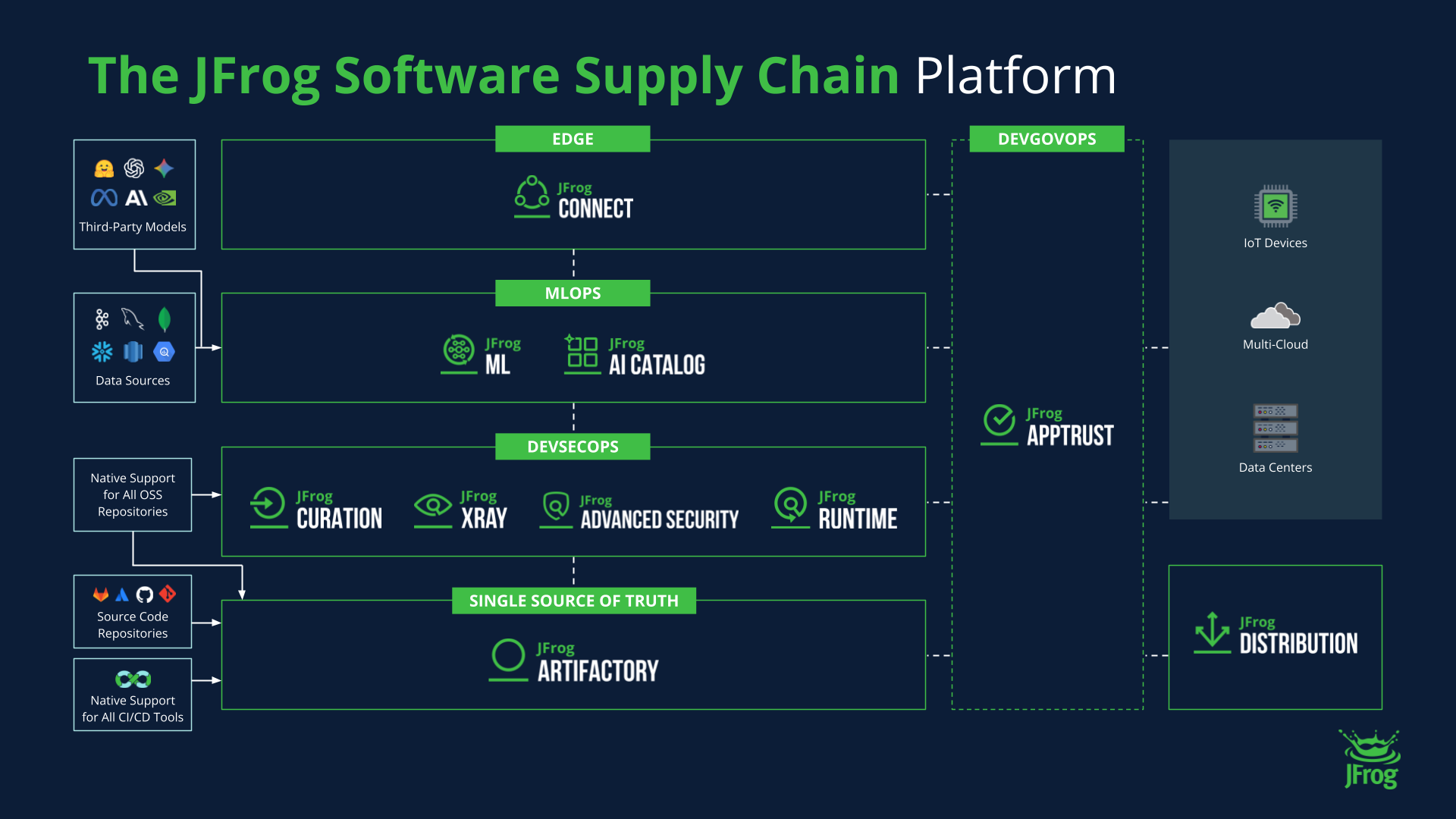 La plateforme JFrog gère et sécurise les fichiers binaires et sert de source unique de vérité pour tous les artefacts logiciels
Le véritable défi pour les professionnels DevOps d’aujourd’hui est de gérer le volume et la complexité sans cesse croissants des fichiers binaires et de leurs dépendances open source tout en maintenant des cycles de publication rapides. Si ces fichiers binaires ne sont pas contrôlés de manière centralisée et analysés en permanence, les entreprises sont confrontées à d’énormes risques opérationnels et à des vulnérabilités potentielles en matière de sécurité.
La gestion et la sécurité des fichiers binaires sont au cœur de la plateforme JFrog.
La plateforme JFrog répond à cette problématique en proposant une approche unifiée de l’ensemble de la chaîne d’approvisionnement logicielle. JFrog Artifactory, le gestionnaire universel de dépôts de fichiers binaires, sert de source unique et centrale de vérité pour tous les binaires et les packages, éliminant ainsi les dépôts chaotiques et fragmentés.
JFrog apporte de la valeur en permettant :
- Une gestion universelle des artefacts : Artifactory prend en charge l’ensemble des formats de packages majeurs et fournit aux développeurs un point d’accès unifié pour la résolution des dépendances.
- Une sécurité intégrée des binaires : JFrog Xray s’intègre nativement pour effectuer une analyse de la composition logicielle (SCA) approfondie et récursive directement sur les fichiers binaires et leurs dépendances transitives, permettant ainsi de mettre en œuvre une approche Shift left au plus tôt dans le processus de développement.
- Provenance et traçabilité complètes : la plateforme capture des métadonnées granulaires, permettant aux organisations de générer une nomenclature logicielle (SBOM) complète et d’assurer la traçabilité de chaque fichier binaire ; indispensable pour une réponse rapide aux incidents de sécurité et pour la conformité.
Pour en savoir plus sur la manière de reprendre le contrôle de vos fichiers binaires, vous pouvez effectuer une visite virtuelle, ou organiser une démonstration ou un essai gratuit à votre convenance.