Claude
 Cursor
 Codex
 Hugging Face
 NVIDIA
 Visual Studio Code
 Devin
 Kiro
 Open Code
 NanoClaw

 Docker
 npm
 PyPy
 Wiz

 Financial Services
 Gaming
 Public Sector
 Automotive
 Technology
 Healthcare


Introducing JFrog Threat Hub: Turning Vulnerability Intelligence into Blast Radius Analysis

By
8 min read

A new supply chain attack hits the news. A CVE with a dramatic name starts trending. A malicious package turns up in npm, PyPI, and Hugging Face. Within minutes, your Slack channels fill up, your CISO wants an update, and someone asks the question every DevSecOps professional dreads:
“How are we affected?”
Providing a definitive answer should be simple. In practice it often takes hours, and sometimes even days to get the complete picture.
The pain: awareness is easy, blast radius is hard
Security teams are not short on information. Advisories, research blogs, vendor bulletins, social media threads, and mailing lists all announce new threats faster than anyone can read them. The challenging part is leveraging that information to understand how it affects your particular environment.
Until now, that process usually looked something like this:
- Separating the signal from the noise. Relevant intelligence is scattered across dozens of sources. Some of it is vetted, some of it is speculation, and some of it is a repost of a repost. Someone has to read it, judge its credibility, and decide whether it deserves attention.
- Translating general threats into actionable responses. A blog post describes an attack. It doesn’t hand you a clean list of the affected packages and versions. Someone has to extract the package names, version ranges, and CVE identifiers, and hope nothing was missed.
- Figuring out where affected components are hiding. Today, software applications are assembled from many open-source components. Unfortunately, the vulnerability that was just discovered is rarely a direct dependency. It’s usually buried several layers deep in a transitive dependency which is part of a Docker image, or sitting in a build from last quarter. Your artifacts are spread across multiple repositories, projects, teams, and pipelines, making it difficult to identify all the affected components across the entire software supply chain.
- Stitching together a holistic view from disparate tools. One tool tracks vulnerabilities, another tracks builds, and a spreadsheet maps services to owners. Correlating these sources manually is a slow and error-prone process, especially in the middle of a high profile security incident where nobody has the time to do it.
- Prioritizing remediation with imperfect data. Published severity scores don’t always match real-world exploitability. A “medium” on paper can be easy to exploit in the wild, while a “critical” threat may not be relevant to your environment. Without context analysis, teams either over-react or under-react because they lack the proper information.
All of the above happens while the clock is ticking. The window between disclosure and exploitation keeps shrinking, and every hour spent hunting for an answer is another hour attackers can use to exploit weaknesses in your application. The real cost is often not the vulnerability itself but the time it takes to figure out the most effective strategy for defending against it.
Meet JFrog Threat Hub: taking you from “what happened?” to “what’s affected?” in a single unified interface
JFrog Threat Hub is designed to close the gap. It brings both publicly published security research and JFrog’s own threat intelligence directly into the JFrog Platform, to help determine how it affects your development environment.
What is JFrog Threat Hub?
JFrog Threat Hub is a detailed threat intelligence dashboard accessed from within JFrog Xray. It includes a daily-updated feed of vetted posts about new attacks, CVEs, and malicious packages. Most of the security intelligence is based on reports from the JFrog Security Research team, which monitors public registries such as npm, PyPI, and Hugging Face, runs automated scanners on every new and updated package, and analyzes CVEs for real-world exploitability. Relevant external advisories are also included in the feed.
Each post includes the name of the source, publish date, CVSS score, and descriptive tags, along with a public label that groups the affected packages and versions. A severity mismatch indicator flags cases where JFrog’s research rates a threat differently from its published score, so teams can prioritize by actual, rather than perceived, risk.
One of the most important features is the Check Impact button. With one click, it runs an impact search across your organization and lists every affected artifact, along with its repository, vulnerable component version, scan date, and runtime status. Teams can export these results, set Xray policies, or move straight into triage and remediation all within a single unified platform.
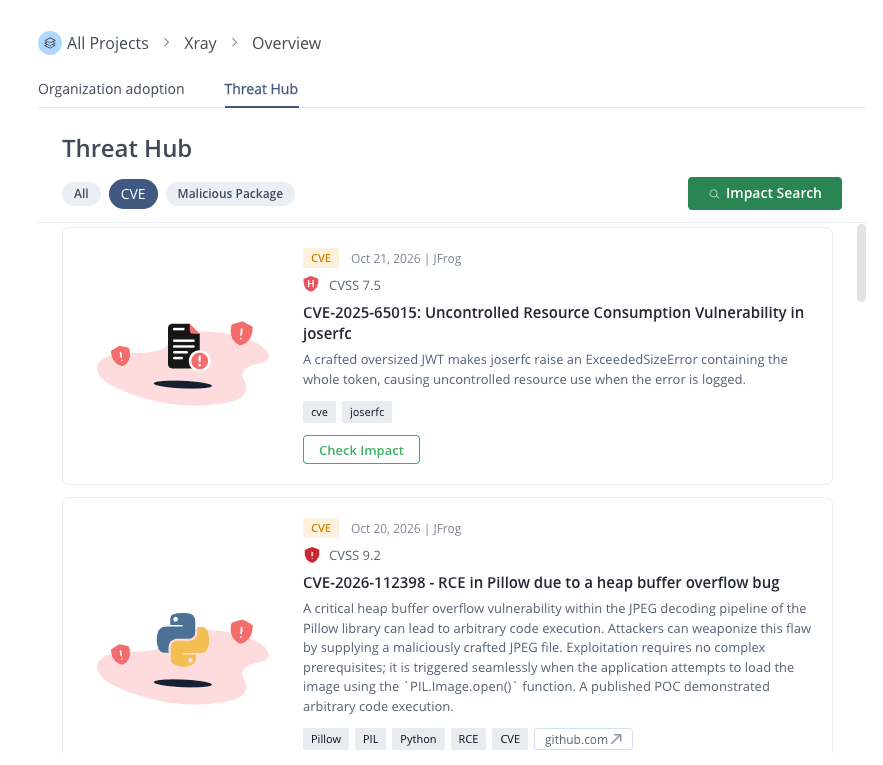 Threat Hub includes updated CVE advisories and impact search across the entire supply chain
Instead of reading about an attack in one place and searching for exposure in another, Threat Hub brings both steps into one seamless workflow. It not only provides early awareness, but also helps map out the true blast radius, taking you directly from reading about a threat to understanding your exact exposure.
Curated intelligence, delivered where you already work
Threat Hub consolidates security posts about new attacks, CVEs, and malicious packages, updates it daily, and then sorts it according to customer preference. In addition, intelligence from the JFrog Security Research Team is integrated as well, including:
- Continuous monitoring of open-source repositories such as npm, PyPI, and Hugging Face for the latest security issues
- Running automated scanners across new and updated packages
- Deeply investigating suspicious findings
- Analyzing new and existing CVEs for real-world exploitability
- Disclosing newly discovered malware to repository maintainers
For our customers, this means original, vetted research sits alongside the external advisories that matter, without the noise of an open-ended news feed. Each post shows its source, publish date, and tags such as which ecosystems are affected. When a post is tied to a known attack, it applies a label that puts together groups of affected packages and versions, and may link to a fix or advisory.
Just one click to gauge CVE impact
When working from the JFrog Xray interface, the Threat Hub dashboard can be accessed by selecting Xray > Overview. One of the most powerful features of the Threat Hub console is the “Check Impact” button. Click it, and Threat Hub opens an Impact Search specifically for your organization. If you are affected, it shows the matching artifacts and their scan dates, so you can see where the problem lives across your scanned artifacts and decide what to fix first.
For supported CVE and malicious package posts, there’s no manual extraction of package names, no custom queries, and no stitching together results from separate tools. The research and the results are presented side by side.
CVE Severity you can act on
Published scores don’t always tell the whole story, so some posts also show a Severity Mismatch Indicator when JFrog Security Research’s assessment differs from the severity of a publicly available CVE or advisory. JFrog’s research severity reflects real-world exploitability and impact, not just the published score, which gives you the context you need when prioritizing your remediation strategy.
What this changes for your team
Operations and Security teams gain these important advantages:
- Faster incident scoping. The question “How are we affected?” can get an answer faster, with less cross-tool detective work.
- Less context switching. Reading the research, understanding the impact, and identifying affected artifacts all happen in one centralized interface.
- Improved prioritization. Vetted research and severity context from JFrog’s own researchers helps focus on the threats that are more likely to be exploitable.
- More precise communications. When leadership asks for a status update, you can present them with the specific affected artifacts and scan dates instead of “we’re still looking.”
See JFrog Threat Hub in action
The next major supply chain attack is a question of when, not if. When it arrives, the teams that respond best won’t be the ones who read the most blog posts. They’ll be the ones who can understand how a specific threat affects their particular environment in the fastest way possible.
Learn more about JFrog Security and see how you can shorten the path from “What happened?” to “How are we affected” by scheduling a demo with one of our domain experts.
 New insights from +1,400 security & DevOps leaders. Get the Full Report.