Claude
 Cursor
 Codex
 Hugging Face
 NVIDIA
 Visual Studio Code
 Devin
 Kiro
 Open Code
 NanoClaw

 Docker
 npm
 PyPy
 Wiz

 Financial Services
 Gaming
 Public Sector
 Automotive
 Technology
 Healthcare


The Token Cost of Shell Commands
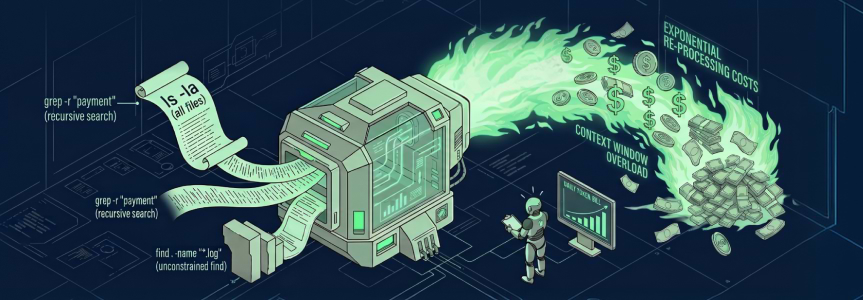
You asked your AI coding agent to debug a simple test failure, and it somehow ended up recursively reading your entire .git/objects history. If your API bills are climbing while your agent seemingly just browses your codebase, you aren’t alone.
Developers often blame the LLM model choice or a poorly written system prompt. But the real budget killer is input context. Your agent isn’t paying to think, it’s paying to re-read a 4,000-line grep output it already understood six turns ago. The biggest culprits are everyday shell commands developers have used for decades without a second thought.
Why Do Shell Commands Break AI Agent Budgets?
Shell commands like ls, find, and grep were built for humans, and human brains filter out terminal noise automatically to find the one line that matters. AI coding agents don’t have that filter. They process raw terminal output as billable context. Even if an agent later summarizes its history, the initial ingestion of these massive, unfiltered outputs causes severe token spikes.
As autonomous coding agents move from simple autocomplete into planning and executing multi-step workflows over a terminal, they call these commands again and again. Each call adds tokens that build up rapidly until the session ends or the agent compacts its history. The gap between a human skimming an output and an agent absorbing every character of it is where your budget gets burned.
The three everyday culprits
Alongside verbose test logs, these three ordinary shell commands are frequent sources of the runaway costs that agentic workflows can rack up. Recognizing them is the first step toward controlling them.
ls, the directory dump: An agent asks what’s in a directory and runsls -la. In a small folder, that’s harmless. In the root of a monorepo, that single command can dump tens of thousands of tokens of permissions, timestamps, file sizes, and hidden files nobody asked for.find, the infinite tree: Asked “where is the database configuration?”, an agent runsfind . -name "*.yaml". Without depth limits, find recursively walks every hidden folder, cache directory, and build artifact path it can reach.grep, the context killer: An agent hunting for a function call runsgrep -r "processPayment". Left unconstrained, it can return minified JavaScript, binary garbage, and endless test-mock data. Worse, if it matches a 10,000-character line in a generated JSON file, that entire line lands in the prompt.
Each of these commands is safe in isolation and expensive at scale, which is exactly why they slip past code review unnoticed.
Why Doesn’t Blind Truncation Fix the Problem?
Blindly truncating shell output (i.e. just capping every command at 1,000 tokens) sounds like a quick fix, but it quietly breaks the agent’s ability to reason about what it’s looking at.
If you silently truncate a grep output, the agent may not know it received partial results. It may assumes the results don’t exist. From there, it can guess, hallucinate, or spiral. In our internal testing, agents re-ran the same ls command up to six times trying to re-establish where they were in the filesystem.
An optimizer the agent can’t detect is an optimizer you can’t debug. Any compression layer you build has to tell the agent what it’s not seeing, or you’ve traded a cost problem for a correctness problem. This is the exact failure mode a token-compression tool like JFrog Boost is built to avoid. It compresses output and tells the agent when it has done so, so the agent can request the full output.
The Snowball Effect: How One Bad Command Multiplies
This is the most easily missed cost in agentic workflows: a bad command isn’t paid for once. Because of how multi-turn LLM conversations typically work, prior turns’ tokens are resent with each new message until the session ends, the agent compacts its history, or the session hits its context limit.
That resend behavior turns small waste into compounding waste. The value of trimming a command’s output isn’t just the tokens you cut, it’s those tokens multiplied by the number of turns they would otherwise have sat in context. For instance, a 3,000-token log removed at turn four of a 40-turn session isn’t a 3,000-token saving.Before prompt caching or history compaction, it’s more than 100,000 input tokens avoided over the life of that session.
| Scenario | Tokens removed once | Turns remaining in session | Cumulative tokens saved |
| Trim at turn 4 of 40 | 3,000 | 36 | ~108,000 |
| Trim at turn 20 of 40 | 3,000 | 20 | ~60,000 |
| Trim at turn 38 of 40 | 3,000 | 2 | ~6,000 |
Illustrative calculation. Assumes no prompt caching or history compaction.
The earlier a command’s output gets optimized, the more that optimization is worth because it avoids being re-processed on every subsequent turn, not just the current one. Note: Prompt caching can reduce some re-processing costs, but cache lifetimes and discounts vary by provider and model, and cached tokens are still billed. In our view, caching complements output optimization rather than replacing it.
At list prices as of October 2026, 100,000 input tokens cost roughly $0.15 to $0.30 on models such as GPT-5 or Claude Sonnet 5, before caching or batch discounts. That sounds cheap until it repeats. If each of 50 daily debugging sessions wastes about 100,000 input tokens on noise, that adds up to roughly $200 to $300 a month at those rates. Suddenly, a team is burning hundreds of dollars a month letting an AI agent stare at hidden cache directories.
Key insight: Saving 2,000 tokens on an early grep command can save far more than the same cut late in the session, because those 2,000 tokens would otherwise be re-processed on every later turn.
How Can You Stop Shell Commands from Draining Your Token Budget?
If you’re building agentic workflows, MCP servers, or custom developer tools, you need an optimization layer that trims noise without blinding the LLM to what it’s missing. JFrog Boost, a free CLI wrapper currently in public preview, is built around four rules for optimization that any team can adopt even without the tool itself.
- Force constraints by default. Where your agent setup allows it, route shell commands through wrapped versions instead of raw commands. Expose wrapped versions or aliases that enforce limits automatically — a safe
lsthat forcesls -1(names only) instead ofls -la, and a safefindthat enforces depth limits, such asfind . -maxdepth 2 -name "*.ts". - Tell the agent what you filtered. If a 10,000-line log has to be truncated, don’t do it silently. Append a system message to the output so the agent knows a summary, not the full picture, is in front of it.
- Provide a recovery hatch. Give the agent a specific tool, such as
cat_full_file <path>, so it can explicitly request the dropped data instead of hallucinating an answer. - Instrument the recovery path. Track how often the agent actually uses that recovery hatch. In our view, your retrieve rate is a better measure of a tool’s usability than your compression ratio alone.
Applying these rules consistently helps keep an agent’s context lean without leaving it guessing about what it can’t see.
Building a Safer Tool Wrapper That Reduces Injection Risk
To make this concrete, let’s look at how to implement Rule 1 (forcing safe constraints). Instead of letting the AI agent execute grep directly on your operating system, we create a Python function that acts as a “wrapper” around the command.
This wrapper intercepts the agent’s request, makes the command safe, runs it, and then filters the output before sending it back to the LLM. Here’s how JFrog Boost and similar tools build these baseline patterns, broken down step-by-step:
Step 1: Pass the Command Arguments as a List. First, we construct the command. Instead of passing a single string to the shell (which can expose you to command injection), we pass a list of separate arguments. We also force grep to ignore notorious token-wasting directories like .git and node_modules.
import subprocess

def safe_grep(search_term: str, directory: str = "."):
""""Illustrative agent tool for searching a codebase with output limits."""
# 1. Passing arguments as a list (no shell) reduces command-injection risk
cmd = [
"grep", "-r", "-n", "-I",
"--exclude-dir=.git", "--exclude-dir=node_modules", "--exclude-dir=dist",
"-e", search_term, "--", directory,
]
Step 2: Execute Safely and Capture Output. Next, we run the command. We explicitly set check=False so that if grep finds nothing (which returns a non-zero exit code), it simply returns an empty string rather than crashing our entire agent loop.
try:
       # 2. Execute without shell=True
       result = subprocess.run(cmd, capture_output=True, text=True, check=False)
       output = result.stdout
Step 3: Enforce Limits and Add the Recovery Hatch. Finally, we check the length of the output. If it exceeds our token limit (roughly 8,000 characters), we truncate it. Crucially, we append a [System] note directly to the output. This tells the LLM exactly what happened and gives it the exact tool command (cat_file) it needs to use if it genuinely needs to read the rest of the file.
# 3. Token limit safeguard (~2000 tokens)
       char_limit = 8000
       if len(output) > char_limit:
           truncated_output = output[:char_limit]
           # 4. Tell the agent what happened and provide the recovery hatch
           return (
               f"{truncated_output}\n\n"
               "[System: Output truncated. Use `cat_file` for specific files.]"
           )
       return output
   except Exception as e:
       return f"[System Error: {str(e)}]"
This wrapper passes arguments as a list instead of a shell string, which reduces shell command-injection risk, and it pairs each truncation with an explicit note the agent can act on. Production versions should also limit which paths the agent can search and run with the least privileges needed. An agent’s outputs are only as trustworthy and cost-effective as what it’s allowed to consume; don’t let a stray shell command break that trust.
How JFrog Boost Helps: Build and Scale Agents with Confidence
Manually wrapping every shell command is a reasonable starting point, but it doesn’t scale across a team running dozens of agentic workflows a day. JFrog Boost, currently in public preview, is designed to apply these rules automatically: it’s a free CLI wrapper that compresses noisy command output before it reaches agents like Cursor, Claude Code, or GitHub Copilot. JFrog Boost is designed to strip irrelevant noise from test runs and searches while preserving failures, summaries, and other signal agents typically need.
This is why JFrog Boost targets compression at the command level, right where the output first enters context, instead of trying to clean up the conversation after the damage compounds.
Paired with that kind of compression layer, the JFrog Software Supply Chain Platform gives teams a single system of record for the artifacts, packages, and binaries their agents touch.
To try JFrog Boost, install it free at boost.jfrog.com. To see how the JFrog Platform governs the artifacts and packages your agents use, schedule a demo, take an online tour, or start a free trial.
This post is provided for general informational purposes only. It is not legal, compliance, or security advice and does not guarantee any security outcome. Results depend on your environment and configuration. Product capabilities vary by edition and deployment model and are governed by your agreement with JFrog. JFrog does not author or warrant third-party AI assets listed in or governed through its products.
JFrog is a registered trademark of JFrog Ltd. in the United States. Cursor, Claude, Claude Code, GitHub Copilot, GPT-5, and Python are trademarks of their respective owners. All other trademarks referenced in this document are the property of their respective owners. Use of these names does not imply any affiliation with or endorsement by them.
Code samples are simplified illustrations provided as-is for educational purposes. Test and adapt them before production use.
 New insights from +1,400 security & DevOps leaders. Get the Full Report.